

BRXCE: AI Task Manager
Jong Hyeck Choe Productivity iPhoneiPadiPod touch
BRXCE: AI Task Manager is a free Productivity app for iPhone and iPad by Jong Hyeck Choe. Requires iOS 13.0. Updated September 24, 2026.
- Price
- Free
- on the App Store
- Size
- 52 MB
- Age 4+
- Updated
- Sep 24
- 2026 · v1.1.9
Screenshots


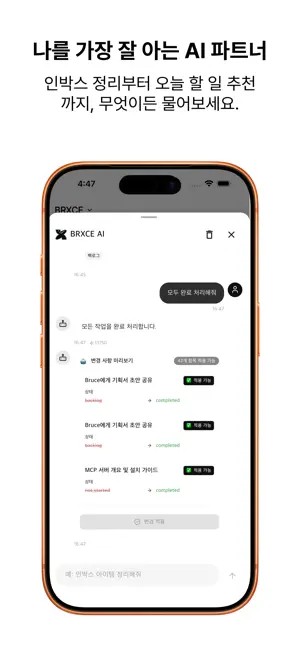
About BRXCE: AI Task Manager
Drowning in tasks? BRXCE crushes them in one go. "Get Things Done with BRXCE." Tasks pile up endlessly, And organizing them becomes yet another 'task' itself. BRXCE organizes and updates for you. ---------------------------------------- Why People Can't Leave BRXCE Once They Try It 1. Copy-Paste Once = Perfect Task Creation Slack threads, email replies, customer complaints, meeting notes… Just copy the whole thing and drop it in. AI reads the content and decides 'This is a bug fix', 'High priority', 'Assign to Dev Kim'—automatically creating tasks with perfect tags. 2. Watch AI Work in Real-Time (Real-time Sync) Not another frustrating AI that just throws results at you. BRXCE shows you in real-time as AI creates and breaks down new tasks. Like watching a colleague work next to you. Don't like something? Jump in and modify anytime. 3. MCP Ready: Infinite Extension via LLM Connection Easily connect with Claude or other AI models via Model Context Protocol. AI automates Create, Read, Update, Delete operations. Integrate with external tools (e.g., GitHub, Calendar) to infinitely expand your workflow. AI collaboration becomes smarter and more cost-efficient. ---------------------------------------- Simple Yet Powerfully Detailed • Quick Capture Random idea? Urgent note? Just throw it in. AI will organize projects, folders, priorities—everything later. • Search Like You Talk "What was that payment error from last week?" "Show me only action items from this month's sales meeting" → Ask in sentences, not keywords. Find exactly what you need. • Process Dozens or Hundreds at Once "Archive all completed tasks from last week" "Change all remaining tasks this week to high priority" → One sentence instead of 100 clicks. ---------------------------------------- Start Right Now • Personal: Completely Free (truly unlimited) • Team Workspaces Escape from organizational hell. Now you just execute. Web: https://brxce.com Email: [email protected] --- Terms of Use: https://brxce.com/terms Privacy Policy: https://brxce.com/terms?section=privacy --- Discord: https://discord.gg/SN6KX4SP
What’s new
Version 1.1.9 · Updated September 24, 2026
Switch projects in one tap from the project row at the top. Create a project straight from search, rename it, set dates, delete with undo, and drag to reorder. See each project's progress at a glance and move a task to another project from its edit screen. Smoother transitions and haptic feedback throughout.
App privacy
The developer, Jong Hyeck Choe, reported these privacy practices to Apple.
Data Linked to You
The following data, which may be collected and linked to your identity, may be used for the following purposes:
- Identifiers: User ID, Device ID
- Usage Data: Product Interaction
- Diagnostics: Crash Data, Performance Data
- Contact Info: Email Address, Name
- User Content: Other User Content
Used for: Analytics, App Functionality
Data Not Linked to You
The following data, which may be collected but is not linked to your identity, may be used for the following purposes:
- User Content: Other User Content
Used for: Analytics, Product Personalization
Alternatives to BRXCE: AI Task Manager
Looking for apps like BRXCE: AI Task Manager? Here are 6 similar apps on the App Store.
-
 talkdam - Capture daily chats
-
 MemoryAI: Offline Private AI
-
 StudyLoop
-
 DayStream: Daily AI Planner
-
 Holowork — Focus Timer
-
 Just Ask Doug
| App | Rating | Price | Last updated | Compare |
|---|---|---|---|---|
| BRXCE: AI Task Manager | – | Free | September 24, 2026 | |
| talkdam - Capture daily chats | – | Free | Oct 7, 2026 | Compare |
| MemoryAI: Offline Private AI | – | Free | Oct 18, 2026 | Compare |
| StudyLoop | – | Free | Sep 28, 2026 | Compare |
| DayStream: Daily AI Planner | – | Free | Jun 7, 2026 | Compare |
| Holowork — Focus Timer | – | Free | Oct 12, 2026 | Compare |
| Just Ask Doug | – | Free | Aug 6, 2026 | Compare |