

PeerPause: Screen Time Control
Andrei Tarce Productivity iPhoneiPadiPod touch
PeerPause: Screen Time Control is a free Productivity app for iPhone and iPad by Andrei Tarce. Rated 5.0/5 from 2 ratings. Requires iOS 18.0.
- Rating
- 5.0
- 2 ratings
- Price
- Free
- on the App Store
- Size
- 105 MB
- Age 17+
- Updated
- Oct 18
- 2026 · v1.2.6
Screenshots
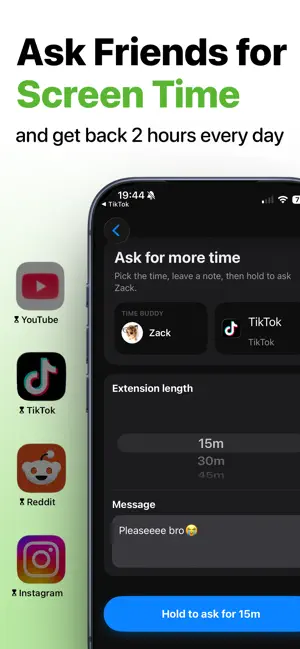
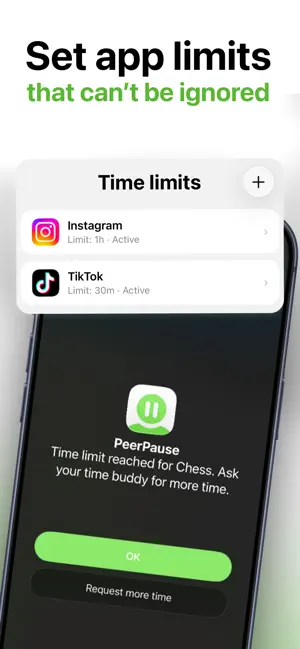
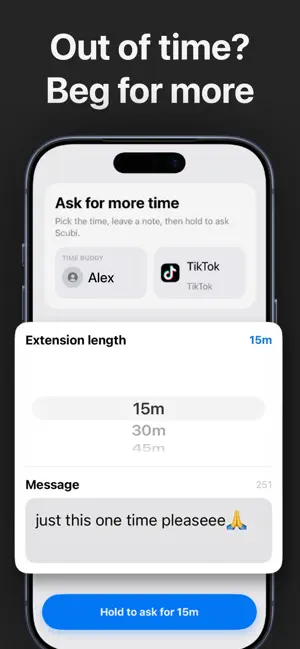
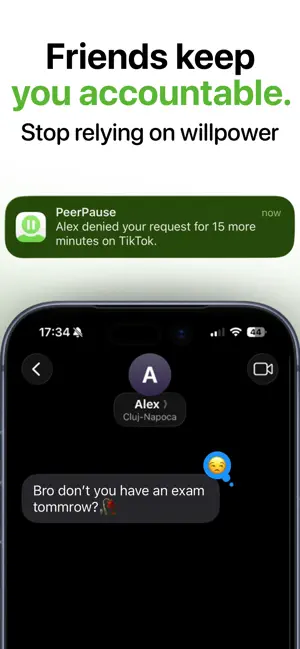
About PeerPause: Screen Time Control
Screen time limits only work when you can't quietly undo them. PeerPause fixes that by putting one person you trust between you and the "just five more minutes" button. Set a daily limit for the apps that eat your day. When the time is gone, the app locks. If you genuinely need longer, you send a request to your Time Buddy — a friend, partner, or sibling who taps accept or deny. No secret override, no deleting the limit at 1am. HOW IT WORKS 1. Pick the app that distracts you most. 2. Set its daily limit. 3. Add a Time Buddy. 4. When you hit the limit, the app locks. 5. Ask for more time, with a note if you want. 6. Your Time Buddy decides. WHAT YOU GET • Blocking for social, video, game, dating, and shopping apps • Daily limits built on Apple's Screen Time • Time extension requests, answered by a real person • Buddy confirmation before a limit is changed or removed • Streaks and insights that show what's actually improving • No instant self-override when you hit the limit WHY A BUDDY BEATS WILLPOWER Every other blocker lets you turn it off. That is the whole problem — the moment you want to break the limit is exactly the moment you are least able to argue with yourself. Handing that one decision to someone else takes about two seconds and changes the outcome. Your Time Buddy is not a parent or a monitor. They see the app name, how much time you asked for, and any note you send. They cannot see your messages, your browsing, your photos, or what you do inside any app. Your Screen Time data stays on your device. BEING SOMEONE'S TIME BUDDY Answering requests for a friend costs nothing — install PeerPause, get added, and tap accept or deny when they ask. A PeerPause Pro subscription is what lets you create and manage your own limits. Pause first. Scroll less. Take your time back. TERMS OF USE https://www.apple.com/legal/internet-services/itunes/dev/stdeula/
What’s new
Version 1.2.6 · Updated October 18, 2026
Adding a Time Buddy is easier, and setting up your limits is smoother. Plus small fixes and improvements.
App privacy
The developer, Andrei Tarce, reported these privacy practices to Apple.
Data Linked to You
The following data, which may be collected and linked to your identity, may be used for the following purposes:
- Usage Data: Product Interaction
- Contact Info: Email Address, Name, Phone Number
- User Content: Emails or Text Messages
- Diagnostics: Crash Data, Performance Data
Used for: Analytics, App Functionality
Data Not Linked to You
The following data, which may be collected but is not linked to your identity, may be used for the following purposes:
- Usage Data: Product Interaction
Used for: Developer’s Advertising or Marketing
Alternatives to PeerPause: Screen Time Control
Looking for apps like PeerPause: Screen Time Control? Here are 6 similar apps on the App Store. The highest rated is Friends67: Screen Time Control (5.0/5), and all 6 are free to download.
-
 LockPact: Screen Time Pact
4.2
LockPact: Screen Time Pact
4.2
-
 Friends67: Screen Time Control
5.0
Friends67: Screen Time Control
5.0
-
 Screen Freedom
5.0
Screen Freedom
5.0
-
 SelfBlock: Screen Time Buddy
-
 Tether: Focus & Accountability
5.0
Tether: Focus & Accountability
5.0
-
 Aergia - Screen Time Control
| App | Rating | Price | Last updated | Compare |
|---|---|---|---|---|
| PeerPause: Screen Time Control | 5.0 / 5 (2 ratings) | Free | October 18, 2026 | |
| LockPact: Screen Time Pact | 4.2 / 5 (6) | Free | Aug 19, 2026 | Compare |
| Friends67: Screen Time Control | 5.0 / 5 (1) | Free | Oct 13, 2026 | Compare |
| Screen Freedom | 5.0 / 5 (6) | Free | Oct 19, 2026 | Compare |
| SelfBlock: Screen Time Buddy | – | Free | Aug 3, 2026 | Compare |
| Tether: Focus & Accountability | 5.0 / 5 (8) | Free | Sep 26, 2026 | Compare |
| Aergia - Screen Time Control | – | Free | Sep 14, 2026 | Compare |