

Live Translate Keyboard Screen
Star Aura LLC Utilities iPhoneiPadiPod touch
Live Translate Keyboard Screen is a free Utilities app for iPhone and iPad by Star Aura LLC. Rated 5.0/5 from 2 ratings. Requires iOS 18.5.
- Rating
- 5.0
- 2 ratings
- Price
- Free
- on the App Store
- Size
- 66 MB
- Age 4+
- Updated
- Apr 17
- 2026 · v1.02
Screenshots


About Live Translate Keyboard Screen
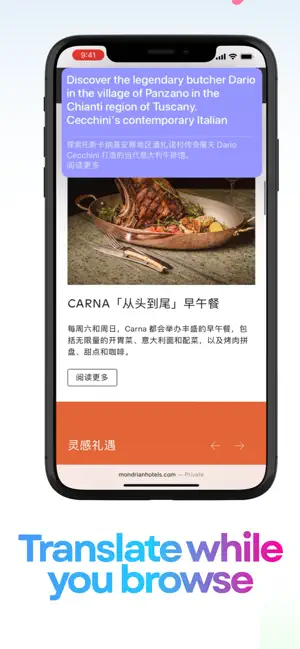
Live Translate offers 6 different ways to translate text on your iPhone - from typing in any app to translating what's on your screen in real-time. Whether you're traveling, chatting with friends in other languages, reading foreign content, or learning a new language, Live Translate gives you multiple translation options that work across your phone. Translate text 6 different ways: keyboard, screen broadcast, iMessage, voice, camera, and text. 6 Translation Methods: Translator Keyboard : Type and translate in any app. Works with messages, social media, emails, and more. Switch between languages as you type. We don't collect or store your translation data. Keyboard access is only used for translation purposes. Live Screen Broadcast : Translate text on your screen in real-time. Useful for games, video calls, foreign apps, and streaming content. Set up a translation area and see translations overlaid on your screen. iMessage Extensions : Translate messages by dragging and dropping them. Type your reply in your language, and it translates automatically. Works directly in the Messages app. Voice Translator : Speak and get text translations. Helpful for quick translations or practicing pronunciation. Camera Translator (OCR) : Point your camera at text - signs, menus, documents - and see translations. Useful for travel and reading printed text. Text Translator : Type or paste text to translate into any of our support languages. Supported Languages: Arabic, Bulgarian, Chinese (Simplified & Traditional), Czech, Danish, Dutch, English (US & UK), Estonian, Finnish, French, German, Greek, Hebrew, Hungarian, Indonesian, Italian, Japanese, Korean, Latvian, Lithuanian, Norwegian, Polish, Portuguese (Brazil & Portugal), Romanian, Russian, Slovak, Slovenian, Spanish (Spain & Latin America), Swedish, Thai, Turkish, Ukrainian, Vietnamese Free users are able to translate 60 messages weekly. Screen Broadcast mode requires a premium subscription. Terms of use: https://www.apple.com/legal/internet-services/itunes/dev/stdeula/
What’s new
Version 1.02 · Updated April 17, 2026
Translation bugs fixed.
App privacy
The developer, Star Aura LLC, reported these privacy practices to Apple.
Data Used to Track You
The following data may be used to track you across apps and websites owned by other companies:
- Usage Data: Product Interaction
Data Not Linked to You
The following data, which may be collected but is not linked to your identity, may be used for the following purposes:
- Usage Data: Product Interaction
Used for: App Functionality
Alternatives to Live Translate Keyboard Screen
Looking for apps like Live Translate Keyboard Screen? Here are 6 similar apps on the App Store. The highest rated is TransPeek (5.0/5), and all 6 are free to download.
-
 AI Translator Keyboard - iKey
4.7
AI Translator Keyboard - iKey
4.7
-
 Keybridge - Translate Keyboard
-
 Mouse Jiggler : Cursor Mover
4.7
Mouse Jiggler : Cursor Mover
4.7
-
 TransPeek
5.0
TransPeek
5.0
-
 Duplila: Screen Mirroring
-
 Translator Keyboard - Verbyte
4.6
Translator Keyboard - Verbyte
4.6
| App | Rating | Price | Last updated | Compare |
|---|---|---|---|---|
| Live Translate Keyboard Screen | 5.0 / 5 (2 ratings) | Free | April 17, 2026 | |
| AI Translator Keyboard - iKey | 4.7 / 5 (3) | Free | Aug 29, 2026 | Compare |
| Keybridge - Translate Keyboard | – | Free | Aug 26, 2026 | Compare |
| Mouse Jiggler : Cursor Mover | 4.7 / 5 (6) | Free | Oct 18, 2026 | Compare |
| TransPeek | 5.0 / 5 (3) | Free | Sep 19, 2026 | Compare |
| Duplila: Screen Mirroring | – | Free | Jan 2, 2026 | Compare |
| Translator Keyboard - Verbyte | 4.6 / 5 (10) | Free | Aug 24, 2026 | Compare |