

Vibideo: AI Video Generator
Vigilainte Inc Photo & Video iPhoneiPadiPod touch
Vibideo: AI Video Generator is a free Photo & Video app for iPhone and iPad by Vigilainte Inc. Requires iOS 18. Updated September 18, 2026.
- Price
- Free
- on the App Store
- Size
- 44 MB
- Age 4+
- Updated
- Sep 18
- 2026 · v1.0.5
Screenshots


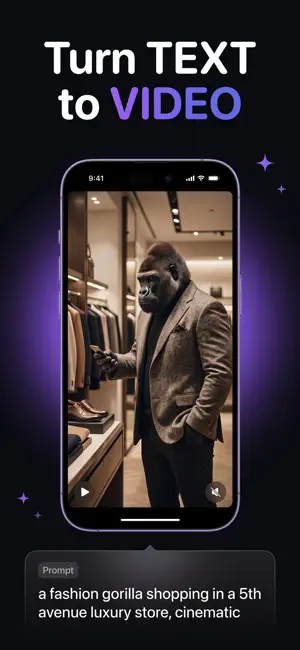

About Vibideo: AI Video Generator
Turn your ideas into video. Type a prompt or drop in a photo, and Vibideo creates a short, shareable clip powered by the latest AI video models. No editing skills, no timeline, no green screen. Bring a still photo to life, animate the space between two keyframes, or start from a ready-made template. When a result is almost right, re-roll it for a fresh take or extend it into a longer scene. What you can do: - Text to video: describe a scene and watch it come to life in seconds. - Photo to video: add a photo and let AI give it natural motion. - Keyframes: set a first and last frame, and Vibideo fills in the motion between them. - Templates: start from a curated look and make it your own in a tap. - Re-roll: not quite there? Generate a new variation instantly. - Extend: add more seconds and grow a clip into a full scene. - Pick your level: Standard or Pro, with higher resolutions up to 1080p. Every video is yours to keep. Save it to your camera roll or share it anywhere: TikTok, Reels, Shorts, or straight to friends. Create for fun, for content, for ads, or just to see what's possible. Creators use Vibideo to go from idea to post without ever opening a video editor. How credits work: Vibideo runs on credits. Each generation uses credits based on the level, length, and resolution you choose, so you always stay in control of what you spend. Get credits with a subscription that refreshes every billing period, or buy one-time credit packs whenever you want more. Subscription details: - Vibideo offers weekly and yearly subscriptions that include a credit allowance which resets at the start of each billing period. - Pricing is shown in the app before you buy and may vary by region. - Payment is charged to your Apple Account at confirmation of purchase. - Your subscription renews automatically unless auto-renew is turned off at least 24 hours before the end of the current period. - Your account is charged for renewal within 24 hours before the end of the current period. - One-time credit packs are also available, and pack credits never expire. - Manage or cancel your subscription anytime in your Apple Account settings. Terms of Use: https://vibideo.app/terms Privacy Policy: https://vibideo.app/privacy
What’s new
Version 1.0.5 · Updated September 18, 2026
Vibideo now suggests video ideas right on your device: pick a photo or start typing, and get three ready-to-use ideas instantly. Prompt enhancement runs on-device too. Say "Start a video with Vibideo" to Siri to jump straight into creating. Templates open straight into the creation mode they need, so there are fewer taps between an idea and a finished video. We now ask what you think of Vibideo only after you have watched something you made. Plus faster flows and polish throughout. Plans are simpler. Two quality levels, Standard and Pro, so you can see what you are picking. Setup remembers where you left off, and you can skip ahead to your plan whenever you like. Links and ads now open straight to the right screen with your choices already filled in, and we fixed a case where the upgrade options would not come back after your first free video.
App privacy
The developer, Vigilainte Inc, reported these privacy practices to Apple.
Data Used to Track You
The following data may be used to track you across apps and websites owned by other companies:
- Purchases: Purchase History
- Identifiers: User ID, Device ID
- Usage Data: Product Interaction
Data Linked to You
The following data, which may be collected and linked to your identity, may be used for the following purposes:
- Purchases: Purchase History
- Identifiers: User ID, Device ID
- Usage Data: Product Interaction
- User Content: Photos or Videos
- Diagnostics: Crash Data
Used for: Third-Party Advertising, Developer’s Advertising or Marketing, Product Personalization, App Functionality
Alternatives to Vibideo: AI Video Generator
Looking for apps like Vibideo: AI Video Generator? Here are 6 similar apps on the App Store. The highest rated is Augify - AR Camera & Video (5.0/5), and all 6 are free to download.
-
 Clixly
-
 Ai Video Generator : Fun Video
-
 Picha - AI Image & Video
2.3
Picha - AI Image & Video
2.3
-
 AI Video Generator: Ginly AI
4.6
AI Video Generator: Ginly AI
4.6
-
 Augify - AR Camera & Video
5.0
Augify - AR Camera & Video
5.0
-
 VideoGen
3.0
VideoGen
3.0
| App | Rating | Price | Last updated | Compare |
|---|---|---|---|---|
| Vibideo: AI Video Generator | – | Free | September 18, 2026 | |
| Clixly | – | Free | Oct 20, 2026 | Compare |
| Ai Video Generator : Fun Video | – | Free | Sep 1, 2026 | Compare |
| Picha - AI Image & Video | 2.3 / 5 (3) | Free | Oct 26, 2026 | Compare |
| AI Video Generator: Ginly AI | 4.6 / 5 (26) | Free | Oct 7, 2026 | Compare |
| Augify - AR Camera & Video | 5.0 / 5 (1) | Free | Oct 17, 2026 | Compare |
| VideoGen | 3.0 / 5 (4) | Free | Sep 14, 2026 | Compare |