

ScrollSteps: Limit Screen Time
Emre Kilinc Productivity iPhoneiPadiPod touch
ScrollSteps: Limit Screen Time is a free Productivity app for iPhone and iPad by Emre Kilinc. Rated 4.3/5 from 4 ratings. Requires iOS 17.6.
- Rating
- 4.3
- 4 ratings
- Price
- Free
- on the App Store
- Size
- 30 MB
- Age 12+
- Updated
- Apr 23
- 2026 · v1.4
Screenshots

About ScrollSteps: Limit Screen Time
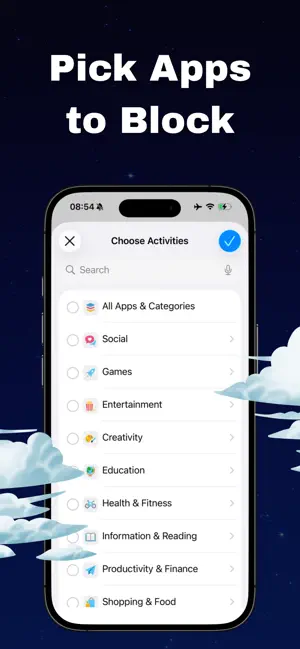
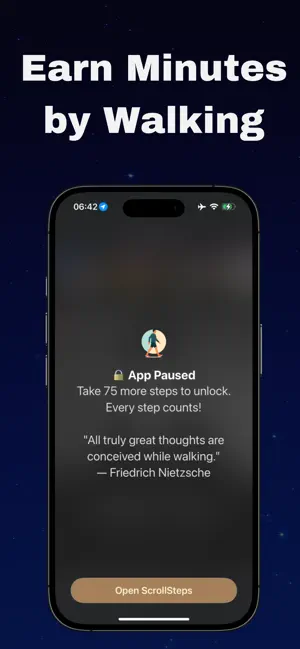
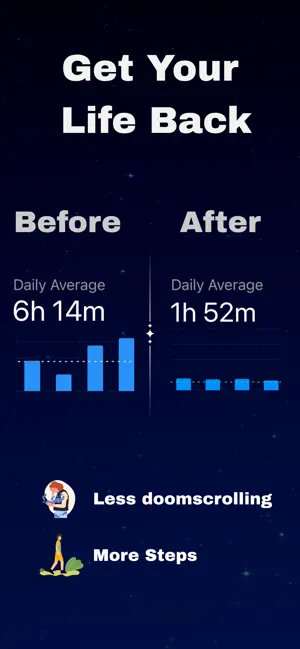
ScrollSteps turns walking into the only way to unlock your most distracting apps. Instead of relying on willpower, you earn screen time by moving: every 100 steps = 1 minute of access. If you haven’t walked enough, your apps stay locked. Take a short walk, earn minutes, and come back with intention instead of falling into a doomscrolling spiral in social media. Walk more, scroll less, and turn your phone into a tool that nudges you toward a better life. Stop doomscrolling. Start doing. All that lost time could’ve been progress—and your future still can be. SUBSCRIPTION INFORMATION A ScrollSteps SUBSCRIPTION is required to unlock and enjoy all features. ScrollSteps is free to download, and you can choose from the following options inside the app: * Annual subscription with free trial: Try all premium features for a limited time, then continue with an annual subscription if you don’t cancel before the trial ends. * Monthly subscription: Recurring subscription that grants full access to all premium features. * Lifetime access: One‑time purchase that unlocks all current premium features for the lifetime of the ScrollSteps app while it remains available on the App Store and is maintained by us (not your personal lifetime). Subscriptions will automatically renew unless canceled at least 24 hours before the current period ends. Your Apple Account will be charged for renewal within 24 hours prior to the end of the current period. You can manage your subscription and turn off auto‑renewal at any time in your Apple Account settings after purchase. If you start the annual free trial and subscribe before it ends, any remaining free trial period will be forfeited when your purchase is confirmed. Please review the Licensed Application End User License Agreement (EULA): Apple Standard EULA Privacy Policy: https://klncemre.github.io/steplocker-web/privacy.html Terms of Use: https://klncemre.github.io/steplocker-web/terms.html
What’s new
Version 1.4 · Updated April 23, 2026
User interface updates.
App privacy
The developer, Emre Kilinc, reported these privacy practices to Apple.
Data Used to Track You
The following data may be used to track you across apps and websites owned by other companies:
- Identifiers: User ID, Device ID
- Usage Data: Product Interaction, Other Usage Data
Data Linked to You
The following data, which may be collected and linked to your identity, may be used for the following purposes:
- Identifiers: User ID, Device ID
- Usage Data: Product Interaction, Other Usage Data
- Contact Info: Name
Used for: Analytics, Product Personalization, App Functionality
Data Not Linked to You
The following data, which may be collected but is not linked to your identity, may be used for the following purposes:
- Diagnostics: Crash Data, Performance Data, Other Diagnostic Data
- Health & Fitness: Health, Fitness
Used for: Analytics, Product Personalization, App Functionality
Alternatives to ScrollSteps: Limit Screen Time
Looking for apps like ScrollSteps: Limit Screen Time? Here are 6 similar apps on the App Store. The highest rated is Weave Thoughts (5.0/5), and all 6 are free to download.
-
 Weave Thoughts
5.0
Weave Thoughts
5.0
-
 DialogNote - Chat Journal
5.0
DialogNote - Chat Journal
5.0
-
 Sticky Notes : StickMe
-
 StepBloc: Screen Time Blocker
4.5
StepBloc: Screen Time Blocker
4.5
-
 Quran Unlock
4.7
Quran Unlock
4.7
-
 Unrot: Earn your Screen Time
4.7
Unrot: Earn your Screen Time
4.7
| App | Rating | Price | Last updated | Compare |
|---|---|---|---|---|
| ScrollSteps: Limit Screen Time | 4.3 / 5 (4 ratings) | Free | April 23, 2026 | |
| Weave Thoughts | 5.0 / 5 (1) | Free | Nov 10, 2025 | Compare |
| DialogNote - Chat Journal | 5.0 / 5 (4) | Free | Sep 27, 2026 | Compare |
| Sticky Notes : StickMe | – | Free | Jul 4, 2026 | Compare |
| StepBloc: Screen Time Blocker | 4.5 / 5 (496) | Free | Sep 15, 2026 | Compare |
| Quran Unlock | 4.7 / 5 (223) | Free | Aug 27, 2026 | Compare |
| Unrot: Earn your Screen Time | 4.7 / 5 (56,982) | Free | Oct 21, 2026 | Compare |