

Cratto: Vinyl & Crate Digging
金刚 王 Music iPhoneiPadiPod touch
Cratto: Vinyl & Crate Digging is a free Music app for iPhone and iPad by 金刚 王. Requires iOS 26.0. Updated October 15, 2026.
- Price
- Free
- on the App Store
- Size
- 46 MB
- Age 17+
- Updated
- Oct 15
- 2026 · v1.1.8
Screenshots


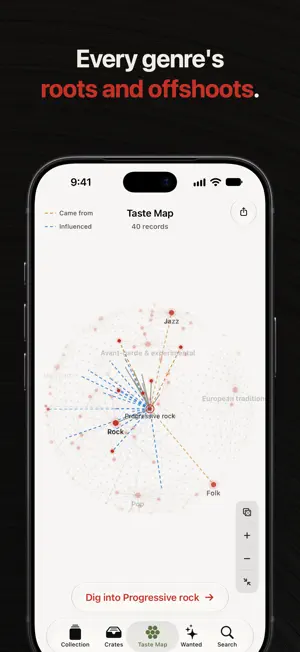
About Cratto: Vinyl & Crate Digging
Collect vinyl with Cratto, dig into new music on the Taste Map, and rediscover the records you love. From cataloging records and CDs and organizing them into crates to listening on Apple Music, Cratto brings collecting, listening and discovery together on iPhone and iPad. 1. Your Vinyl Collection, Cataloged Keep a pocket-sized catalog of your records, with artwork, artists, tracklists, and release details, and note the media and sleeve condition of each copy using Discogs grading. At record shops and fairs, check what you own before you buy it twice. 2. Dig Through the Taste Map Over 1,200 music genres form a turning globe, and the genres your records belong to light up. Tap a genre to see where it came from and what it influenced, then dig into its must-hear albums by decade: play them on Apple Music, collect them, or add them to your want list. Share it as an image or a turning-globe video. 3. Bring Your Collection In Import your Discogs collection and want list, with condition grades, or add the albums in your Apple Music library as digital albums. Pick what to import; records already in Cratto are skipped. 4. Your CDs, Too CDs from Discogs or a barcode scan get their own CD tab beside Vinyl, each shown in its jewel case. Play a CD from Today's Pick, and a disc slides out of its sleeve. 5. Find Records with a Scan Scan a barcode or a catalog number to find the exact release on Discogs, with less typing. 6. Organize Your Way Crates appear automatically from your collection's genres, or create your own, add records, and arrange their order. Give each crate a finish: acrylic, walnut, aluminum, or wood and acrylic. 7. Keep a Want List Save records you're interested in, apart from the ones you own: a friend's tip or an edition you're still hunting for. 8. Listen with Apple Music Play the matching album on Apple Music as you browse. Revisit your collection away from the turntable, or hear an album before you hunt for a copy. You can also collect digital albums. 9. Rediscover What You Own Let Today's Pick and Shuffle choose your next listen: a familiar favorite, or an album you haven't played in a while. On iPhone, add the Today's Pick widget to your Home Screen. 10. Make Artwork Part of the Experience Cratto Gold Record unlocks premium players inspired by vinyl, CDs, and album art: a record spinning under a tonearm, an aluminum CD player with the album printed on its spinning disc, and a player built around the cover. Choose classic black, colored or picture-disc vinyl drawn from the album's artwork, and a printed or silver CD. 11. Sync Across iPhone and iPad With Cratto Gold Record, turn on Library Sync to keep your collection, want list, condition grades, and crates up to date across your devices through your own iCloud account. Sync is off until you turn it on. 12. At Home on iPad On iPad, Cratto spreads out with a sidebar, players designed for the larger screen, and keyboard shortcuts for playback. 13. Share Your Favorite Records Create a poster with a record's artwork and details, with a release code friends can scan with Cratto to find the same release. Or turn your collection's covers into a cover collage, each labeled with its title and artist. 14. Your Collection Stays Yours Your collection is stored on your device and, if you turn on Library Sync, in your own iCloud. There's no Cratto account and no Cratto server. Automatic local backups and backup export keep a copy you can restore. Please note: Record information is provided by Discogs. Related features require an internet connection, and some actions require a connected Discogs account. Music is provided by Apple Music. Full playback requires an active Apple Music subscription and the appropriate authorization; availability varies by region and catalog. Cratto Gold Record is a one-time purchase and does not include an Apple Music subscription. Library Sync requires Cratto Gold Record and the same iCloud account on each device.
What’s new
Version 1.1.8 · Updated October 15, 2026
What's New: Taste Map: a new tab that draws more than 1,200 music genres as a slowly turning globe, and the genres your records belong to light up. Tap a genre to see where it came from and what it influenced, then dig into its must-hear albums by decade: play them with Apple Music, collect them, or add them to your want list. Share your taste map as an image or as a video of the turning globe. Cover Collage: in Settings, turn your collection's covers into one collage, each cover labeled with its title and artist. Choose the aspect ratio, the number of covers and a title, then save or share it. Record pages: redesigned, with the cover behind frosted glass and round Collect, Want and Play buttons. On iPad, record pages float in a rounded card. Improvements: bug fixes and smoother interactions.
App privacy
The developer, 金刚 王, reported these privacy practices to Apple.
Data Not Collected
The developer does not collect any data from this app.
Alternatives to Cratto: Vinyl & Crate Digging
Looking for apps like Cratto: Vinyl & Crate Digging? Here are 6 similar apps on the App Store. The highest rated is rcrd. (5.0/5), and 5 of the 6 are free to download.



| App | Rating | Price | Last updated | Compare |
|---|---|---|---|---|
| Cratto: Vinyl & Crate Digging | – | Free | October 15, 2026 | |
| 唱片柜 | 1.5 / 5 (2) | Free | Oct 20, 2026 | Compare |
| rcrd. | 5.0 / 5 (1) | Free | May 9, 2026 | Compare |
| Alby Wall | – | Free | Sep 2, 2026 | Compare |
| FlipMusic | – | 1.99 USD | Sep 8, 2026 | Compare |
| Groova | – | Free | Jun 13, 2026 | Compare |
| Disc Shelf | 3.0 / 5 (2) | Free | Mar 30, 2026 | Compare |