

TodoTicked: Task Planner
Phoenix Digital, LLC Productivity iPhoneiPadiPod touchApple Watch
TodoTicked: Task Planner is a free Productivity app for iPhone and iPad by Phoenix Digital, LLC. Requires iOS 18.0. Updated September 21, 2026.
- Price
- Free
- on the App Store
- Size
- 31 MB
- Age 4+
- Updated
- Sep 21
- 2026 · v2.0.1
Screenshots

About TodoTicked: Task Planner
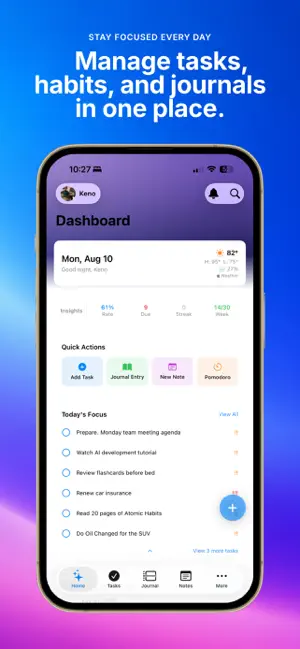
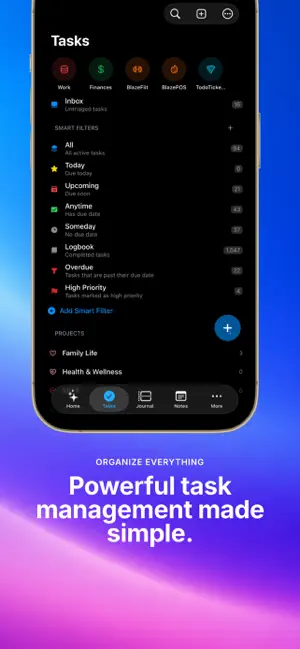
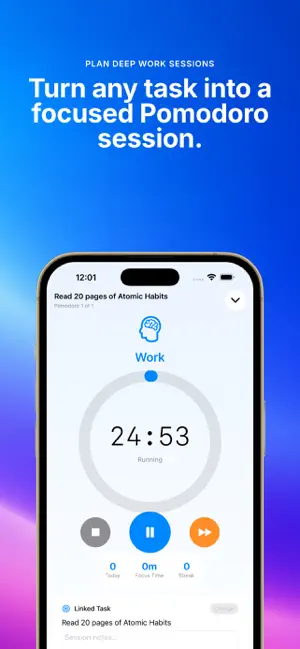
Plan what matters, protect your focus, and reflect on your progress in one calm workspace. TodoTicked brings task planning, Pomodoro focus sessions, notes, and journaling together across iPhone, iPad, Apple Watch, and the web. PLAN WITH CLARITY • Capture tasks quickly, then organize them with projects, tags, priorities, subtasks, and recurring schedules. • Use Inbox, Today, Upcoming, and custom smart filters to see the right work at the right time. • Toggle a compact calendar inside List view. Tap one date or select several dates to narrow any compatible list without losing context. • Import selected Apple Reminders through a preview that highlights unsupported details and avoids exact duplicates. TodoTicked never changes your Apple Reminders. • Keep working offline and sync changes when your connection returns. TURN THOUGHTS INTO ACTION • Pro members can use Voice Capture to turn spoken ideas into several structured task suggestions. • Review and edit every proposed task before anything is created. • Add dates, priorities, durations, recurrence, projects, and tags from one editable preview. FOCUS ON THE NEXT STEP • Start Classic, Deep Work, or Quick Pomodoro sessions. • Connect a focus session to the task you are completing. • Follow active sessions with Live Activities, Dynamic Island, supported widgets, and Apple Watch. BUILD MOMENTUM • Set daily and weekly completion goals that reward finishing—not creating busywork. • See progress, points, levels, seven-day trends, and current or longest streaks. • Protect streaks with days off and vacation mode. KEEP NOTES AND REFLECTIONS CLOSE • Write Markdown notes, attach files and images, organize folders, pin important ideas, and search your library. • Keep a private journal with moods, prompts, folders, tags, and progress insights. WORK YOUR WAY • Use Siri and Shortcuts to capture tasks, notes, and journal entries. • Share projects with teammates and choose role-based access. • Personalize projects with colors and icons, then choose the sorting and grouping that fit your workflow. Whether you are planning a project, protecting a focus block, or reflecting at the end of the day, TodoTicked keeps the full workflow together without making it feel crowded. Terms of Use (EULA): https://www.apple.com/legal/internet-services/itunes/dev/stdeula/
What’s new
Version 2.0.1 · Updated September 21, 2026
This update improves reminders, planning, and everyday reliability.
App privacy
The developer, Phoenix Digital, LLC, reported these privacy practices to Apple.
Data Linked to You
The following data, which may be collected and linked to your identity, may be used for the following purposes:
- Contact Info: Email Address, Name
- Identifiers: User ID, Device ID
Used for: App Functionality
Data Not Linked to You
The following data, which may be collected but is not linked to your identity, may be used for the following purposes:
- Diagnostics: Crash Data
- Location: Coarse Location
Used for: Analytics, App Functionality
Alternatives to TodoTicked: Task Planner
Looking for apps like TodoTicked: Task Planner? Here are 6 similar apps on the App Store.
-
 MyCMMS
-
 Top3: Daily Focus & To-Do
-
 O Assessor
-
 Aim3: Rule of Three Focus
-
 Odak: Yapılacaklar & Pomodoro
-
 Study Smart Timer
| App | Rating | Price | Last updated | Compare |
|---|---|---|---|---|
| TodoTicked: Task Planner | – | Free | September 21, 2026 | |
| MyCMMS | – | Free | Jul 27, 2026 | Compare |
| Top3: Daily Focus & To-Do | – | Free | Sep 19, 2026 | Compare |
| O Assessor | – | Free | Oct 22, 2026 | Compare |
| Aim3: Rule of Three Focus | – | Free | Feb 26, 2026 | Compare |
| Odak: Yapılacaklar & Pomodoro | – | Free | Sep 23, 2026 | Compare |
| Study Smart Timer | – | Free | May 26, 2026 | Compare |