

Brikr
Steven Eldridge Lifestyle iPhoneiPadiPod touch
Brikr is a free Lifestyle app for iPhone and iPad by Steven Eldridge. Rated 5.0/5 from 5 ratings. Requires iOS 18.2. Updated October 20, 2026.
- Rating
- 5.0
- 5 ratings
- Price
- Free
- on the App Store
- Size
- 89 MB
- Age 4+
- Updated
- Oct 20
- 2026 · v1.4.5
Screenshots



About Brikr
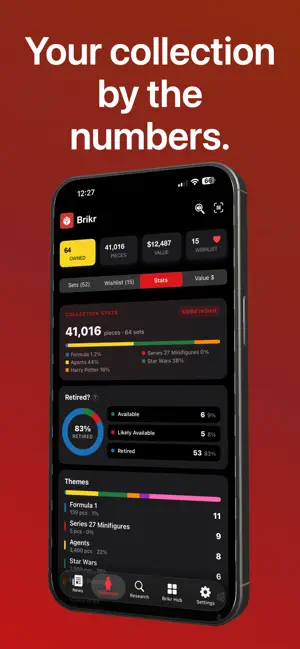
Brikr is the LEGO® collection app built for serious collectors. Track every set you own, monitor market values, discover deals, and share your own custom builds with the community. MANAGE YOUR COLLECTION Add sets by scanning a barcode, searching by name, or snapping a photo. Track condition (New or Used), view current secondary market prices alongside MSRP, add personal notes, and sync everything across all your Apple devices automatically. KNOW WHAT IT'S WORTH — BRIKR PRO Turn your collection into a financial dashboard. See total collection value, per-set pricing, ROI leaders, appreciation trends, and future value projections. Get weekly price alerts when any set in your collection moves 10% or more. Export your full collection as a formatted PDF. CAN I BUILD IT? Find out whether you have enough parts to build any set — or any community MOC. Brikr compares your parts inventory against what you need, shows your completion percentage, and lists exactly what's missing with images and quantities. COMMUNITY MOC GALLERY Browse original custom builds submitted by the Brikr community. Sort by name, year, or piece count. Tap any part for its full detail. Submit your own MOC with a cover photo, your Studio design file, and build instructions — approved builds join the gallery with full builder credit and a downloadable instructions PDF. BRIKR AI — BETA Ask your collection anything in plain language. "What Star Wars sets do I own?" "What parts come with the Millennium Falcon?" "What's my most valuable set?" "What Technic sets released in 2023?" Brikr AI searches your collection, wishlist, and the full LEGO® catalog — sets, parts, themes, retirement status, and more. Your conversation history saves automatically so you can pick up where you left off. Free users get 5 questions a day; Brikr Pro unlocks unlimited questions, per-set pricing answers, and a cloud AI fallback for complex queries. Requires iOS 26 and an Apple Intelligence-capable device. GAMES & LEADERBOARDS Test your knowledge in Fig Blitz, Parts# Blitz, and Minifig Identifier. Compete on global leaderboards. Both Blitz games were rebuilt for a faster, smoother experience with no timing glitches. STAY INFORMED The News tab aggregates curated LEGO content, official announcements, retiring-set alerts, new releases, and live promotions — all in one feed. Get notified when a gift-with-purchase deal drops or a set is about to leave shelves. CMF TRACKER A dedicated tracker for Collectible Minifigures series. Track completion, condition, and value across every CMF series — separate from your main set collection. HOME SCREEN WIDGETS — BRIKR PRO Three widget types in small and medium sizes: Collection snapshot, live Promotions feed, and Retiring Soon. Real LEGO product images. ——— BRIKR PRO • Collection value analysis and price history • Weekly price change alerts (10%+ threshold) • Can I Build It — parts Brikr Terms of Use (also in the app): https://www.brikr.net/terms-of-service Apple Terms of Use: https://www.apple.com/legal/internet-services/itunes/dev/stdeula/
Ratings & reviews
5.0
5 ratings
What’s new
Version 1.4.5 · Updated October 20, 2026
Set Labels You can now label sets in your collection to track their status at a glance. How to use Labels: Open the Collection tab. Tap any set row to open its detail card. Scroll to the Labels section at the bottom of the card. Tap a label to apply it. Tap it again to remove it. Available labels adjust based on the condition of your copies: Your copies Available labels New only Sealed, Storage, Gift Any used copy Built, Displayed, Storage, Gift Labels apply to all copies of that set number. When you mark a copy as used (moved from New to Used), Sealed is automatically removed since an opened set is no longer sealed. Labels appear in your Collection PDF export so you can see the status of each set at a glance when you print your collection. Wishlist PDF Export You can now export your wishlist as a printable PDF. Go to Settings → Export → Wishlist PDF. The PDF includes the set image, set number, name, year, and piece count for each wishlisted set — ready to bring to a store or share with someone buying you a gift. WhatToBuy – AI Purchase Recommendations (requires iOS 26) The Brikr Assistant now includes a WhatToBuy tool. Ask the assistant something like "What should I buy next?" and it will analyze your collection's theme profile, your current wishlist, and sets that are retiring soon to give you a personalized recommendation.
App privacy
The developer, Steven Eldridge, reported these privacy practices to Apple.
Data Not Linked to You
The following data, which may be collected but is not linked to your identity, may be used for the following purposes:
- Location: Precise Location
- Diagnostics: Crash Data, Other Diagnostic Data, Performance Data
Used for: Third-Party Advertising, Analytics, App Functionality
Alternatives to Brikr
Looking for apps like Brikr? Here are 6 similar apps on the App Store. The highest rated is Brckly (5.0/5), and all 6 are free to download.
-
 BrickStudio - Set Tracker
-
 Brckly
5.0
Brckly
5.0
-
 BrikZ
5.0
BrikZ
5.0
-
 SetShelf: Brick Set Tracker
-
 Brick Collector: Set Tracker
-
 BRYXS
BRYXS
| App | Rating | Price | Last updated | Compare |
|---|---|---|---|---|
| Brikr | 5.0 / 5 (5 ratings) | Free | October 20, 2026 | |
| BrickStudio - Set Tracker | – | Free | May 18, 2026 | Compare |
| Brckly | 5.0 / 5 (1) | Free | Oct 18, 2026 | Compare |
| BrikZ | 5.0 / 5 (3) | Free | Aug 13, 2026 | Compare |
| SetShelf: Brick Set Tracker | – | Free | Sep 2, 2026 | Compare |
| Brick Collector: Set Tracker | – | Free | Aug 5, 2026 | Compare |
| BRYXS | – | Free | Sep 6, 2026 | Compare |
Compare Brikr with the top alternatives: ratings, updates, ASO score and keyword gaps →