

VocalPDF
KEVIN COHEN Education iPhoneiPadiPod touch
VocalPDF is a free Education app for iPhone and iPad by KEVIN COHEN. Requires iOS 17.6. Updated October 28, 2025.
- Price
- Free
- on the App Store
- Size
- 5 MB
- Age 4+
- Updated
- Oct 28
- 2025 · v1.0
Screenshots

About VocalPDF
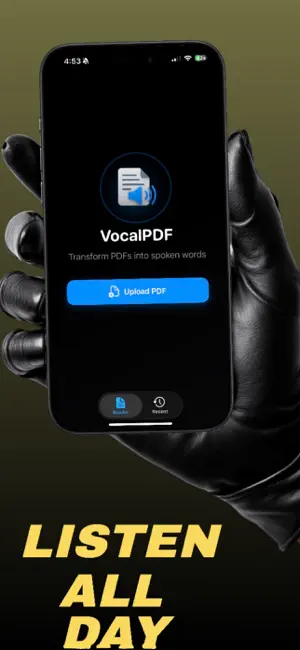
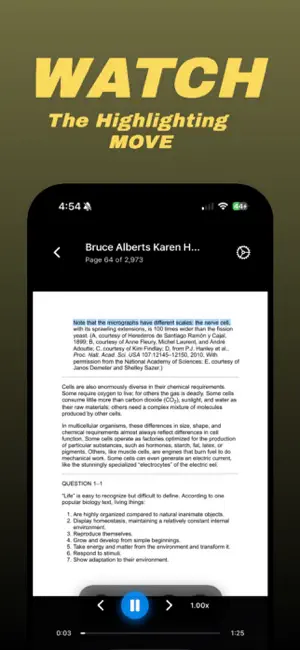
VocalPDF transforms your reading experience by converting any PDF document into clear, natural speech. Whether you’re studying, reviewing contracts, reading reports, or relaxing with an eBook, VocalPDF lets you listen hands-free while following along with synchronized highlighting — a modern, interactive way to read smarter and faster. Key Features • Instantly turn PDFs into speech Upload any document and VocalPDF reads it aloud using advanced iOS text-to-speech voices with natural inflection and tone. • Smart word highlighting Follow along visually as each word, line, or paragraph is spoken. The synchronized highlighting adapts in real time for better focus and comprehension. • Multiple languages and voices Switch effortlessly between English and French, or let VocalPDF automatically detect your document’s language. Choose from dozens of male or female voices, including Enhanced and Premium options. • Adjustable playback speed Control your pace — slow down for detailed reading or speed up for quick review (0.5× to 3×). • Modern, distraction-free interface Enjoy a beautiful reader with smooth gradients, animations, and minimalist controls. Everything you need is right at your fingertips, without clutter. • Recent History & Memory Sync Pick up exactly where you left off — VocalPDF remembers your last page, playback position, and highlight state across sessions. • Offline & iCloud support Your PDFs sync securely with iCloud and are accessible anytime, even without internet. • Customizable Highlight Colors Personalize your reading experience with bright, subtle, or color-coded highlight options. • Full Voice Settings Preview, choose, and refresh available voices from within the app. Integrates directly with iOS system voice settings for seamless control. Perfect For Students studying textbooks or research papers Professionals reviewing long reports or documentation Readers with visual fatigue or accessibility needs Multitaskers who prefer learning on the go Anyone who wants to turn reading time into listening time Why Choose VocalPDF? Unlike basic PDF readers, VocalPDF combines AI-driven speech, adaptive highlighting, and modern design for a smooth, enjoyable, and accessible experience. It’s not just reading — it’s listening, learning, and comprehending in one continuous flow. Privacy First Your documents stay private on your device or iCloud account — never shared, never uploaded to external servers. Transform the way you read today. Upload a PDF, press play, and let your words come alive with VocalPDF.
App privacy
The developer, KEVIN COHEN, reported these privacy practices to Apple.
Data Not Collected
The developer does not collect any data from this app.
Alternatives to VocalPDF
Looking for apps like VocalPDF? Here are 6 similar apps on the App Store. The highest rated is AI Stable Genius Recorder (4.7/5), and all 6 are free to download.
-
 English Grammar ToGo
4.0
-
 Liyas Welt Speed Reading Math
-
 SpeedRace:Speed test & Ranking
4.6
-
 Telling Time For Kids - Clock
4.6
-
 Proverbs & Sayings Master
4.6
-
 AI Stable Genius Recorder
4.7
| App | Rating | Price | Last updated | Compare |
|---|---|---|---|---|
| VocalPDF | – | Free | October 28, 2025 | |
| English Grammar ToGo | 4.0 / 5 (1) | Free | Nov 23, 2025 | Compare |
| Liyas Welt Speed Reading Math | – | Free | Mar 22, 2026 | Compare |
| SpeedRace:Speed test & Ranking | 4.6 / 5 (49) | Free | Oct 21, 2025 | Compare |
| Telling Time For Kids - Clock | 4.6 / 5 (88) | Free | Oct 20, 2026 | Compare |
| Proverbs & Sayings Master | 4.6 / 5 (387) | Free | Aug 30, 2026 | Compare |
| AI Stable Genius Recorder | 4.7 / 5 (33) | Free | Oct 10, 2026 | Compare |
Compare VocalPDF with the top alternatives: ratings, updates, ASO score and keyword gaps →