

Chameleon Lighting
Jarrod Brown Utilities iPhoneiPadiPod touch
Chameleon Lighting is a free Utilities app for iPhone and iPad by Jarrod Brown. Rated 5.0/5 from 3 ratings. Requires iOS 15.0. Updated October 20, 2026.
- Rating
- 5.0
- 3 ratings
- Price
- Free
- on the App Store
- Size
- 58 MB
- Age 4+
- Updated
- Oct 20
- 2026 · v3.2.1
Screenshots


About Chameleon Lighting
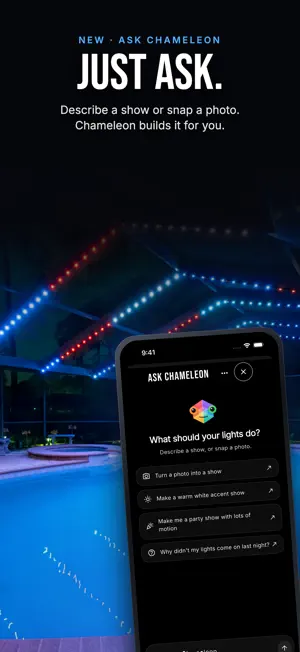
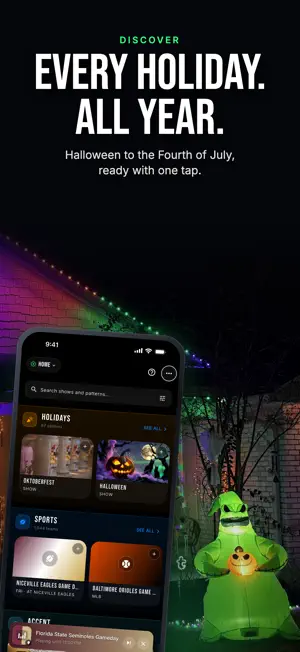
Bring your home to life with Chameleon Lighting, the control center for your professional-grade addressable LED lights. No coding, no confusing setup, no light-by-light programming — just beautiful light, customized for you. ONE-TAP SHOWS, ALREADY DESIGNED A library of professionally designed playlists, ready to run. Holidays: Christmas, Halloween, Fourth of July, Easter and more, as complete multi-effect shows. Moods and animations: rainbows, ocean waves, firelight, aurora, and simple, elegant accent lighting. Dozens of effects — Fireworks, Twinkle Fade, Bouncing Balls, Meteor, Chase — each matched to a curated color palette. Browse the entire library before you ever create an account. SCHEDULING THAT RUNS ITSELF Add an event and it schedules itself. There is nothing else to set up. Holidays arrive on the right days every year, including the ones that move. Your team's colors run on game nights, following the real schedule. Sunrise and sunset are worked out for you, wherever you live. Choose your on and off times once and every event follows them — or give any single event its own. FAVORITES AND LIVE CONTROL Favorites on the Home screen: one tap puts a look on your lights right now, and turns them on if they were off. Now Playing shows what is running and what is coming up next, with brightness and speed you can move while it plays. Zones: split one controller across the roofline, the porch and the walkway, and send different content to each. Turn everything on or off from the main screen. MAKE IT YOUR OWN Studio: build your own playlists, patterns and color palettes — or start from anything in the library and change it. Quick Color: pick a color and it is on your lights immediately. See exactly how a pattern will lay out across your strip before it gets there. WORKS ON YOUR WI-FI, WITH OR WITHOUT AN ACCOUNT Your controller runs on your own network. Find it, drive it, set its schedules and save its settings straight from the app — no account, no internet connection. When your internet is out, your lights carry on. Everything local stays free, always. BUILT FOR THE WHOLE HOUSE A free Chameleon account keeps your devices, schedules and creations in sync across every phone in the home. Set something up on one, and it is there on all of them. Your lights keep to their schedule whether the app is open or not. A Chameleon Cloud plan adds the cloud half: calendars that keep themselves current, live sports schedules, control from outside the house, the Ask Chameleon assistant and over-the-air firmware updates, for up to 5 controllers on your account. New accounts get a free 10-day trial when they add their first controller. Designed to work exclusively with Chameleon Lighting hardware. SUBSCRIPTION DETAILS Chameleon Cloud — Yearly: $24.99 per year, auto-renewing. Chameleon Cloud — Lifetime: $149.99, a one-time purchase. Payment is charged to your Apple ID account at confirmation of purchase. The Yearly plan renews automatically unless it is canceled at least 24 hours before the end of the current period, and your account is charged for renewal within 24 hours before the end of the current period. Manage or cancel your subscription in your App Store account settings after purchase. Prices are in US dollars and may vary by country. Terms of Use (EULA): https://www.apple.com/legal/internet-services/itunes/dev/stdeula/ Chameleon Terms: https://chameleon.lighting/terms Privacy Policy: https://chameleon.lighting/privacy-policy
What’s new
Version 3.2.1 · Updated October 20, 2026
A clearer calendar: each day shows what will actually play on the controller you pick, with a simple key. Shows that are outranked are struck through, disabled ones are grouped, and other controllers' shows are listed separately. Also new: • Up Next always names the show that will really play next • Easier to read in dark mode: sheets and cards stand out from the background • Sports games show their date until the kickoff time is announced • Discover files shared shows under their category, adds an Other shelf, and marks your own shows "by you" • Ask Chameleon is easier to find, from Home and Tools • A new controller asks whether your strip is RGB or RGBW during setup • A controller keeps its own name and time zone when it connects to the cloud • Power-injection markers in the zone pixel helper • Many fixes for Wi-Fi-only controllers and slow connections
App privacy
The developer, Jarrod Brown, reported these privacy practices to Apple.
Data Linked to You
The following data, which may be collected and linked to your identity, may be used for the following purposes:
- Purchases: Purchase History
- Location: Coarse Location
- Contact Info: Email Address, Name
- User Content: Photos or Videos, Other User Content
- Identifiers: User ID, Device ID
- Diagnostics: Other Diagnostic Data
Used for: App Functionality