

Focus: Simple Timer with ToDo
Hiroto Nakamura Productivity iPhoneiPadiPod touch
Focus: Simple Timer with ToDo is a free Productivity app for iPhone and iPad by Hiroto Nakamura. Requires iOS 17.0. Updated November 15, 2025.
- Price
- Free
- on the App Store
- Size
- 8 MB
- Age 4+
- Updated
- Nov 15
- 2025 · v1.1.2
Screenshots

About Focus: Simple Timer with ToDo
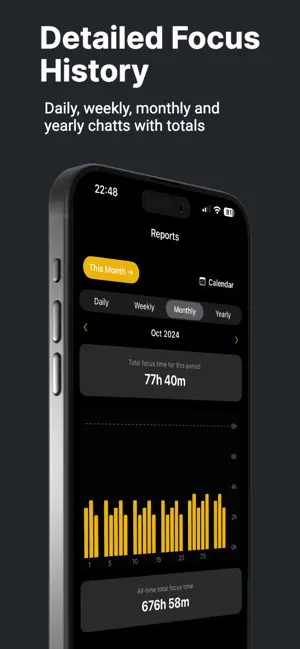
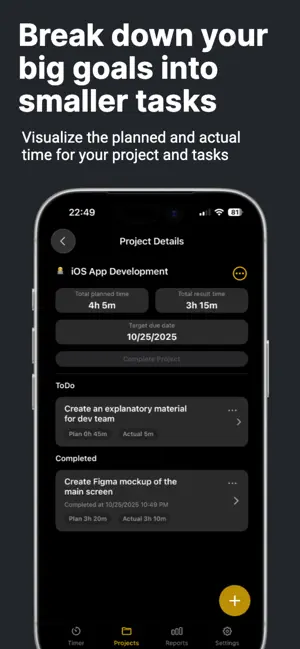
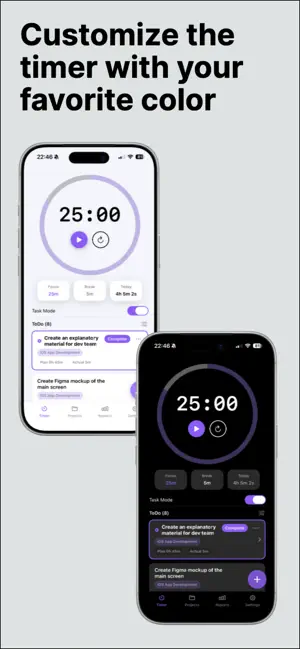
Focus is a clean and simple timer designed to help you start quickly, stay on track, and see your progress at a glance. It masterfully pairs a beautiful circular timer with lightweight task and project management, privacy‑first data handling, and rich Live Activities on your Lock Screen and Dynamic Island. Why you’ll enjoy Focus: A Timer You’ll Actually Want to Use: Start, pause, and reset your sessions with deeply satisfying haptics. The elegant dual-segment ring visualizes both focus and break periods in a single, clear view. Time is rendered in a crisp, monospaced font, complemented by smooth animations that make every interaction a pleasure. Effortless Preset Switching: Swipe between your favorite timer configurations directly on the main screen. Set up different presets for various activities—like 'Deep Work,' 'Reading,' or 'Quick Review'—and switch between them instantly without navigating through menus. Stay in the Flow: Receive optional notifications for the end of Focus and Break sessions, plus a helpful reminder minutes before your focus time is up. Banners can be shown even while the app is open, and an option to "Keep Screen Awake" ensures your timer is always visible when you need it. Rich Live Activity Support: Track your remaining time directly from the Lock Screen and Dynamic Island (iOS 16.2+). The Live Activity is more than just a countdown; it beautifully reflects the current phase (focus or break), pause state, and your chosen theme color, keeping you informed without unlocking your device. Tasks and Projects, Perfectly Integrated: Go beyond a simple timer by adding tasks with optional memos and planned times. Group them under projects with custom emoji and due dates, and easily reorder everything with a long-press drag. Mark tasks as complete, restore them later, and review your recent accomplishments—all within a clean, unified interface. Clear Progress, Every Day: See today’s total focus time right on the timer screen. For a deeper analysis, a dedicated Reports tab provides daily, weekly, monthly, and yearly charts and totals. Use quick-jump buttons to navigate to "today," "this week," "this month," or "this year," and visualize your commitment with a color-coded calendar view that shows your focus history at a glance. Focus Pro unlocks more for power users: Unlimited Tasks and Projects: Break free from limitations. Create as many tasks and projects as you need to manage everything from small to-dos to large, complex goals. Full Focus History: Go beyond the recent activity window. Unlock complete weekly, monthly, and yearly charts, and browse your entire focus history with the interactive calendar to identify patterns and celebrate your long-term progress. Customizable Timer Duration: Tailor every session to your exact needs. Adjust Focus and Break durations in precise 1-minute steps, allowing you to perfect your personal productivity rhythm. Multiple Preset Timers: Create and save up to 8 unique timer configurations for different activities. Switch between them with a simple swipe to instantly match the timer to your current task. Expanded Theme Palette: Personalize your experience by unlocking a full palette of 8 beautiful accent colors to match your mood, project, or home screen setup. Advanced iCloud Backup & Restore: Your data is always safe with automatic daily backups to your private iCloud account. Browse your backup history and restore your entire dataset from a specific version with a single tap, giving you complete peace of mind. Whether you want a simple, reliable timer—or a focused workflow with tasks, projects, charts, and more—Focus keeps everything fast, clear, and distraction-free so you can do your best work, every day. Terms of Use: https://nkmr35.github.io/terms_en.html Privacy Policy: https://nkmr35.github.io/privacy_en.html
What’s new
Version 1.1.2 · Updated November 15, 2025
Implemented minor UI adjustments and performance improvements
App privacy
The developer, Hiroto Nakamura, reported these privacy practices to Apple.
Data Not Linked to You
The following data, which may be collected but is not linked to your identity, may be used for the following purposes:
- Purchases: Purchase History
Used for: Analytics, App Functionality
Alternatives to Focus: Simple Timer with ToDo
Looking for apps like Focus: Simple Timer with ToDo? Here are 6 similar apps on the App Store. The highest rated is LastDone: Routine Tracker (5.0/5), and all 6 are free to download.
-
 Triloop - Tasks Habits Journal
-
 Habit Light
-
 LastDone: Routine Tracker
5.0
-
 Focus Grid - Habit Tracker
-
 Today: Live Calendar
-
 Moment Timer: Reminders & Todo
| App | Rating | Price | Last updated | Compare |
|---|---|---|---|---|
| Focus: Simple Timer with ToDo | – | Free | November 15, 2025 | |
| Triloop - Tasks Habits Journal | – | Free | Oct 17, 2026 | Compare |
| Habit Light | – | Free | Mar 17, 2025 | Compare |
| LastDone: Routine Tracker | 5.0 / 5 (1) | Free | Oct 9, 2026 | Compare |
| Focus Grid - Habit Tracker | – | Free | May 7, 2025 | Compare |
| Today: Live Calendar | – | Free | Jun 1, 2026 | Compare |
| Moment Timer: Reminders & Todo | – | Free | Sep 12, 2025 | Compare |