

PrismText: OCR Scanner
CHANG DEOK KIM Utilities iPhoneiPadiPod touch
PrismText: OCR Scanner is a free Utilities app for iPhone and iPad by CHANG DEOK KIM. Requires iOS 13.0. Updated March 7, 2026.
- Price
- Free
- on the App Store
- Size
- 115 MB
- Age 4+
- Updated
- Mar 7
- 2026 · v1.3
Screenshots

About PrismText: OCR Scanner
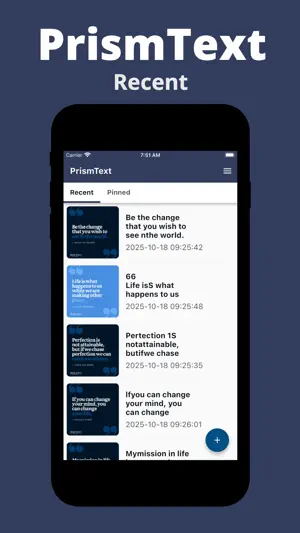
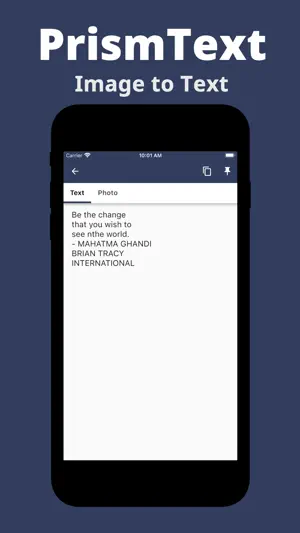
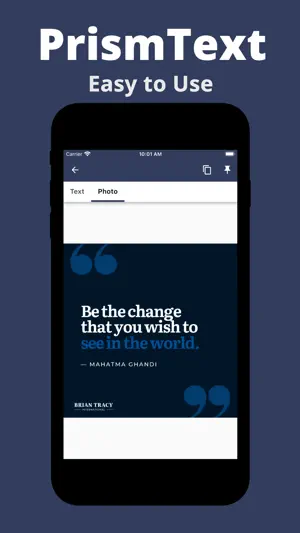
Turn your photos into editable text in seconds with PrismText. Pick an image from your gallery and get clean, selectable text you can copy, favorite, and reuse anytime. 『 Why PrismText 』 • One-tap from Photos: Choose a photo and see the text instantly. • Copy in a second: Send the result to your clipboard for quick paste into notes, chats, or email. • Favorites & History: Star important results and revisit your full scan history for easy reuse. • Fast, private, on-device OCR: Text recognition runs locally on your device — no account required. 『 Great for 』 • Documents, receipts, labels, menus, signs, slides, and magazines • Copying Wi-Fi passwords, serial numbers, and short snippets • Saving quotes or key notes for later 『 How it works 』 ① Open PrismText and pick a photo from your gallery. ② The app recognizes the text on-device. ③ Copy, favorite, or share. Your history keeps everything handy. 『 Pro tips 』 • Use sharp, well-lit images for the best accuracy. • Try to avoid glare, heavy tilt, or busy backgrounds. • Crop to the area with text before scanning for cleaner results. 『 Accessibility 』 • Simple UI, large adjustable text display, and high-contrast layout. 『 Privacy 』 • Your scans stay on your device. We do not collect your content. Download PrismText and experience its convenience now!
What’s new
Version 1.3 · Updated March 7, 2026
We improved some features for better service.
App privacy
The developer, CHANG DEOK KIM, reported these privacy practices to Apple.
Data Used to Track You
The following data may be used to track you across apps and websites owned by other companies:
- Location: Coarse Location
- Identifiers: Device ID
- Usage Data: Product Interaction, Advertising Data
- Diagnostics: Crash Data, Performance Data
Data Linked to You
The following data, which may be collected and linked to your identity, may be used for the following purposes:
- Location: Coarse Location
- Identifiers: Device ID
- Usage Data: Product Interaction, Advertising Data
- Diagnostics: Performance Data
Used for: Third-Party Advertising, Analytics
Data Not Linked to You
The following data, which may be collected but is not linked to your identity, may be used for the following purposes:
- Diagnostics: Crash Data
Used for: Third-Party Advertising, Analytics
Alternatives to PrismText: OCR Scanner
Looking for apps like PrismText: OCR Scanner? Here are 6 similar apps on the App Store. The highest rated is Wrist Codes: Barcode Wallet (5.0/5), and 4 of the 6 are free to download.
-
 AI Text Scanner: Copy Paste
-
 LaterBox
-
 CosmicCleaner:Clean your space
-
 QFreedom
-
 Wrist Codes: Barcode Wallet
5.0
Wrist Codes: Barcode Wallet
5.0
-
 CamScan: Image to Text
| App | Rating | Price | Last updated | Compare |
|---|---|---|---|---|
| PrismText: OCR Scanner | – | Free | March 7, 2026 | |
| AI Text Scanner: Copy Paste | – | Free | Aug 18, 2026 | Compare |
| LaterBox | – | 0.99 USD | Dec 29, 2025 | Compare |
| CosmicCleaner:Clean your space | – | Free | Oct 19, 2026 | Compare |
| QFreedom | – | 0.99 USD | Apr 28, 2025 | Compare |
| Wrist Codes: Barcode Wallet | 5.0 / 5 (1) | Free | Oct 21, 2026 | Compare |
| CamScan: Image to Text | – | Free | Dec 3, 2025 | Compare |