

MultiTimer - PRO
Sergey Astakhov Utilities iPhoneiPadiPod touchMacApple Watch
MultiTimer - PRO is a paid Utilities app for iPhone and iPad by Sergey Astakhov. Rated 4.0/5 from 1 ratings. Requires iOS 16.0. Updated October 3, 2026.
- Rating
- 4.0
- 1 ratings
- Price
- 17.99 USD
- on the App Store
- Size
- 82 MB
- Age 4+
- Updated
- Oct 3
- 2026 · v7.9.1
Screenshots



About MultiTimer - PRO
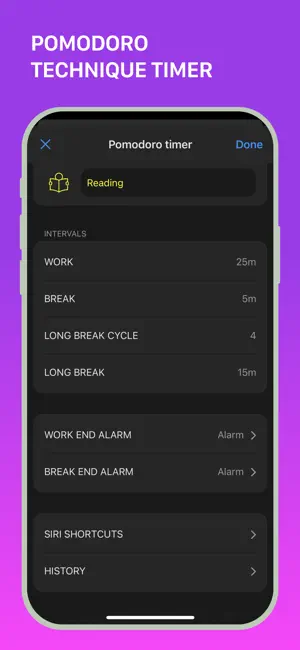
Whether it’s daily tasks, cooking, studying, or workouts, MultiTimer offers customizable timers for any situation. With options like task timers, kitchen timers, Pomodoro timers, and many other features, you'll always be organized and efficient. **VERSATILE TIMERS FOR ANY SITUATION Create multiple timers for any purpose. Choose from: - Countdown - Quick Start - CountUp - Pomodoro - Interval Timer - Stopwatch - Counter - Clock - Buttons - Container **FLEXIBLE LAYOUT FOR YOUR NEEDS Customize timer boards the way you like. Choose between adaptive and flexible layouts. Copy, delete, and move timers at your discretion. Create multiple boards to place different timers side by side and manage them effortlessly. **PERSONALIZE YOUR TIME Give your timers and counters a personal touch with numerous labels, colours, icons, alert styles, custom sounds, and notifications. **MAXIMUM CONTROL & CUSTOMIZATION Full control over your timers. Set timer start delays, add or subtract time from running timers, and choose the "Auto-repeat" option for automatic timer restart. **SAVE TIME WITH EASE Track and save the entire history of your timers and counters. **SHARE TIMERS Use the web feature to share a link with friends, family, or colleagues to track ongoing or upcoming events or tasks. **AND MANY OTHER GREAT FEATURES - Place timers on separate screens (boards) or manage them in fullscreen mode. - Sync timer data across devices using iCloud. - Use all available types of widgets. - Check out Siri integration, shortcuts, and x-callback-URL support. - Try 3D Touch for quick timer management through the pop-up menu. - Use MultiTimer on your Apple Watch. - Export boards and timers to another device. - Use the built-in tools to run and manage multiple timers at the same time. MultiTimer is your indispensable assistant, whether in the kitchen, gym, at work, or in the office. Focus on what really matters with quick timer settings, optimize your time management, and achieve your goals faster and more efficiently. Download MultiTimer and start managing your time today with unlimited boards, timers, and various features (some features are part of the Pro upgrade). We love feedback! Send your suggestions and ideas to [email protected] or use the "Feedback" option in the app settings. **ADDITIONAL INFORMATION: Terms of Use: http://persapps.com/terms/ Standard Agreement: https://www.apple.com/legal/internet-services/itunes/dev/stdeula/ Icons by icons8: https://icons8.com/
What’s new
Version 7.9.1 · Updated October 3, 2026
- Fixed some bugs
App privacy
The developer, Sergey Astakhov, reported these privacy practices to Apple.
Data Not Linked to You
The following data, which may be collected but is not linked to your identity, may be used for the following purposes:
- User Content: Other User Content
- Search History: Search History
- Identifiers: Device ID
- Usage Data: Product Interaction
- Diagnostics: Crash Data
Used for: Analytics, App Functionality
Alternatives to MultiTimer - PRO
Looking for apps like MultiTimer - PRO? Here are 6 similar apps on the App Store. The highest rated is Multi Timer: Kitchen Timer Pro (5.0/5), and 2 of the 6 are free to download.
-
 Future Book
-
 Multi Timer: Kitchen Timer Pro
5.0
-
 TabKey
4.0
-
 TurboLance
3.8
-
 Odysseus - Mobile
5.0
-
 Ring Sizer Pro
2.0
| App | Rating | Price | Last updated | Compare |
|---|---|---|---|---|
| MultiTimer - PRO | 4.0 / 5 (1 rating) | 17.99 USD | October 3, 2026 | |
| Future Book | – | Free | Aug 10, 2026 | Compare |
| Multi Timer: Kitchen Timer Pro | 5.0 / 5 (1) | Free | Aug 4, 2026 | Compare |
| TabKey | 4.0 / 5 (8) | 0.99 USD | Nov 14, 2023 | Compare |
| TurboLance | 3.8 / 5 (4) | 3.99 USD | Mar 18, 2024 | Compare |
| Odysseus - Mobile | 5.0 / 5 (1) | 2.99 USD | Oct 21, 2026 | Compare |
| Ring Sizer Pro | 2.0 / 5 (1) | 1.99 USD | Oct 29, 2026 | Compare |
Compare MultiTimer - PRO with the top alternatives: ratings, updates, ASO score and keyword gaps →