

Ask The Word
Edward Juden Book iPhoneiPadiPod touch
Ask The Word is a free Book app for iPhone and iPad by Edward Juden. Rated 5.0/5 from 1 ratings. Requires iOS 18.4. Updated May 5, 2026.
- Rating
- 5.0
- 1 ratings
- Price
- Free
- on the App Store
- Size
- 10 MB
- Age 4+
- Updated
- May 5
- 2026 · v1.2.1
Screenshots

About Ask The Word
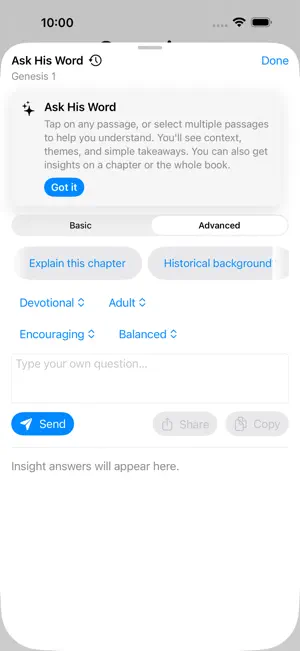
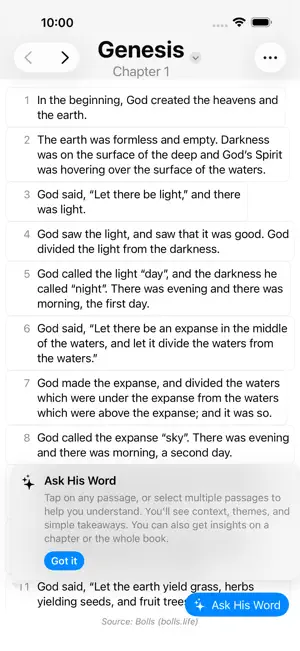
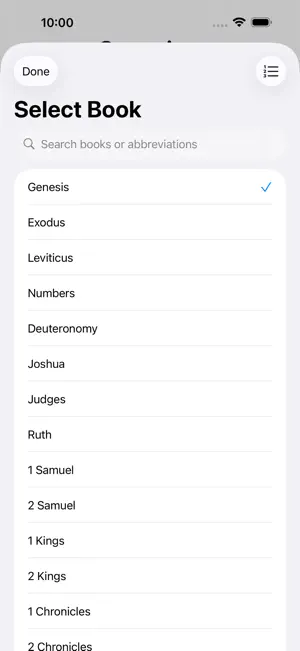
Go deeper in your Bible study—anytime, anywhere. Ask The Word helps you explore the meaning of Scripture in a clear and personal way. Whether you're reading a single verse, a full chapter, or an entire book, the app gives you instant explanations that bring greater understanding of God's Word. With a simple, modern design, Ask The Word makes Bible study interactive and meaningful. Tap any verse to receive thoughtful commentary, ask your own questions for deeper insight, and share your discoveries with friends and study groups to inspire others. Key Features - Instant Understanding — Tap any verse, range, or chapter to receive clear, easy-to-read explanations. - Ask The Word — Use built-in study prompts or type your own questions to explore deeper meaning. - AI-Generated Insights — Gain contextual summaries that highlight themes, background, and lessons from each passage. - Favorites — Save your favorite verses for quick access. A star marks each favorited verse in the reader. - Verse Groups — Organize verses into named groups for study guides, sermon prep, or topical collections. Get AI insights on your entire group. - Verse Notes — Add personal notes to any verse. A marker appears next to verses with notes so you never lose a thought. - Dark Mode — Switch between light and dark themes to suit your reading preference. - Share Insights — Send verses and your insights to friends or post them on social media to spark discussion and encouragement. - Multiple Bible Sources — Compare modern translations and languages within a clean, intuitive reader. - 32 Languages — Full UI support for 32 languages including Arabic, Hebrew, Persian, and Urdu with RTL layout. - Personal Study History — All your questions and answers are saved so you can revisit past insights anytime. - Verse and Chapter Navigation — Quickly move between books, chapters, and translations without losing your place. - Offline Reading — Read your saved Bible texts even without an internet connection. - Built for iPhone and iPad — Enjoy a seamless reading and study experience on any screen size, including landscape with side-by-side panels. Designed for Learning and Reflection Ask The Word is for anyone who wants to better understand Scripture—whether you're opening the Bible for the first time or have studied it for years. Each insight is written to deepen your faith, strengthen your daily walk, and help you share God's Word with others.
What’s new
Version 1.2.1 · Updated May 5, 2026
Saved insights now show a bookmark on the matching preset button, so you can see at a glance which presets you've already used on a verse or chapter. Tap a bookmarked button to re-open the saved answer instead of starting a new one. Also fixed: verse highlights in the reader now refresh correctly after deleting a saved insight.
App privacy
The developer, Edward Juden, reported these privacy practices to Apple.
Data Not Linked to You
The following data, which may be collected but is not linked to your identity, may be used for the following purposes:
- Diagnostics: Performance Data, Other Diagnostic Data, Crash Data
Used for: Analytics, App Functionality, Other Purposes
Alternatives to Ask The Word
Looking for apps like Ask The Word? Here are 6 similar apps on the App Store. The highest rated is BibleUp (5.0/5), and all 6 are free to download.
-
 Reach4Life العربية
-
 BibleUp
5.0
BibleUp
5.0
-
 Bible4Me
-
 DocKinhThanh
-
 Scriptura: Bible Study Tools
5.0
Scriptura: Bible Study Tools
5.0
-
 The Truth: Bible
| App | Rating | Price | Last updated | Compare |
|---|---|---|---|---|
| Ask The Word | 5.0 / 5 (1 rating) | Free | May 5, 2026 | |
| Reach4Life العربية | – | Free | Sep 12, 2026 | Compare |
| BibleUp | 5.0 / 5 (4) | Free | Nov 25, 2025 | Compare |
| Bible4Me | – | Free | Aug 25, 2026 | Compare |
| DocKinhThanh | – | Free | Sep 21, 2026 | Compare |
| Scriptura: Bible Study Tools | 5.0 / 5 (3) | Free | Sep 26, 2026 | Compare |
| The Truth: Bible | – | Free | Jul 7, 2026 | Compare |
Compare Ask The Word with the top alternatives: ratings, updates, ASO score and keyword gaps →