

PhotoCull: AI Photo Cleaner
Nick Lewers Utilities iPhoneiPadiPod touch
PhotoCull: AI Photo Cleaner is a free Utilities app for iPhone and iPad by Nick Lewers. Rated 5.0/5 from 3 ratings. Requires iOS 18.5.
- Rating
- 5.0
- 3 ratings
- Price
- Free
- on the App Store
- Size
- 21 MB
- Age 4+
- Updated
- Oct 10
- 2026 · v3.0.0
Screenshots
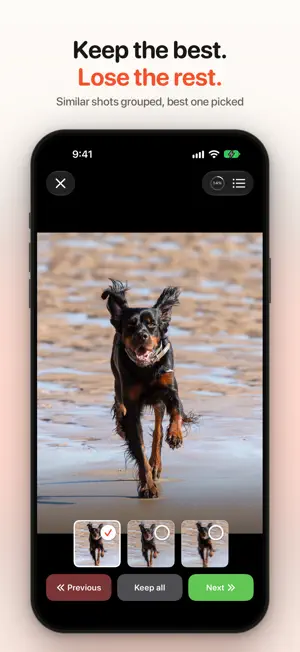
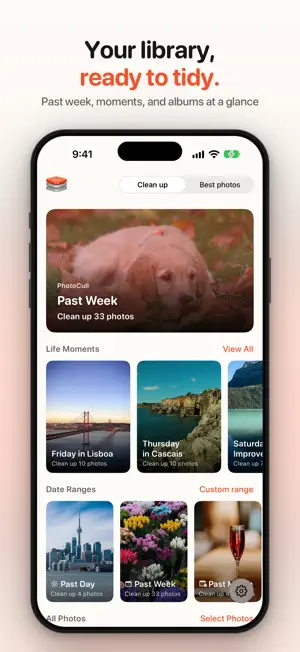

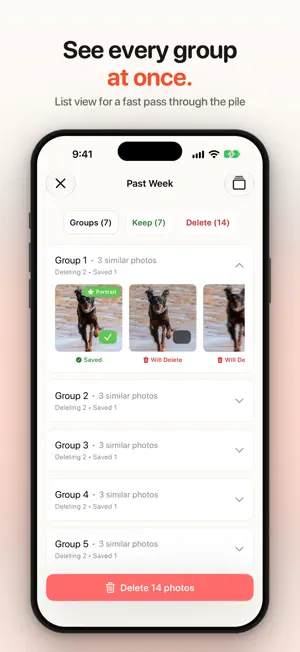
About PhotoCull: AI Photo Cleaner
PhotoCull is the smart way to clean up your photo library. It finds duplicates, near-duplicates and bursts, keeps the best shot from each group, and helps you delete the rest with confidence. BEST PHOTOS PhotoCull puts together a ready-made set of your favorite shots. Filter by people, food, scenery and more, then share them or save them to an album. SAFER CLEANUP Only near-duplicates and bursts are suggested for deletion, so different photos from the same moment stay in your library. In every group, PhotoCull favors the sharper, clearer shot as the one to keep. SMART FEATURES • Finds duplicate and near-duplicate photos and bursts • Favors the sharpest, clearest shot in each group • Spots photos with people smiling and eyes open • Separates solo portraits from group photos • Flags blurry, dark or low-quality shots • Groups photos from the same moment for quick review EASIER REVIEW • Go through one group at a time, with a progress ring to show how far along you are • Tap any photo to enlarge it, and pinch to zoom in on detail • An end-of-session summary shows what will be saved and what will be deleted • Start from your recent photos on the home screen, or pick your own date range PRIVACY Photos are analyzed on your device and never uploaded. PhotoCull collects only anonymous usage analytics to improve the app, never your photos. HOW IT WORKS 1. Pick your recent photos or a date range 2. Let PhotoCull sort them into groups 3. Review the suggestions one group at a time 4. Check the summary, delete the duplicates and keep your favorites Finally, a photo library you actually enjoy scrolling through. Privacy Policy: https://nicklewers.github.io/ai-photo-sorter-public/privacy.html
What’s new
Version 3.0.0 · Updated October 10, 2026
PhotoCull 3.0 is here! Best Photos (new) • A ready-made set of your favorites. Filter by people, food, scenery and more, then share or save to an album. Safer cleanup • Only near-duplicates and bursts are suggested for deletion, so different photos from the same moment stay. • The photo kept in each group now favors the sharper, clearer shot. Easier review • Review one group at a time, with a progress ring. • Tap a photo to enlarge it, and pinch to zoom in on detail. • An end-of-session summary shows what will be saved and what will be deleted. Also new • The home screen shows your recent photos, and you can start from your own date range. • Faster sorting, and Settings is now reachable from the home screen.
App privacy
The developer, Nick Lewers, reported these privacy practices to Apple.
Data Not Linked to You
The following data, which may be collected but is not linked to your identity, may be used for the following purposes:
- Purchases: Purchase History
- Usage Data: Product Interaction, Advertising Data
Used for: Analytics
Alternatives to PhotoCull: AI Photo Cleaner
Looking for apps like PhotoCull: AI Photo Cleaner? Here are 6 similar apps on the App Store. The highest rated is SpectraSort - AI Photo Sorter (5.0/5), and all 6 are free to download.
-
 Cull - Photo Cleaner
-
 SpectraSort - AI Photo Sorter
5.0
SpectraSort - AI Photo Sorter
5.0
-
 Cull - AI Photo Cleaner
-
 Aesthetica: AI Photo Curator
5.0
Aesthetica: AI Photo Curator
5.0
-
 PasteBox - Paste Keyboard
5.0
PasteBox - Paste Keyboard
5.0
-
 Aestractor: Your AI Gallery
1.5
Aestractor: Your AI Gallery
1.5
| App | Rating | Price | Last updated | Compare |
|---|---|---|---|---|
| PhotoCull: AI Photo Cleaner | 5.0 / 5 (3 ratings) | Free | October 10, 2026 | |
| Cull - Photo Cleaner | – | Free | Feb 5, 2026 | Compare |
| SpectraSort - AI Photo Sorter | 5.0 / 5 (2) | Free | Oct 13, 2026 | Compare |
| Cull - AI Photo Cleaner | – | Free | Sep 15, 2026 | Compare |
| Aesthetica: AI Photo Curator | 5.0 / 5 (1) | Free | Sep 20, 2025 | Compare |
| PasteBox - Paste Keyboard | 5.0 / 5 (1) | Free | Oct 31, 2025 | Compare |
| Aestractor: Your AI Gallery | 1.5 / 5 (2) | Free | Dec 3, 2024 | Compare |