

GrindLab
Nathan King Food & Drink iPhoneiPadiPod touch
GrindLab is a free Food & Drink app for iPhone and iPad by Nathan King. Requires iOS 26.0. Updated July 10, 2026.
- Price
- Free
- on the App Store
- Size
- 32 MB
- Age 4+
- Updated
- Jul 10
- 2026 · v1.3.0
Screenshots

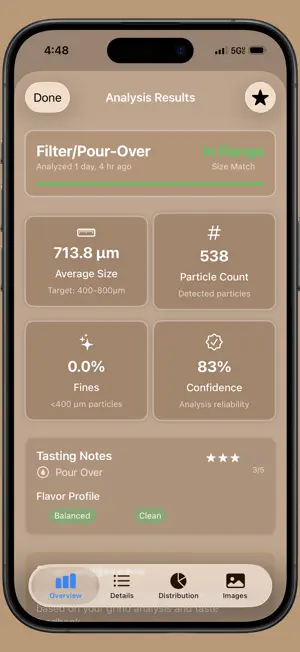

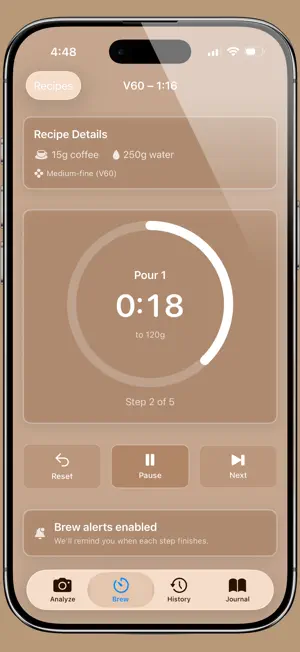
About GrindLab
GrindLab turns your iPhone camera into a precision coffee grind analyzer. Snap a photo of your grounds and get instant, micron-level particle size measurements — no extra hardware needed. ANALYZE YOUR GRIND Use computer vision to detect individual particles and measure their size distribution. GrindLab calculates median size, uniformity score, fines percentage, and boulders percentage so you know exactly how consistent your grinder is performing. Calibrate with a coin or ruler for real-world micron accuracy. FOUR GRIND PROFILES Dial in for any brew method with built-in target ranges: - Espresso: 170-300μm - Filter/Pour-Over: 400-800μm - French Press: 750-1000μm - Cold Brew: 800-1200μm TASTE-TO-GRIND RECOMMENDATIONS Log how your coffee tastes — sour, bitter, balanced, weak — and GrindLab connects your flavor feedback to your grind data. BREW TIMER & RECIPES Time your brews with step-by-step guidance for V60, Espresso, French Press, and Chemex. Create custom recipes with your own ratios, steps, and notes. Live Activities put your timer on the Lock Screen and Dynamic Island so you never miss a pour. BREW JOURNAL Track every cup. Log your beans (roaster, origin, roast level, freshness), brew parameters (dose, yield, temperature, time), and tasting notes with star ratings. Search and filter your history to spot trends and refine your process over time. COMPARE & IMPROVE Save analyses and compare them side by side. Overlay distribution charts, view delta metrics, and set a baseline to track how grinder adjustments affect consistency. See your stats at a glance: total analyses, percentage in target range, and weekly trends. DETAILED VISUALIZATIONS Color-coded particle overlays show exactly where fines and boulders live in your sample. Distribution charts, histograms, and pie charts make your data easy to understand and share. PRIVACY FIRST GrindLab processes everything on-device. Your photos and data stay on your iPhone. No account required. No tracking. Whether you're a home barista chasing the perfect espresso or a pour-over enthusiast dialing in a new bag, GrindLab gives you the data to brew better coffee every day.
What’s new
Version 1.3.0 · Updated July 10, 2026
This update guards your saved data: a single corrupt analysis or journal entry can no longer wipe your entire history, unreadable data is backed up before anything overwrites it, and custom recipes survive a bad read. Your history, journal, and recipes have also moved to a sturdier database — migrated automatically, no action needed — and the old 50-analysis history cap is gone, with images now loading on demand so history stays fast as it grows. And two calibration fixes keep your measurements honest: pinch-zooming the ruler photo no longer throws off the measured distance, and particle sizes are no longer inflated on scaled calibration images.
App privacy
The developer, Nathan King, reported these privacy practices to Apple.
Data Not Collected
The developer does not collect any data from this app.
Alternatives to GrindLab
Looking for apps like GrindLab? Here are 6 similar apps on the App Store. The highest rated is DOSE - Coffee Grind Analysis (5.0/5), and all 6 are free to download.
-
 DOSE - Coffee Grind Analysis
5.0
DOSE - Coffee Grind Analysis
5.0
-
 BeanBench
-
 BrewLens: Coffee Brewing Lab
-
 BrewLog: Coffee Dial-In
-
 Orenda+
-
 Caliburr
| App | Rating | Price | Last updated | Compare |
|---|---|---|---|---|
| GrindLab | – | Free | July 10, 2026 | |
| DOSE - Coffee Grind Analysis | 5.0 / 5 (1) | Free | Jun 15, 2026 | Compare |
| BeanBench | – | Free | Oct 10, 2026 | Compare |
| BrewLens: Coffee Brewing Lab | – | Free | Mar 11, 2026 | Compare |
| BrewLog: Coffee Dial-In | – | Free | Sep 22, 2026 | Compare |
| Orenda+ | – | Free | May 18, 2026 | Compare |
| Caliburr | – | Free | May 5, 2026 | Compare |
Compare GrindLab with the top alternatives: ratings, updates, ASO score and keyword gaps →