

Video to Photo: Frame Extract
Kwok Chun Hin Photo & Video iPhoneiPadiPod touch
Video to Photo: Frame Extract is a free Photo & Video app for iPhone and iPad by Kwok Chun Hin. Rated 5.0/5 from 7 ratings. Requires iOS 15.6.
- Rating
- 5.0
- 7 ratings
- Price
- Free
- on the App Store
- Size
- 115 MB
- Age 4+
- Updated
- Oct 21
- 2026 · v1.0.84
Screenshots



About Video to Photo: Frame Extract
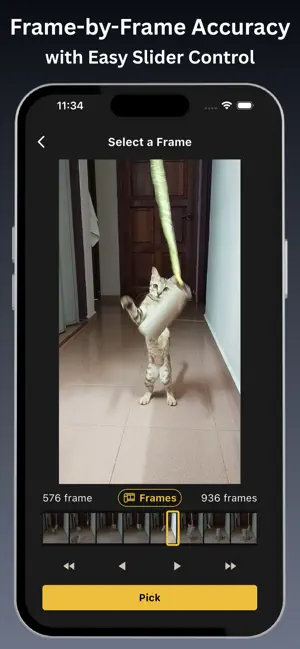
Extract frame‑perfect photos from any video. Freeze the exact moment and save it as a high‑quality image - no screenshots, no guesswork. Frame Extractor gives you precise control: scrub frame‑by‑frame for pixel accuracy or jump in 0.1‑second steps for fast navigation. Every image is exported in original quality with metadata intact - no compression, no watermark. Key Features - Open videos from your library or other supported sources - Frame Mode for pixel‑perfect frame selection; Time Mode for 0.1‑second steps - Save images in original quality - no compression, no compromise - Preserve metadata: exported photos keep the original shooting date and location - Bulk Export - select multiple frames and export them all at once - Built‑in editor: crop, apply filters, adjust exposure, and draw - No watermark on saved photos How it works 1. Open a video from your library or supported source. 2. Use Frame Mode for exact frames or Time Mode for quick scrubbing. 3. Tap to select frames; use Bulk Export to export all selections in one action. 4. Edit if needed and save - images retain original quality and metadata. Who it’s for Perfect for content creators, videographers, photographers, social media managers, and journalists who need reliable, high‑quality video‑to‑photo conversion and precise frame extraction. Download Frame Extractor and stop screenshotting - start extracting perfect frames. Privacy Policy: https://resource.optionalapp.com/app/fe/docs/tos.html Terms of Use: https://resource.optionalapp.com/app/fe/docs/privacypolicy.html
Ratings & reviews
5.0
7 ratings
What’s new
Version 1.0.84 · Updated October 21, 2026
Fixed minor issues to improve stability
App privacy
The developer, Kwok Chun Hin, reported these privacy practices to Apple.
Data Used to Track You
The following data may be used to track you across apps and websites owned by other companies:
- Usage Data: Advertising Data
Data Not Linked to You
The following data, which may be collected but is not linked to your identity, may be used for the following purposes:
- Identifiers: Device ID
- Usage Data: Advertising Data, Product Interaction
- Diagnostics: Crash Data, Performance Data, Other Diagnostic Data
Used for: Third-Party Advertising, Developer’s Advertising or Marketing, Analytics, App Functionality
Alternatives to Video to Photo: Frame Extract
Looking for apps like Video to Photo: Frame Extract? Here are 6 similar apps on the App Store. The highest rated is Video to Photo – Frame Grabber (4.9/5), and all 6 are free to download.
-
 Grab Frame from Video Clips
4.6
Grab Frame from Video Clips
4.6
-
 Video to Photo - Frame Snap
-
 Video to Photo – Frame Grabber
4.9
Video to Photo – Frame Grabber
4.9
-
 Frame Extractor: Video Photo
4.0
Frame Extractor: Video Photo
4.0
-
 Frame Grabber - Framera
4.3
Frame Grabber - Framera
4.3
-
 Video to Photo - Vid2Pix Bulk
3.0
Video to Photo - Vid2Pix Bulk
3.0
| App | Rating | Price | Last updated | Compare |
|---|---|---|---|---|
| Video to Photo: Frame Extract | 5.0 / 5 (7 ratings) | Free | October 21, 2026 | |
| Grab Frame from Video Clips | 4.6 / 5 (12) | Free | Oct 19, 2026 | Compare |
| Video to Photo - Frame Snap | – | Free | Aug 30, 2026 | Compare |
| Video to Photo – Frame Grabber | 4.9 / 5 (9) | Free | Sep 4, 2026 | Compare |
| Frame Extractor: Video Photo | 4.0 / 5 (1) | Free | Sep 7, 2026 | Compare |
| Frame Grabber - Framera | 4.3 / 5 (6) | Free | Oct 15, 2026 | Compare |
| Video to Photo - Vid2Pix Bulk | 3.0 / 5 (2) | Free | Oct 16, 2026 | Compare |