

TabiTalk: Daily-Life Japanese
Jun Xiang Lee Education iPhoneiPadiPod touch
TabiTalk: Daily-Life Japanese is a free Education app for iPhone and iPad by Jun Xiang Lee. Requires iOS 15.5. Updated October 24, 2026.
- Price
- Free
- on the App Store
- Size
- 292 MB
- Age 4+
- Updated
- Oct 24
- 2026 · v1.1.33
Screenshots


About TabiTalk: Daily-Life Japanese
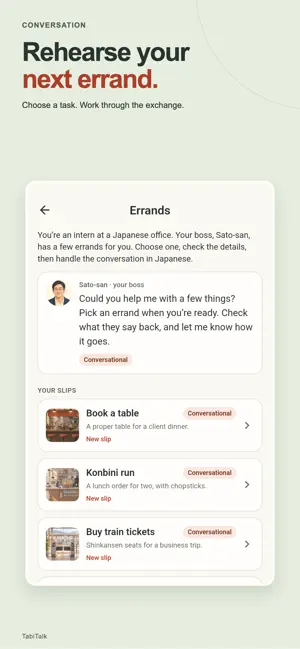
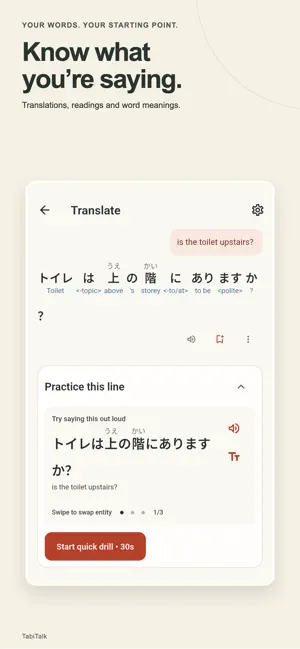
Translate it. Practise it. Say it. New in Japan, or visiting soon? TabiTalk helps with the Japanese you need this week: at the shop counter, the clinic, the station or the restaurant. Type what you want to say, see the Japanese and how it works, then practise saying it before you need it. START WITH WHAT YOU NEED TO SAY Translate between English and Japanese. Your translation comes first, with readings, word meanings and a short practice built right into it, so a phrase you looked up becomes a phrase you can say. PRACTISE IN EVERYDAY SITUATIONS Pick the phrases that matter to you when you start, and your first scene is built around them. Scenes walk you through everyday exchanges, from shopping and eating out to asking for help, with listening, reading support and speaking practice. TRY THE NEXT TURN IN A CONVERSATION Choose an everyday errand, read Sato-san's brief and work through the exchange. Stuck? Tap "What could I say?" for help with your reply. Rehearse here before you try it for real. PRICES, TIMES, DATES AND COUNTERS Practise hearing and saying prices, times and dates at a level that matches yours. Learn the Japanese counters for food, drinks, tickets and the other things you count every day. READ KANA FROM DAY ONE Learn hiragana and katakana and practise reading everyday words. Readings appear above kanji, and you can answer in romaji while you are still learning to type Japanese. KEEP WHAT YOU LEARN Save words and phrases to your library and review them. Saved words come back in warm-ups and recaps as you practise. WORDS FROM WHAT YOU WATCH With our separate desktop browser extension, save words from Japanese subtitles while you watch on a computer, then find them in the app with the same account. Subtitle availability depends on the video and region. The app does not add subtitles to video apps on your phone. WHAT WORKS OFFLINE Kana, Numbers and Counters practice work offline, along with on-device Japanese-English translation and word meanings. Download the translation model and any Japanese voice you need before you go offline, and open each practice once while online so its audio is ready. Online translation, AI explanations, new scenes, Conversation and account sync need an internet connection. FOR NEW RESIDENTS AND VISITORS TabiTalk is for people who have just moved to Japan, are about to, or are visiting and want to handle everyday exchanges in Japanese. Start with a phrase you need, understand how it works and give yourself a chance to say it.
What’s new
Version 1.1.33 · Updated October 24, 2026
You can now handwrite Japanese on the Translate page, and the chips under it say what Translate is for. The word sheet shows real example sentences under each word's definitions, Library history opens faster and keeps your searches, and Converse errands give a cleaner report with a clearer slip. Scenes started from a chat phrase now build on that phrase.
App privacy
The developer, Jun Xiang Lee, reported these privacy practices to Apple.
Data Linked to You
The following data, which may be collected and linked to your identity, may be used for the following purposes:
- Usage Data: Product Interaction
- User Content: Other User Content
- Contact Info: Email Address
- Diagnostics: Crash Data, Performance Data, Other Diagnostic Data
Used for: Analytics, Product Personalization, App Functionality