

OBox MyCloud VPN·Self Host VPS
Situs Technologies LLC Developer Tools iPhoneiPadiPod touch
OBox MyCloud VPN·Self Host VPS is a free Developer Tools app for iPhone and iPad by Situs Technologies LLC. Rated 5.0/5 from 3 ratings. Requires iOS 15.6.
- Rating
- 5.0
- 3 ratings
- Price
- Free
- on the App Store
- Size
- 26 MB
- Age 4+
- Updated
- Oct 21
- 2026 · v2.0.4
Screenshots

About OBox MyCloud VPN·Self Host VPS
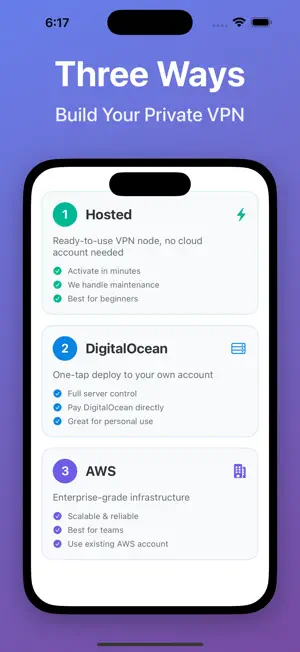
OBox MyCloud Self-host VLESS+Reality / Outline VPN Node — Your Private VPN Get your own private VPN in minutes with dedicated IP. No coding, no command line. Three Ways to Create Your VPN Node 1. Hosted Node (Easiest) Purchase a ready-to-use VPN node. No cloud account needed. - Activate and connect in minutes - We handle setup and maintenance - Perfect for beginners 2. DigitalOcean Deployment One-tap deploy to your own DigitalOcean account. - Full control over your server - Pay DigitalOcean directly - Great for personal use 3. AWS Deployment Deploy on Amazon Web Services for enterprise-grade infrastructure. - Scalable and reliable - Ideal for teams and businesses - Use your existing AWS account Supported Clients Outline, Shadowrocket, sing-box, Quantumult X, Clash and more. All Platforms iOS, macOS, Windows, Linux, OpenWRT Why OBox MyCloud? - Self-hosted node with dedicated IP, not shared with others - Supports VLESS+Reality, Outline, sing-box protocols - Simple user and access management - No traffic logging, no data resale Who Is It For? - Users who want a private VPN without technical hassle - Users who prefer not to manage cloud accounts - Families or small teams sharing a secure network - Travelers and remote workers needing reliable access Video Tutorials https://www.youtube.com/@Situs-Technologies Official Channel https://t.me/obox_mycloud User Guides: https://situstechnologies.com/guides Privacy Policy: https://situstechnologies.com/pages/privacy-policy Terms of Use: https://situstechnologies.com/pages/terms-conditions
What’s new
Version 2.0.4 · Updated October 21, 2026
• New "Residential IP Exit": on the sing-box server page, enter your own residential IP (SOCKS5) credentials, check the exit IP on the server, then turn it on with one tap. Turn it off and on again anytime without re-entering anything • If the settings don't work, the server is automatically restored, so your existing setup is never affected • Machines in your cloud account that weren't created by OBox can no longer be deleted from the app, preventing accidental deletion of your other servers • Cleaner sing-box server page: "Info" and "Firewall Ports" are collapsed by default, with port status shown right in the header • Other bug fixes
App privacy
The developer, Situs Technologies LLC, reported these privacy practices to Apple.
Data Not Collected
The developer does not collect any data from this app.
Alternatives to OBox MyCloud VPN·Self Host VPS
Looking for apps like OBox MyCloud VPN·Self Host VPS? Here are 6 similar apps on the App Store. The highest rated is Conduit: SSH, Mosh & SFTP (5.0/5), and all 6 are free to download.
-
 Conduit: SSH, Mosh & SFTP
5.0
Conduit: SSH, Mosh & SFTP
5.0
-
 AI Game Maker & Engine: Max2D
4.6
AI Game Maker & Engine: Max2D
4.6
-
 GameForge AI: Code & Build
3.0
GameForge AI: Code & Build
3.0
-
 VPN - Feichi
1.0
VPN - Feichi
1.0
-
 ZScripter: Visual Novel Player
4.8
ZScripter: Visual Novel Player
4.8
-
 MintFlow: VPN & HTTPS Capture
4.8
MintFlow: VPN & HTTPS Capture
4.8
| App | Rating | Price | Last updated | Compare |
|---|---|---|---|---|
| OBox MyCloud VPN·Self Host VPS | 5.0 / 5 (3 ratings) | Free | October 21, 2026 | |
| Conduit: SSH, Mosh & SFTP | 5.0 / 5 (2) | Free | Jul 6, 2026 | Compare |
| AI Game Maker & Engine: Max2D | 4.6 / 5 (17) | Free | Oct 17, 2026 | Compare |
| GameForge AI: Code & Build | 3.0 / 5 (20) | Free | Jul 24, 2026 | Compare |
| VPN - Feichi | 1.0 / 5 (4) | Free | Sep 23, 2026 | Compare |
| ZScripter: Visual Novel Player | 4.8 / 5 (55) | Free | Oct 30, 2026 | Compare |
| MintFlow: VPN & HTTPS Capture | 4.8 / 5 (8) | Free | Oct 9, 2026 | Compare |