

ID Scanner - ID Card Scanner
ESPRESSO TECH (SMC-PRIVATE) LIMITED Utilities iPhoneiPadiPod touch
ID Scanner - ID Card Scanner is a free Utilities app for iPhone and iPad by ESPRESSO TECH (SMC-PRIVATE) LIMITED. Requires iOS 16.1.
- Price
- Free
- on the App Store
- Size
- 16 MB
- Age 4+
- Updated
- Sep 21
- 2026 · v1.6
Screenshots


About ID Scanner - ID Card Scanner
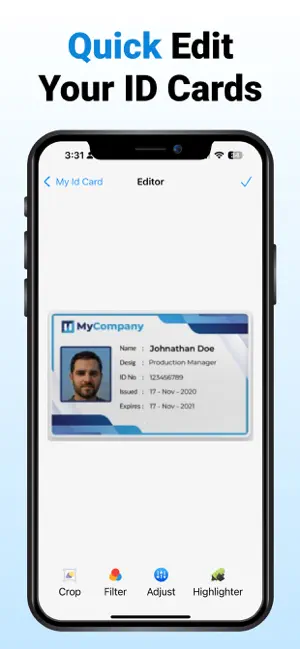
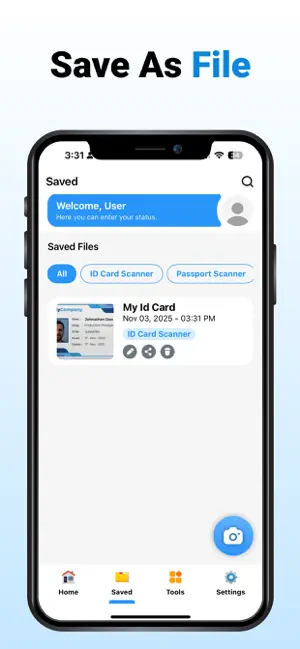
ID Card Scanner - ID Scanner App is a powerful, feature-rich solution designed to streamline the way you scan, store, and manage identification cards and important documents. Whether you're verifying IDs, digitizing documents, or organizing business information, this app delivers precise, high-quality results with exceptional ease of use. Key Features of ID Card Scanner - ID Scanner: • Precision scanning for all types of ID cards • Multi-page document scanning • OCR text extraction and recognition • PDF to image & image to PDF conversion • Business card reader and contact management • Built-in editor with filters, signatures, and annotation tools • Clean, user-friendly interface • Secure and private – your data remains on your device Comprehensive ID Card Scanning: At the core of the app is a highly accurate and efficient ID Card Scanner. Effortlessly scan a wide range of ID types, including driver's licenses, passports, employee badges, student IDs, and more. Our intelligent edge detection and automatic enhancement technology ensure every scan is clear, cropped, and ready for digital storage or sharing. Keep your scanned IDs neatly organized and easily accessible, right on your device. Document Scanner with Professional Output: Beyond ID cards, the app offers full functionality as a multi-page document scanner. Scan contracts, invoices, receipts, and notes in seconds. With high-resolution results and batch scanning capabilities, it's ideal for both personal and professional use. OCR Text Scanner: Easily extract printed or handwritten text from any image using advanced Optical Character Recognition (OCR). Copy, edit, and share text instantly, making it easier to digitize printed materials, business information, or scanned IDs. PDF & Image Conversion: Convert scanned images to high-quality PDFs or extract images from PDF files with just a tap. Whether you're archiving, printing, or sharing, our PDF/Image converter ensures maximum flexibility. Business Card Scanning: Quickly capture and digitize business cards with our smart business card scanner. Extract contact details such as name, email, phone number, and organization automatically, and store them in a searchable format. Edit, Sign & Enhance: Enhance your scans with a robust set of tools. Apply professional filters for better clarity, crop or rotate as needed, add annotations or signatures, and ensure every scan meets your standards for quality and presentation. Secure Storage & Organization: Organize your scanned ID cards and documents into folders for efficient management. All files are stored securely on your device, ensuring data privacy and offline access at all times. Whether you're a business professional, student, or individual managing personal records, ID Card Scanner - ID Scanner App offers a reliable and versatile scanning experience. Download now and turn your device into a smart, portable scanner for ID cards and beyond. This app offers optional paid subscriptions to access premium features. Weekly, Monthly, and Yearly plans are available. Subscriptions can be managed or canceled at any time through the user’s Apple ID settings. Privacy policy: https://health-fitness-pro.fit/privacy Terms of use: https://health-fitness-pro.fit/terms
What’s new
Version 1.6 · Updated September 21, 2026
Hi there! We’ve made some exciting improvements for you: • Enhanced ID scanning accuracy and speed • Smarter text recognition (OCR) for perfect results • Faster exports and smoother performance • Minor bug fixes and overall stability updates
App privacy
The developer, ESPRESSO TECH (SMC-PRIVATE) LIMITED, reported these privacy practices to Apple.
Data Used to Track You
The following data may be used to track you across apps and websites owned by other companies:
- Identifiers: Device ID
- Usage Data: Advertising Data
Data Not Linked to You
The following data, which may be collected but is not linked to your identity, may be used for the following purposes:
- Identifiers: Device ID
- Usage Data: Advertising Data
- Diagnostics: Crash Data, Performance Data
- User Content: Photos or Videos
Used for: Third-Party Advertising, App Functionality
Alternatives to ID Scanner - ID Card Scanner
Looking for apps like ID Scanner - ID Card Scanner? Here are 6 similar apps on the App Store. The highest rated is Car Identifier - Snap & Scan (4.2/5), and all 6 are free to download.
-
 Car Identifier - Snap & Scan
4.2
Car Identifier - Snap & Scan
4.2
-
 ID Scanner +.
-
 Photo to PDF | PDF Converter
-
 Image to PDF - PDF creator +
-
 CardSnap ID Scanner
-
 ID to PDF: Make ID PDF Easy
| App | Rating | Price | Last updated | Compare |
|---|---|---|---|---|
| ID Scanner - ID Card Scanner | – | Free | September 21, 2026 | |
| Car Identifier - Snap & Scan | 4.2 / 5 (12) | Free | Sep 29, 2026 | Compare |
| ID Scanner +. | – | Free | Jun 29, 2026 | Compare |
| Photo to PDF | PDF Converter | – | Free | Apr 17, 2026 | Compare |
| Image to PDF - PDF creator + | – | Free | Oct 14, 2025 | Compare |
| CardSnap ID Scanner | – | Free | Mar 19, 2026 | Compare |
| ID to PDF: Make ID PDF Easy | – | Free | Nov 12, 2025 | Compare |