

PDFz: PDF Scanner & Editor
Khaled Khalifa Productivity iPhoneiPadiPod touch
PDFz: PDF Scanner & Editor is a free Productivity app for iPhone and iPad by Khaled Khalifa. Rated 5.0/5 from 4 ratings. Requires iOS 18.0.
- Rating
- 5.0
- 4 ratings
- Price
- Free
- on the App Store
- Size
- 45 MB
- Age 4+
- Updated
- Oct 5
- 2026 · v2.0.3
Screenshots


About PDFz: PDF Scanner & Editor
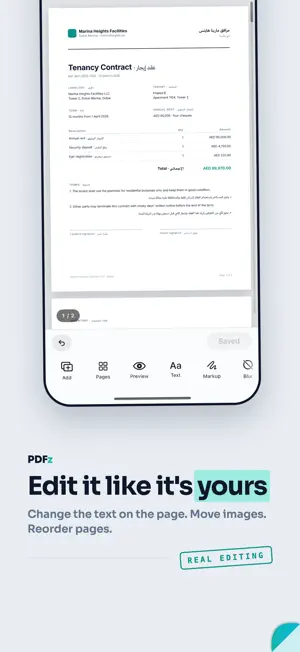
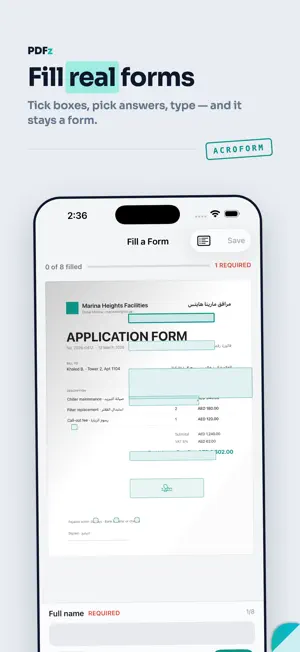
PDFz turns your iPhone into a complete PDF office: scan, edit, sign, fill forms, convert and share — in English and Arabic, side by side. SCAN ANYTHING • Point the camera. The page is found, straightened and cleaned before you lift your thumb. • Filters for shadows, handwriting and colour. Multi-page in one go. • ID cards: front and back on a single page. Passport and visa photos in official sizes. • Long receipts stitched from several shots. Books split into left and right pages. EDIT IT LIKE A DOCUMENT, NOT A PICTURE • Edit the text that is already on the page. Move and resize images. Add, reorder and rotate pages. • Text, markup and signatures are live layers you can move — not pixels you have to redo. • Watermark, page numbers, permanent redaction, full undo history. SIGN AND FILL • Draw your signature, type it, or lift it from paper. It stays saved on the device. • Fill real PDF forms: tick boxes, dropdowns, required fields — and it stays a form. • Start from a blank page and build your own form. CONVERT • PDF to Word, Excel and PowerPoint with layout, tables and bilingual text kept in reading order. Processed on the PDFz server and deleted the moment it finishes. • Images to PDF, PDF to images, one long image, print. ORGANISE AND FIND • Search the words inside every document — OCR included. • Merge, split, extract pages. Compress with the new size shown before you commit. • Password-protect any PDF. Lock folders with Face ID. • Share over Wi-Fi to any browser on your network. No cloud account. TRANSLATE • Translate a whole document on the page and save it, or translate live through the camera. MADE FOR ARABIC AND ENGLISH Right-to-left layout, bilingual pages that stay side by side, Arabic and English OCR. Available in 49 languages. PRIVACY No account. Scanning, editing, signing and OCR run on the device. Conversion files are deleted from the server as soon as your download is ready. PDFz PLUS Some features need PDFz Plus — weekly, monthly or yearly, with a free trial. Payment is charged to your Apple ID account. The subscription renews automatically unless cancelled at least 24 hours before the end of the current period; manage or cancel in Settings. Terms of Use: https://www.apple.com/legal/internet-services/itunes/dev/stdeula/
What’s new
Version 2.0.3 · Updated October 5, 2026
Polish and fixes throughout the app.
App privacy
The developer, Khaled Khalifa, reported these privacy practices to Apple.
Data Not Linked to You
The following data, which may be collected but is not linked to your identity, may be used for the following purposes:
- Usage Data: Advertising Data, Product Interaction, Other Usage Data
- Diagnostics: Crash Data, Performance Data, Other Diagnostic Data
Used for: Developer’s Advertising or Marketing, Analytics, App Functionality
Alternatives to PDFz: PDF Scanner & Editor
Looking for apps like PDFz: PDF Scanner & Editor? Here are 6 similar apps on the App Store. The highest rated is Time Pencil - Clock Planner (5.0/5), and 5 of the 6 are free to download.
-
 Shared Grocery Shopping Lists
4.3
Shared Grocery Shopping Lists
4.3
-
 QuickPrompts: AI Prompt Helper
-
 Time Pencil - Clock Planner
5.0
Time Pencil - Clock Planner
5.0
-
 GoalSteps | Goal Tracker
4.2
GoalSteps | Goal Tracker
4.2
-
 txt.edit: Code & Text Editor
4.9
txt.edit: Code & Text Editor
4.9
-
 Pomodoro Timer: Pomidor Focus
4.7
Pomodoro Timer: Pomidor Focus
4.7
| App | Rating | Price | Last updated | Compare |
|---|---|---|---|---|
| PDFz: PDF Scanner & Editor | 5.0 / 5 (4 ratings) | Free | October 5, 2026 | |
| Shared Grocery Shopping Lists | 4.3 / 5 (11) | Free | Nov 30, 2025 | Compare |
| QuickPrompts: AI Prompt Helper | – | Free | Apr 18, 2025 | Compare |
| Time Pencil - Clock Planner | 5.0 / 5 (3) | Free | Oct 21, 2026 | Compare |
| GoalSteps | Goal Tracker | 4.2 / 5 (5) | Free | Aug 10, 2026 | Compare |
| txt.edit: Code & Text Editor | 4.9 / 5 (26) | 3.99 USD | Oct 19, 2026 | Compare |
| Pomodoro Timer: Pomidor Focus | 4.7 / 5 (14) | Free | Oct 19, 2026 | Compare |