

ID Wallet - My Cards
Volodymyr Sichka Utilities iPhoneiPadiPod touch
ID Wallet - My Cards is a free Utilities app for iPhone and iPad by Volodymyr Sichka. Requires iOS 17.6. Updated October 15, 2026.
- Price
- Free
- on the App Store
- Size
- 4 MB
- Age 4+
- Updated
- Oct 15
- 2026 · v3.0
Screenshots


About ID Wallet - My Cards
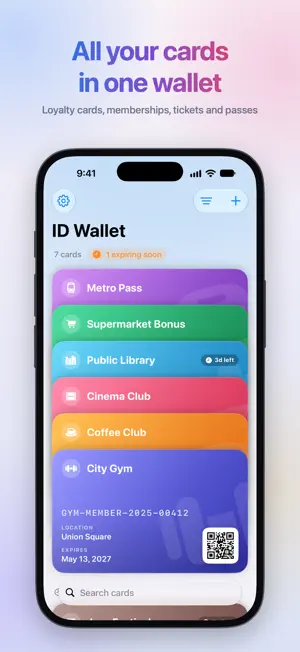
ID Wallet keeps all your loyalty cards, memberships, tickets and passes in one beautiful wallet on your iPhone. Scan a card once and show it at the checkout in a tap. ADD ANY CARD IN SECONDS • Scan a QR code or barcode with the camera • Import it from a photo or screenshot • Or simply type the number ID Wallet recognizes the code type and suggests a name and icon for you. SHOW IT IN A TAP Open a card to get a large, bright code that any scanner can read. The screen stays on, and barcodes can be rotated for easier scanning. You can also ask Siri: "Show City Gym in ID Wallet". ADD TO APPLE WALLET Turn any card into an Apple Wallet pass, so it's always on your Lock Screen and Apple Watch. Add a location, and the pass can appear on your Lock Screen when you're nearby. MAKE IT YOURS Choose from 8 colors and 23 icons, and add expiration dates and places. Light and Dark appearance, with accent colors to match your style. NEVER MISS AN EXPIRY Get a reminder 3 days before a card expires and on the day itself. Expired cards move to their own section. ALWAYS IN SYNC Your cards sync through iCloud across your devices. No account or sign-up needed. Works with QR codes, Aztec, PDF417 and popular barcodes like EAN-13, EAN-8, UPC-E, Code 128, Code 39, Code 93 and ITF-14. Adding a card to Apple Wallet is a one-time in-app purchase per pass. LEGAL • Privacy Policy: https://vybgss.github.io/id-wallet-docs/privacy-policy.html • Terms of Use: https://www.apple.com/legal/internet-services/itunes/dev/stdeula/
What’s new
Version 3.0 · Updated October 15, 2026
• A new wallet: your cards are stacked like in a real wallet. Pull down to fan them out, long-press for quick actions. • Add cards faster: start with the code (scan, pick a photo or type it in) and the app suggests a name, icon and barcode type. • New card editor with a live preview, 8 colors and 23 icons. • Redesigned card page with a large code, a map of the location and the Add to Apple Wallet button. • Full-screen code keeps the screen on, and barcodes can be rotated for easier scanning. • New scanner with a flashlight and success animation. • Siri and Shortcuts: say "Show City Gym in ID Wallet" or put it on the Action button. • Expiry reminders 3 days before a card expires and on the day. • Search, sorting by recently used, and a separate section for expired cards. • Light and Dark appearance, accent colors and a new app icon.
App privacy
The developer, Volodymyr Sichka, reported these privacy practices to Apple.
Data Not Collected
The developer does not collect any data from this app.
Alternatives to ID Wallet - My Cards
Looking for apps like ID Wallet - My Cards? Here are 6 similar apps on the App Store. The highest rated is InnoClock -Screen Clock Widget (5.0/5), and 4 of the 6 are free to download.
-
 Note by Xi - The Cleanest note
-
 iAliveWell
-
 MomentMark Camera
-
 InnoClock -Screen Clock Widget
5.0
-
 Recorder by Xi - Voice Record
-
 SocialSave - Organise Links
3.7
| App | Rating | Price | Last updated | Compare |
|---|---|---|---|---|
| ID Wallet - My Cards | – | Free | October 15, 2026 | |
| Note by Xi - The Cleanest note | – | 0.99 USD | Jul 19, 2026 | Compare |
| iAliveWell | – | Free | Jan 15, 2026 | Compare |
| MomentMark Camera | – | Free | Mar 17, 2026 | Compare |
| InnoClock -Screen Clock Widget | 5.0 / 5 (1) | Free | Sep 17, 2026 | Compare |
| Recorder by Xi - Voice Record | – | 0.99 USD | Jul 2, 2026 | Compare |
| SocialSave - Organise Links | 3.7 / 5 (3) | Free | Mar 14, 2026 | Compare |