

Viska: Dictation
Ideang Productions AB Productivity iPhoneiPadiPod touch
Viska: Dictation is a free Productivity app for iPhone and iPad by Ideang Productions AB. Requires iOS 26.0. Updated September 26, 2026.
- Price
- Free
- on the App Store
- Size
- 11 MB
- Age 4+
- Updated
- Sep 26
- 2026 · v1.7.2
Screenshots



About Viska: Dictation
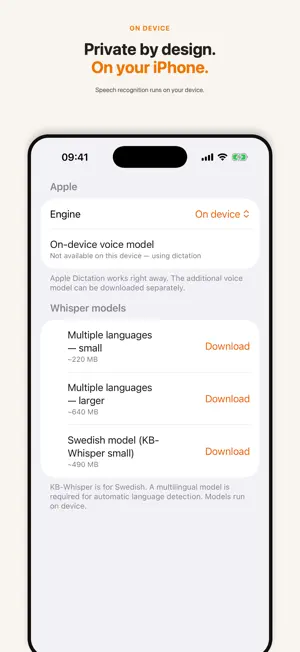
Viska turns speech into text and copies the result to your clipboard. Tap the microphone, speak, and paste the text wherever you need it. Processed on device Audio and text are processed on your iPhone. Viska needs no account and does not send dictation to an external AI service. If you enable iCloud, note history is saved in your own iCloud account. Built for Swedish Use Apple Dictation immediately or download the Swedish KB-Whisper model. The models run on device and work offline when available. Cleaner text Choose a writing mode, say commands such as “new line,” “new paragraph,” and “period,” or format text with Apple Intelligence when the feature is available on your device. Add names and specialist terms to your word list. Quick access Start from the app, Action Button, Lock Screen, Control Center, or Siri. Text is copied to the clipboard automatically and saved to history if you want it. Try everything for 60 days After the trial, buy lifetime access or choose the monthly subscription. Prices are shown in the app. You can restore earlier purchases at any time. Terms of Use: https://www.apple.com/legal/internet-services/itunes/dev/stdeula/ Privacy Policy: https://ideang.com/app/viska/privacy/
What’s new
Version 1.7.2 · Updated September 26, 2026
• Fixed: long dictations with the downloadable speech models (KB-Whisper, Whisper) could lose whole sentences and paragraphs. The full text now comes through. • Names in your vocabulary are corrected afterwards, e.g. “system bolaget” becomes “Systembolaget”. • The text shown while you speak is a preview – the final text is always made from the whole recording. • History: select several notes and copy them as one text, oldest first.
App privacy
The developer, Ideang Productions AB, reported these privacy practices to Apple.
Data Not Linked to You
The following data, which may be collected but is not linked to your identity, may be used for the following purposes:
- Purchases: Purchase History
Used for: App Functionality
Alternatives to Viska: Dictation
Looking for apps like Viska: Dictation? Here are 6 similar apps on the App Store. The highest rated is Viska: Local AI Meeting Notes (5.0/5), and 5 of the 6 are free to download.
-
 Diktera: Lectures & Meetings
-
 Viska: Local AI Meeting Notes
5.0
Viska: Local AI Meeting Notes
5.0
-
 Nib - AI Notes & Translation
-
 SpeakType: Voice to Text
-
 Voice Notes, AI Speech to Text
3.0
Voice Notes, AI Speech to Text
3.0
-
 Fieldnoter: Transcription
5.0
Fieldnoter: Transcription
5.0
| App | Rating | Price | Last updated | Compare |
|---|---|---|---|---|
| Viska: Dictation | – | Free | September 26, 2026 | |
| Diktera: Lectures & Meetings | – | Free | Aug 17, 2026 | Compare |
| Viska: Local AI Meeting Notes | 5.0 / 5 (2) | 6.99 USD | Oct 15, 2026 | Compare |
| Nib - AI Notes & Translation | – | Free | Aug 19, 2026 | Compare |
| SpeakType: Voice to Text | – | Free | Jul 8, 2026 | Compare |
| Voice Notes, AI Speech to Text | 3.0 / 5 (2) | Free | Feb 28, 2026 | Compare |
| Fieldnoter: Transcription | 5.0 / 5 (1) | Free | Oct 20, 2026 | Compare |
Compare Viska: Dictation with the top alternatives: ratings, updates, ASO score and keyword gaps →