

Pagio: Bookworm's Diary
Dmytro Lytvynenko Lifestyle iPhoneiPadiPod touch
Pagio: Bookworm's Diary is a free Lifestyle app for iPhone and iPad by Dmytro Lytvynenko. Rated 5.0/5 from 1 ratings. Requires iOS 18.0.
- Rating
- 5.0
- 1 ratings
- Price
- Free
- on the App Store
- Size
- 72 MB
- Age 4+
- Updated
- Sep 28
- 2026 · v1.6.0
Screenshots


About Pagio: Bookworm's Diary
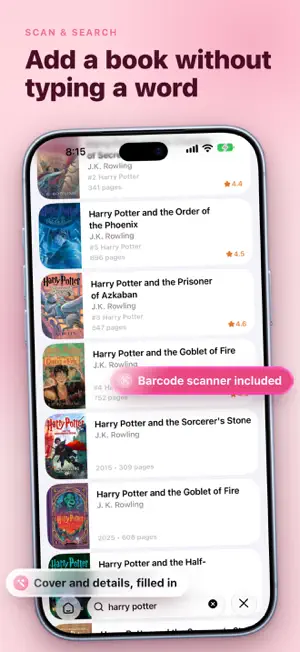
Whether you read for hours or just a few pages before bed, Pagio helps you stay consistent and enjoy the journey. A calm, private reading companion. No feeds, no distractions, just you and your books. LIBRARY Keep everything in one place. Books you want to read, books you're reading now, books you've finished, and the ones you set aside or came back to for a second time. Browse by author, genre, tag, or publisher when you'd rather start from a name than a cover. UP NEXT Line up what you're reading next and keep it in the order you actually mean. Add books from anywhere in the app, reorder the queue whenever your mood changes, and the one on top waits for you on Home. Can't choose? Tap Surprise Me and Pagio picks one of your unread books for you. SHELVES, COLLECTIONS & SERIES Organize your library however fits. Build custom shelves for whatever matters to you. Favorites, comfort rereads, gifts, beach reads. Put a book on as many shelves as you like. Group books into ordered collections like a reading challenge or your top ten of the year, and nest them when you want more structure. And bring every book in a series together, from the first volume to the seventh, so a long story stays in one place. IMPORT Already have a reading history? Bring it along. Import your books from Kindle, Goodreads, Bookshelf, or any CSV file. Pagio does its best to match everything up, so getting started feels like magic. READING SESSIONS Time every session and see how long you spend with each book. Jot a note without leaving the session, switch to night mode for reading in bed, and check your progress and streak before you save. Follow your current session and page progress from the Lock Screen, the Dynamic Island, or your Apple Watch with Live Activities. WIDGETS Keep your reading on the Home Screen and the Lock Screen. The book you're in the middle of, with buttons to start or pause a session without opening the app. Your goal and the pace it needs. Your streak and the week behind it. A month of reading as a calendar, for your whole library or for a single book. Each widget can follow whichever book or goal you choose. GOALS Set gentle reading targets in books, hours, days, or pages, and stay motivated as you move toward them. Add a quiet reminder if you'd like a nudge, or leave it off. QUOTES AND NOTES Save the passages that moved you and the thoughts they started, with the page they came from. Everything you've marked lives together in your library, ready to scroll, favorite, or share as a card. CHARACTERS Keep track of who's who in every book, with a name, a role, a photo, and a line or two about them. Point your quotes and notes at a character, and everything about them gathers on their own page. STATISTICS See where you stand, then dig in. Four sections cover your overview, your collection by genre, publisher, format, language and rating, the habits behind when and how long you read, and a history with a day-by-day calendar and your all-time records. Scope any of it to a month or a year, and turn a month you're proud of, or a book you've just finished, into artwork worth sharing. SEARCH Discover millions of books. Search by title, author, or ISBN, or point your camera at a barcode, and add them to your library in a tap. SYNC Keep everything up to date across all your devices with secure iCloud sync. Your data stays yours. OFFLINE Add time, update progress, and browse your library anywhere, even without an internet connection. Pagio works on iPhone and iPad. It's for readers who value clarity, consistency, and a deeper connection with their books. Download Pagio and rediscover the joy of reading. Terms of Use: https://pagio.cc/terms Privacy Policy: https://pagio.cc/privacy
What’s new
Version 1.6.0 · Updated September 28, 2026
Somewhere around chapter nine, a name turns up that you're sure you've met before. Every book can now keep its own cast: who each character is, the part they play, a photo if you have one. Point a quote or a note at someone and it stays with them, so when they walk back into the story, everything you noticed is a tap away. Six hundred pages and four dozen names, and suddenly it's a fair fight. Reading sessions have a new look. The book's own cover fills the screen while the clock runs, and there's a night mode now, for the chapters that happen after lights out. And if rating story, writing and feeling separately always felt like homework, a single overall score will do now. Half stars are optional too. Stars aside, iOS 27 is out, and Pagio is already there. Your move.
App privacy
The developer, Dmytro Lytvynenko, reported these privacy practices to Apple.
Data Not Linked to You
The following data, which may be collected but is not linked to your identity, may be used for the following purposes:
- Usage Data: Product Interaction
- Diagnostics: Crash Data, Performance Data
Used for: Analytics
Alternatives to Pagio: Bookworm's Diary
Looking for apps like Pagio: Bookworm's Diary? Here are 6 similar apps on the App Store. The highest rated is CountWhen: Last Time Tracker (5.0/5), and all 6 are free to download.
-
 CountWhen: Last Time Tracker
5.0
CountWhen: Last Time Tracker
5.0
-
 Linera: Save and Scan Quotes
-
 FamilySyncBooks - 家族読書共有
-
 Bittyworks: Activities
5.0
Bittyworks: Activities
5.0
-
 ReWorth
-
 Terka
Terka
| App | Rating | Price | Last updated | Compare |
|---|---|---|---|---|
| Pagio: Bookworm's Diary | 5.0 / 5 (1 rating) | Free | September 28, 2026 | |
| CountWhen: Last Time Tracker | 5.0 / 5 (1) | Free | Apr 13, 2026 | Compare |
| Linera: Save and Scan Quotes | – | Free | Aug 29, 2026 | Compare |
| FamilySyncBooks - 家族読書共有 | – | Free | Aug 25, 2026 | Compare |
| Bittyworks: Activities | 5.0 / 5 (2) | Free | Oct 23, 2023 | Compare |
| ReWorth | – | Free | Apr 7, 2026 | Compare |
| Terka | – | Free | Mar 28, 2026 | Compare |