

OutLowd
Greg Alton Utilities iPhoneiPadiPod touch
OutLowd is a free Utilities app for iPhone and iPad by Greg Alton. Requires iOS 18.5. Updated October 20, 2025.
- Price
- Free
- on the App Store
- Size
- 1 MB
- Age 4+
- Updated
- Oct 20
- 2025 · v1.1
Screenshots

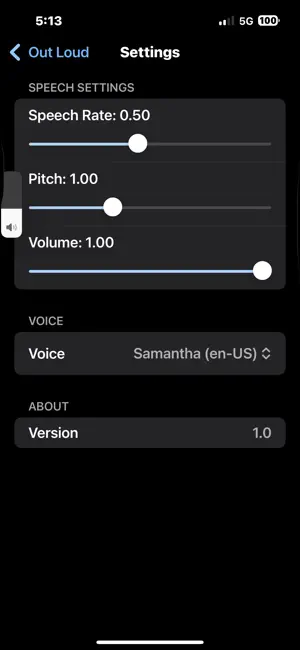
About OutLowd
TURN SCREENSHOTS INTO SPEECH OutLowd reads your screenshots aloud with natural-sounding voices. Perfect for multitasking, accessibility, or simply giving your eyes a rest. Select a screenshot, tap play, and listen. It's that simple. KEY FEATURES Screenshot to Speech Select any screenshot from your photo library and hear the text read aloud instantly. Accurate Text Recognition Powered by Apple's Vision framework for precise, on-device OCR that works with virtually any text. Customizable Playback - Adjust speech rate (slow, normal, fast) - Control pitch and volume - Choose from multiple natural-sounding voices - Pause, resume, and stop controls Multi-Language Support Automatically detects and reads text in multiple languages using your device's installed voices. Background Audio Continue listening while using other apps or when your screen is locked. Control playback from the lock screen or Control Center. PRIVACY FIRST OutLowd is designed with your privacy as the top priority: - Zero Data Collection - We don't collect, store, or transmit any of your data - 100% On-Device Processing - All text recognition happens on your device using Apple Intelligence - No Internet Required - Works completely offline - No Accounts - No sign-up, no login, no tracking - No Third-Party Services - No analytics, no ads, no external SDKs What you read stays on your device. Period. PERFECT FOR - Reading long articles while commuting or exercising - Listening to messages or emails hands-free - Accessibility - helping those with visual impairments or reading difficulties - Learning - hearing text read aloud can improve comprehension - Multitasking - listen while cooking, cleaning, or working - Reducing screen time and eye strain HOW IT WORKS 1. Take a screenshot of any text (article, message, document, etc.) 2. Open OutLowd and select the screenshot 3. Tap play and listen 4. Adjust settings to your preference That's it. No complicated setup, no accounts, no hassle. TECHNICAL DETAILS - Uses Apple's Vision framework for text recognition - Uses Apple's AVFoundation for natural speech synthesis - Supports all languages available in iOS text-to-speech - Works on iPhone and iPad - Requires iOS 15.0 or later - Optimized for the latest iOS versions WHY OUTLOWD? Unlike other text-to-speech apps, OutLowd: - Respects your privacy completely - Works entirely offline - Has a simple, focused interface - Requires no subscription or in-app purchases - Is built using only Apple's native frameworks SUPPORT Questions or feedback? We'd love to hear from you at [email protected] Download OutLowd today and experience the freedom of hands-free reading with complete privacy.
What’s new
Version 1.1 · Updated October 20, 2025
Added camera button.
App privacy
The developer, Greg Alton, reported these privacy practices to Apple.
Data Not Collected
The developer does not collect any data from this app.
Alternatives to OutLowd
Looking for apps like OutLowd? Here are 6 similar apps on the App Store. The highest rated is Getwid: Widget Design Studio (5.0/5), and all 6 are free to download.
-
 Getwid: Widget Design Studio
5.0
-
 BabalaVPN - fast and secure
-
 zxCamera
2.0
-
 ReadLoud: Scan Image to Text
4.4
-
 Lightspeed App
3.3
-
 AI Lip Reading - Video Reader
3.2
| App | Rating | Price | Last updated | Compare |
|---|---|---|---|---|
| OutLowd | – | Free | October 20, 2025 | |
| Getwid: Widget Design Studio | 5.0 / 5 (2) | Free | Oct 29, 2026 | Compare |
| BabalaVPN - fast and secure | – | Free | Mar 22, 2024 | Compare |
| zxCamera | 2.0 / 5 (4) | Free | Sep 3, 2025 | Compare |
| ReadLoud: Scan Image to Text | 4.4 / 5 (122) | Free | May 29, 2026 | Compare |
| Lightspeed App | 3.3 / 5 (54) | Free | Oct 19, 2026 | Compare |
| AI Lip Reading - Video Reader | 3.2 / 5 (80) | Free | May 19, 2025 | Compare |
Compare OutLowd with the top alternatives: ratings, updates, ASO score and keyword gaps →