

SQM Mobile
GerSpatial Utilities iPhoneiPadiPod touch
SQM Mobile is a free Utilities app for iPhone and iPad by GerSpatial. Requires iOS 17.6. Updated July 12, 2026.
- Price
- Free
- on the App Store
- Size
- 42 MB
- Age 4+
- Updated
- Jul 12
- 2026 · v1.3
Screenshots
About SQM Mobile
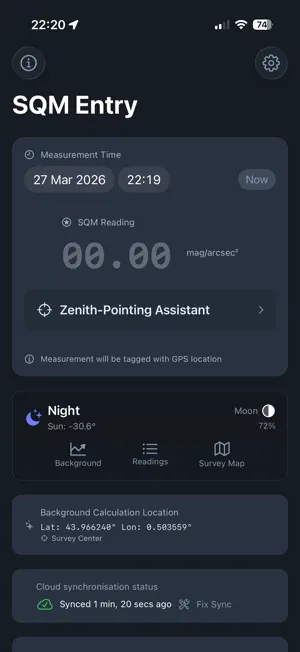
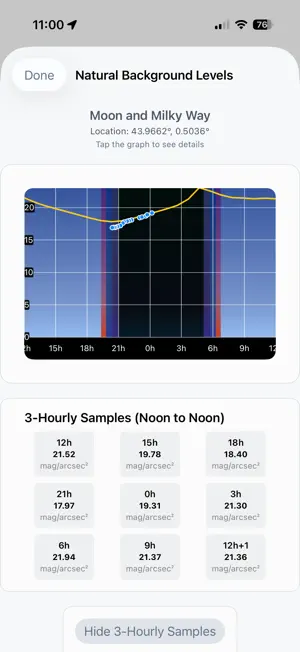
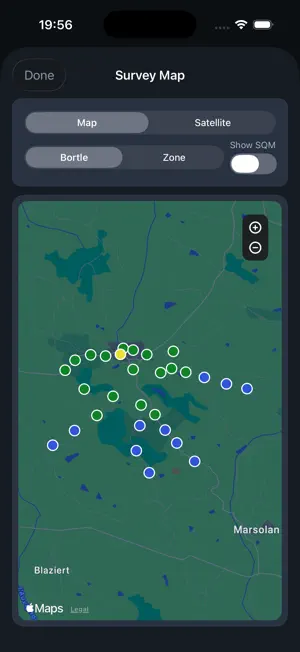
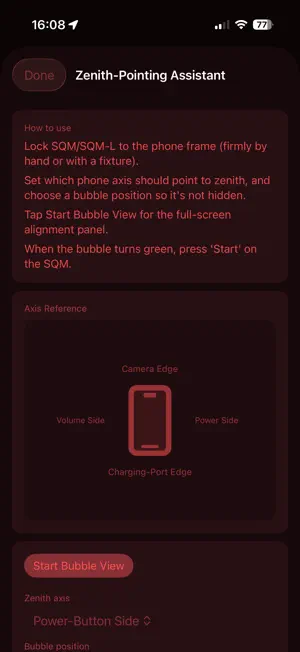
Bring all your sky quality measurements together in one place. SQM Mobile is the ideal companion for handheld Sky Quality Meters, automatically synchronizing field measurements with SQM Toolbox on your Mac. It also imports measurements exported from Dark Sky Meter Pro, making it easy to build a single long-term archive of all your observations. KEY FEATURES Field-Ready Data Collection * Quick and easy measurement entry for handheld SQM devices * Manual entry of measurements from Dark Sky Meter * Automatic GPS location recording for each measurement * Timestamp for accurate astronomical correlation * Offline measurement storage – sync whenever a connection becomes available * Bubble level for accurate zenith pointing * Import measurements exported from Dark Sky Meter Pro Smart Location Features * Automatic GPS coordinate capture * Manual location override (to define local sky-background conditions during site surveys) * Perfect for camping trips, dark-sky site surveys and travel observations Automatic Cloud Sync * Seamlessly sync measurements to SQM Toolbox on your Mac via iCloud * Private, secure storage – only you can access your measurements * Works anywhere with an internet connection – no complex setup required * Real-time synchronization across all your Apple devices Quick Analysis * Instant Bortle classification for every measurement * On-device light pollution assessment * Comparison with natural sky-background brightness * Simple graphical display including twilight conditions * Measurement validation and quality indicators * Clean, intuitive interface designed for field use Astronomical Context * Automatic twilight condition detection * Moon phase information for every measurement * Sun elevation calculations Simple and Reliable * Designed for easy use in the dark * Large, clear controls for nighttime operation * No account setup required – simply use your existing iCloud account Perfect for * Amateur astronomers and citizen scientists carrying out site surveys * Researchers monitoring light pollution * Dark-sky organizations documenting observing conditions * Anyone using handheld SQM instruments or Dark Sky Meter who wants long-term storage, synchronization and analysis of their measurements Requires: iOS 17.0 or later, iCloud account Works with: Unihedron Sky Quality Meter (SQM, SQM-L), Dark Sky Meter Pro imports, and manual entry from Dark Sky Meter. Companion to: SQM Toolbox for macOS (available separately)
What’s new
Version 1.3 · Updated July 12, 2026
VERSION 1.1 Version 1.1 focused on improving the user interface and overall user experience: * introduced numerous user interface improvements for entering metadata, including: * additional metadata fields; * metadata are retained between entries, avoiding the need to re-enter them unless necessary; * timestamps now remain set to the current time unless explicitly overridden using the new **Set Time** toggle. * added a field for the SQM serial number in Settings, which is then synchronized via CloudKit. * significantly improved the workflow for using the zenith alignment guide / bubble level, including: * added a shortcut button on the main screen for direct access to the bubble level; * improved the behavior and presentation of the bubble level; * improved the bubble-level calibration instructions. * added standardized cloud-condition descriptions via a drop-down menu to ensure consistent terminology. * added a button to retrieve air temperature from Apple Weather (automatically falling back to Open-Meteo if Apple Weather is unavailable, which is currently the case pending an update that is already in development). * improved the reliability of CloudKit uploads with better acknowledgment and retry handling, along with a more accessible CloudKit synchronization status display and **Fix** button. * added a keyboard **Done** button to prevent the keyboard from blocking further actions while entering metadata. * added a link to a 3D-printable mounting fixture on Thingiverse. VERSION 1.2 Version 1.2 improves usability and performance: * fixed retrieval of air temperature from WeatherKit / Apple Weather. * added warnings when no weather data can be downloaded. * added calibration of the bubble level's third axis (perpendicular to the screen). * expanded the calibration instructions and added scrolling so the entire guide is visible. * modified the instant sky-quality feedback to adapt to daylight and twilight conditions. * replaced most cryptic CloudKit messages with clear, meaningful messages. * made the CloudKit upload mechanism more robust, allowing individual upload failures without blocking the upload queue. * fixed the **No GPS** location screen: the **Find** button could not be used because it was hidden behind the **Use** button. * removed automatic capitalization of every word in Notes. VERSION 1.3 Version 1.3 introduces localization in German, French, Italian, Dutch, and U.S. English. It also adds: * an export feature, eliminating the need for a Mac running SQM Toolbox when exporting data. * ability to import CSV data from Dark Sky Meter Pro and add these to your CloudKit database
App privacy
The developer, GerSpatial, reported these privacy practices to Apple.
Data Not Collected
The developer does not collect any data from this app.
Alternatives to SQM Mobile
Looking for apps like SQM Mobile? Here are 6 similar apps on the App Store. The highest rated is Bubble Level + Compass Pro (5.0/5), and 3 of the 6 are free to download.
-
 CellPilot
-
 motor-app
-
 Bubble Level + Compass Pro
5.0
Bubble Level + Compass Pro
5.0
-
 Haptic Watch Metronome
4.7
Haptic Watch Metronome
4.7
-
 Barber Store
-
 Dark Sky Meter
3.8
Dark Sky Meter
3.8
| App | Rating | Price | Last updated | Compare |
|---|---|---|---|---|
| SQM Mobile | – | Free | July 12, 2026 | |
| CellPilot | – | Free | Jul 8, 2026 | Compare |
| motor-app | – | Free | Mar 8, 2024 | Compare |
| Bubble Level + Compass Pro | 5.0 / 5 (22) | 0.99 USD | Mar 11, 2026 | Compare |
| Haptic Watch Metronome | 4.7 / 5 (3) | 1.99 USD | Aug 6, 2026 | Compare |
| Barber Store | – | Free | Jan 7, 2025 | Compare |
| Dark Sky Meter | 3.8 / 5 (6) | 1.99 USD | Oct 11, 2024 | Compare |
Compare SQM Mobile with the top alternatives: ratings, updates, ASO score and keyword gaps →