

Gimi AI - AI Video Generator
Amir Landau Photo & Video iPhoneiPadiPod touch
Gimi AI - AI Video Generator is a free Photo & Video app for iPhone and iPad by Amir Landau. Rated 4.0/5 from 26 ratings. Requires iOS 16.0.
- Rating
- 4.0
- 26 ratings
- Price
- Free
- on the App Store
- Size
- 160 MB
- Age 4+
- Updated
- Aug 5
- 2026 · v1.2.4
Screenshots

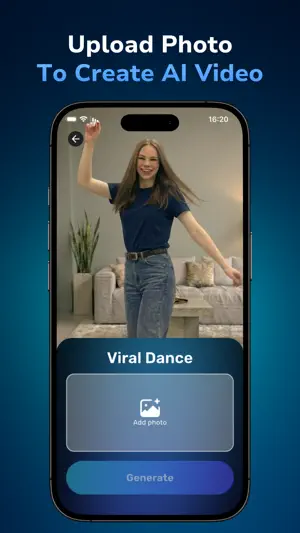


About Gimi AI - AI Video Generator
Create stunning AI videos with Gimi app, the ultimate AI Video Generator & Maker that transforms text and images into cinematic, viral video clips. It’s the app that makes people say “Gimme AI Video Magic.” With one tap, Gimi turns your ideas into expressive short films filled with motion, lighting, and emotion. Whether you want to make something romantic, dramatic, or simply fun, Gimi brings imagination to life in seconds. Bring your ideas to life Upload a photo, write a few words, or choose a style and watch your creation unfold. Gimi AI video maker animates your image with realistic movement, natural lighting, and cinematic detail powered by advanced AI models. You don’t need editing skills — just creativity. Explore unique transformations and creative styles — from emotional scenes to bold visual effects and imaginative worlds. Each video tells its own story, turning simple text and images into content that feels alive. Create videos your way • Image to Video: Upload a photo or image and watch it become a cinematic AI video. • Text to Video: Type your idea, caption, or story, and let Gimi’s AI turn your words into visuals and motion. • Template Library: Choose ready-made looks for artistic, emotional, or social-media clips. • High quality Export: Save and share your videos on TikTok, Instagram reels, YouTube shorts, and more. Powered by world-class AI Behind the scenes, Gimi runs on advanced models including Sora 2, Veo 3, Kling 2.5, and more. They deliver lifelike motion, cinematic lighting, and smooth animation. Everything is processed securely in the cloud for fast and reliable results. Why creators love Gimi Gimi combines simplicity and power. It’s an AI video creator that makes professional video production easy for everyone. Influencers use it for engaging clips, artists for storytelling, and everyday users to create emotional, shareable moments. Highlights • Clean, beginner-friendly interface for quick results. • New templates and creative styles added regularly. • Built-in moderation for safe, positive creativity. How it works 1. Choose your creation mode: • Templates – Choose a template, upload your photo, and Gimi will turn it into a video that matches the template’s style. • Text to Video – Write a prompt, add an optional image or style, and let Gimi create a video from your idea. 2. Let the AI handle the motion, lighting, and effects. 3. Preview your video and see the magic come to life. 4. Export and share it anywhere – TikTok, Instagram, YouTube, or with friends. Perfect for: • Content creators and influencers making short, viral videos. • Businesses and brands creating ads and marketing content quickly and affordably. • Creative & Social pros looking for innovative, fast tools. • Anyone who wants to create stunning, high-level videos effortlessly. Every creation in Gimi is unique, shaped by your photo, your words, and your imagination. From bold transformations to imaginative worlds, Gimi helps you turn ideas into videos that stand out. Feel creative. Feel cinematic. When the moment strikes, just think “Gimme AI Video Magic.” — The Gimi Team Privacy Policy: https://gimiapp.com/privacy Terms of Use: https://gimiapp.com/terms
Ratings & reviews
4.0
26 ratings
What’s new
Version 1.2.4 · Updated August 5, 2026
We’ve made performance improvements to keep your experience smooth.
App privacy
The developer, Amir Landau, reported these privacy practices to Apple.
Data Used to Track You
The following data may be used to track you across apps and websites owned by other companies:
- Purchases: Purchase History
- Identifiers: User ID, Device ID
- Usage Data: Product Interaction
Data Linked to You
The following data, which may be collected and linked to your identity, may be used for the following purposes:
- Purchases: Purchase History
- Identifiers: Device ID, User ID
- Usage Data: Product Interaction
- Diagnostics: Crash Data
- Contact Info: Email Address, Name
- User Content: Photos or Videos
Used for: Analytics, App Functionality
Data Not Linked to You
The following data, which may be collected but is not linked to your identity, may be used for the following purposes:
- Purchases: Purchase History
- Identifiers: User ID, Device ID
- Usage Data: Product Interaction
Used for: Developer’s Advertising or Marketing, Analytics
Alternatives to Gimi AI - AI Video Generator
Looking for apps like Gimi AI - AI Video Generator? Here are 6 similar apps on the App Store. The highest rated is AI Video Generator: Video3 (4.7/5), and all 6 are free to download.
-
 AI Video Generator - Sorvi
3.0
AI Video Generator - Sorvi
3.0
-
 Hootz - AI Video Generator
4.4
Hootz - AI Video Generator
4.4
-
 AI Video Generator - Video
3.0
AI Video Generator - Video
3.0
-
 AI Video Generator: Beo Image
2.6
AI Video Generator: Beo Image
2.6
-
 Vide - AR Video Prints
-
 AI Video Generator: Video3
4.7
AI Video Generator: Video3
4.7
| App | Rating | Price | Last updated | Compare |
|---|---|---|---|---|
| Gimi AI - AI Video Generator | 4.0 / 5 (26 ratings) | Free | August 5, 2026 | |
| AI Video Generator - Sorvi | 3.0 / 5 (6) | Free | Jan 28, 2026 | Compare |
| Hootz - AI Video Generator | 4.4 / 5 (84) | Free | Aug 31, 2026 | Compare |
| AI Video Generator - Video | 3.0 / 5 (2) | Free | Aug 31, 2026 | Compare |
| AI Video Generator: Beo Image | 2.6 / 5 (5) | Free | May 13, 2026 | Compare |
| Vide - AR Video Prints | – | Free | Jan 23, 2026 | Compare |
| AI Video Generator: Video3 | 4.7 / 5 (12) | Free | Aug 1, 2026 | Compare |