

TimeFix Camera–Edit Watermark
勇福 卢 Photo & Video iPhoneiPadiPod touch
TimeFix Camera–Edit Watermark is a free Photo & Video app for iPhone and iPad by 勇福 卢. Rated 5.0/5 from 7 ratings. Requires iOS 14.0.
- Rating
- 5.0
- 7 ratings
- Price
- Free
- on the App Store
- Size
- 46 MB
- Age 4+
- Updated
- Oct 12
- 2026 · v3.3.3
Screenshots

About TimeFix Camera–Edit Watermark
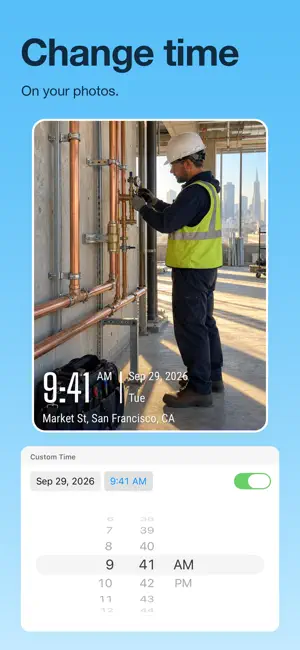
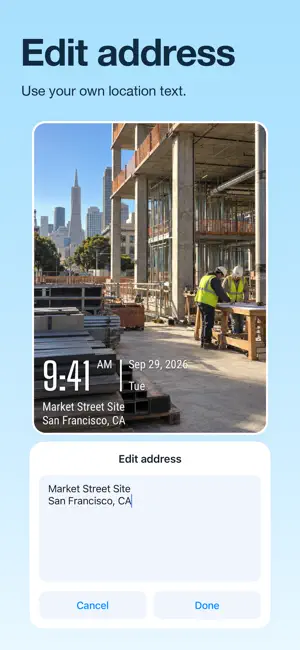
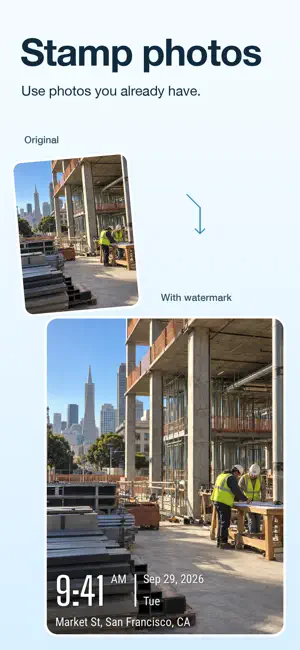
TimeFix Camera: Custom Time & Address Watermark Camera TimeFix is a powerful and fully customizable watermark camera that lets you personalize the time, location, text, and style displayed on your photos. Whether you’re documenting fieldwork, construction progress, inspections, or daily reports, TimeFix ensures every image carries precise, editable, and verifiable proof of when and where it was taken. Key Features 1. Smart & Customizable Watermark Generation TimeFix automatically captures and generates watermark information in real time — and lets you customize every element before saving: Customizable Timestamp: Automatically use the current time and date, or manually set your own for complete flexibility. Customizable Geographical Data: Use your real GPS coordinates, a street address, or manually enter any location you choose. 2. Complete Control & Flexible Customization TimeFix gives you full creative and professional control over every watermark detail: Set Your Own Time: Choose, edit, or adjust the displayed time for retrospective documentation or clock corrections. Set Your Own Location: Override GPS data and input any address or coordinates to match your project or report context. Adjustable Layout: Reposition, resize, and restyle your watermark elements for the perfect visual balance. 3. Rich, Professional, and Fully Customizable Watermarks Design every watermark to look exactly the way you want: Logo & Branding: Add and position your company logo, watermark image, or team badge. Custom Map Element: Embed a dynamic or static map showing your chosen location. Editable Text Fields: Add project titles, site names, job numbers, or personal notes — all with customizable font, color, and alignment. Multiple Custom Styles: Choose from a range of sleek templates, or design your own watermark layout for a unique look. Stop relying on generic records — create personalized, verifiable, and professional photo documentation with TimeFix today 4.term of use: https://v0-time-fix-camera-privacy.vercel.app/terms 5.pravicy policy https://v0-time-fix-camera-privacy.vercel.app/privacy 6. Contact Us If you have any questions about these Terms, please contact us at:[email protected]
Ratings & reviews
5.0
7 ratings
What’s new
Version 3.3.3 · Updated October 12, 2026
Bug fixes and improvements.
App privacy
The developer, 勇福 卢, reported these privacy practices to Apple.
Data Used to Track You
The following data may be used to track you across apps and websites owned by other companies:
- Identifiers: User ID, Device ID
- Usage Data: Advertising Data
Data Not Linked to You
The following data, which may be collected but is not linked to your identity, may be used for the following purposes:
- Identifiers: User ID, Device ID
- Usage Data: Advertising Data
Used for: Third-Party Advertising, Developer’s Advertising or Marketing, App Functionality
Alternatives to TimeFix Camera–Edit Watermark
Looking for apps like TimeFix Camera–Edit Watermark? Here are 6 similar apps on the App Store. The highest rated is Timestamp Camera ~ GPS Maps AI (5.0/5), and all 6 are free to download.
-
 Timestamp Camera ~ GPS Maps AI
5.0
Timestamp Camera ~ GPS Maps AI
5.0
-
 GPS Map Camera Editor
5.0
GPS Map Camera Editor
5.0
-
 Timeprint: Timestamp Camera
4.8
Timeprint: Timestamp Camera
4.8
-
 Add Text & Stamp to Photos
4.3
Add Text & Stamp to Photos
4.3
-
 Timestamp Camera:Snap Timemark
5.0
Timestamp Camera:Snap Timemark
5.0
-
 GPS Map - Timestamp Camera
4.4
GPS Map - Timestamp Camera
4.4
| App | Rating | Price | Last updated | Compare |
|---|---|---|---|---|
| TimeFix Camera–Edit Watermark | 5.0 / 5 (7 ratings) | Free | October 12, 2026 | |
| Timestamp Camera ~ GPS Maps AI | 5.0 / 5 (16) | Free | Sep 6, 2025 | Compare |
| GPS Map Camera Editor | 5.0 / 5 (1) | Free | Sep 15, 2026 | Compare |
| Timeprint: Timestamp Camera | 4.8 / 5 (187) | Free | Oct 22, 2026 | Compare |
| Add Text & Stamp to Photos | 4.3 / 5 (132) | Free | Feb 28, 2025 | Compare |
| Timestamp Camera:Snap Timemark | 5.0 / 5 (2) | Free | Sep 23, 2025 | Compare |
| GPS Map - Timestamp Camera | 4.4 / 5 (10) | Free | Jan 22, 2025 | Compare |