

Stones: Tracker & Counter
Grachev Dmitrii Productivity iPhoneiPadiPod touch
Stones: Tracker & Counter is a free Productivity app for iPhone and iPad by Grachev Dmitrii. Requires iOS 15.6. Updated October 16, 2026.
- Price
- Free
- on the App Store
- Size
- 64 MB
- Age 4+
- Updated
- Oct 16
- 2026 · v1.1.4
Screenshots
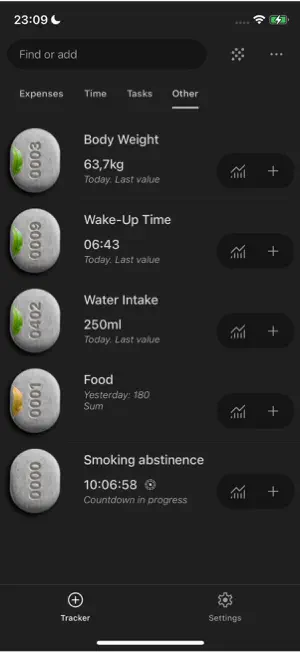
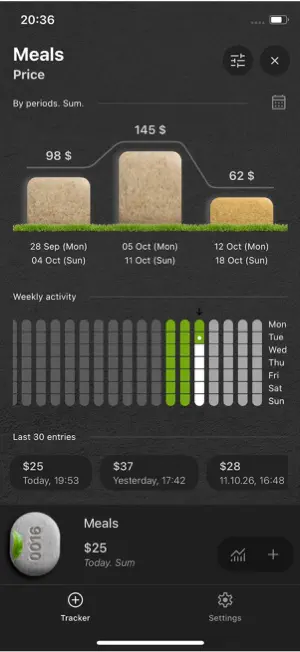

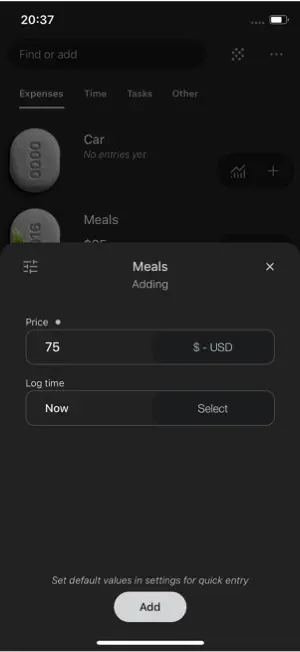
About Stones: Tracker & Counter
What to expect in the app Features: * Versatile Tracker: Perfect for almost any personal goal — from tracking push-ups and daily water intake to managing personal finances. * Deep Customization: Tailor every tracker in two taps: unit of measurement, custom fields, data format, and categories. * Declutter Mode: Hide trackers you aren't using right now to keep your focus sharp. * Dark & Light Themes: Native support for both modes. * Lightning Fast: Instant app launch and frictionless data entry. * Smart Data Aggregation: Display daily sums, averages, min/max, or your latest entries at a glance. Privacy & Storage: * 100% Local Data: All your logged data stays strictly on your device. * Cloud Sync for Purchases: Cloud services are used solely to store your in-app purchase history. Powerful Analytics: * Flexible Period Comparison: Compare performance across days, weeks, months, years, or custom date ranges (e.g., track expenses from the 20th to the 20th and compare with previous billing cycles). * Weekly & Monthly Activity Heatmaps: Clear visual insights into your consistency. * Custom Output Formats: Seamlessly switch between kg, lbs, liters, currency symbols, and custom units. * Quick Management: Effortlessly view, repeat, or edit your recent entries. * Unified Activity Feed: See all your logged events in a single chronological timeline. * Time-Since-Last-Entry Indicator: A visual glanceable timer showing time elapsed since your last entry so you immediately know what needs attention.
What’s new
Version 1.1.4 · Updated October 16, 2026
Cool notifications added. Four types: during the day, by days of the week, by days of the month, on specific dates.
App privacy
The developer, Grachev Dmitrii, reported these privacy practices to Apple.
Data Linked to You
The following data, which may be collected and linked to your identity, may be used for the following purposes:
- Purchases: Purchase History
- Identifiers: User ID
- Usage Data: Product Interaction
- Contact Info: Email Address
Used for: Analytics, App Functionality
Data Not Linked to You
The following data, which may be collected but is not linked to your identity, may be used for the following purposes:
- Diagnostics: Crash Data, Performance Data
Used for: App Functionality
Alternatives to Stones: Tracker & Counter
Looking for apps like Stones: Tracker & Counter? Here are 6 similar apps on the App Store. The highest rated is Lost Time: Day Journal (5.0/5), and all 6 are free to download.
-
 Memosin
-
 Task Planner: Daily Schedule
-
 Day Planner: Balance Your Life
-
 Lost Time: Day Journal
5.0
Lost Time: Day Journal
5.0
-
 Sweezy: AI Life Assistant
4.8
Sweezy: AI Life Assistant
4.8
-
 Hibu: Daily Routine Coach
5.0
Hibu: Daily Routine Coach
5.0
| App | Rating | Price | Last updated | Compare |
|---|---|---|---|---|
| Stones: Tracker & Counter | – | Free | October 16, 2026 | |
| Memosin | – | Free | Sep 21, 2025 | Compare |
| Task Planner: Daily Schedule | – | Free | Sep 19, 2026 | Compare |
| Day Planner: Balance Your Life | – | Free | Sep 24, 2025 | Compare |
| Lost Time: Day Journal | 5.0 / 5 (10) | Free | Oct 16, 2026 | Compare |
| Sweezy: AI Life Assistant | 4.8 / 5 (10) | Free | Oct 24, 2026 | Compare |
| Hibu: Daily Routine Coach | 5.0 / 5 (4) | Free | Aug 4, 2026 | Compare |