

Image to PDF Converter °
Yusuf Ozmavi Productivity iPhoneiPadiPod touch
Image to PDF Converter ° is a free Productivity app for iPhone and iPad by Yusuf Ozmavi. Requires iOS 18.3. Updated November 10, 2025.
- Price
- Free
- on the App Store
- Size
- 28 MB
- Age 4+
- Updated
- Nov 10
- 2025 · v1.3
Screenshots


About Image to PDF Converter °
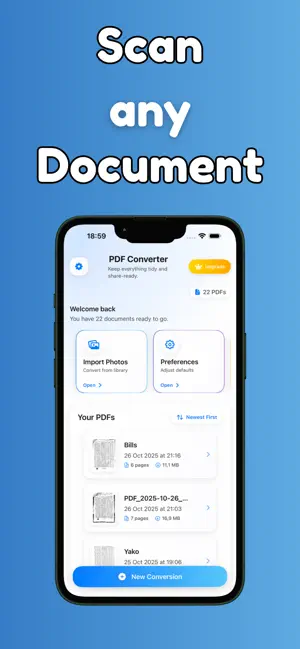
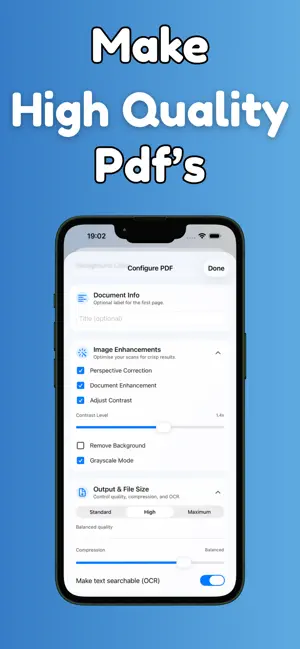
PDF Converter Transform your photos and documents into professional PDF files with ease. PDF Converter offers powerful image-to-PDF conversion capabilities with advanced document processing features. Key Features: Smart Document Processing Convert photos of documents into clean, professional PDFs with automatic document detection and cropping. The app intelligently identifies document boundaries and removes background clutter for crisp, scanner-quality results. Advanced Enhancement Options Choose between Quick PDF mode for fast, simple conversions or Smart Scan mode for professional document enhancement. Smart Scan includes automatic perspective correction, contrast adjustment, brightness optimization, noise reduction, and grayscale conversion. Flexible Conversion Settings Customize your PDFs with multiple page sizes, background colors, titles, and margins. Add watermarks and digital signatures to personalize your documents. Document Scanner Integration Use the built-in document scanner to capture multi-page documents directly within the app, with automatic page detection and processing. File Management Organize your converted PDFs with favorites, rename files, and easily share or delete documents as needed. All files are stored locally on your device for privacy and offline access. Professional Quality Generate high-quality PDFs suitable for business, academic, and personal use. The advanced image processing ensures text remains sharp and readable while maintaining document integrity. User-Friendly Interface Intuitive design makes document conversion simple and efficient. Configure settings once and apply them to multiple conversions, or adjust options for each document as needed. Privacy and Security All document processing occurs locally on your device. Your documents and personal information remain private and secure. Terms of Use: https://www.apple.com/legal/internet-services/itunes/dev/stdeula/ Privacy Policy: https://sites.google.com/view/pdfconv/ana-sayfa
What’s new
Version 1.3 · Updated November 10, 2025
bugs and issues fixed
App privacy
The developer, Yusuf Ozmavi, reported these privacy practices to Apple.
Data Not Collected
The developer does not collect any data from this app.
Alternatives to Image to PDF Converter °
Looking for apps like Image to PDF Converter °? Here are 6 similar apps on the App Store. The highest rated is Photo Report X (5.0/5), and all 6 are free to download.
-
 Photo Report X
5.0
-
 Photo to PDF Converter & Tools
-
 PDF Scanner: Scan PDF Editor
5.0
-
 Chay: Habbit Tracker
5.0
-
 Speech to Text: Transcribe STT
-
 PDF Report Maker
| App | Rating | Price | Last updated | Compare |
|---|---|---|---|---|
| Image to PDF Converter ° | – | Free | November 10, 2025 | |
| Photo Report X | 5.0 / 5 (1) | Free | Jul 4, 2026 | Compare |
| Photo to PDF Converter & Tools | – | Free | Apr 6, 2026 | Compare |
| PDF Scanner: Scan PDF Editor | 5.0 / 5 (1) | Free | Oct 10, 2026 | Compare |
| Chay: Habbit Tracker | 5.0 / 5 (1) | Free | Feb 27, 2026 | Compare |
| Speech to Text: Transcribe STT | – | Free | May 11, 2026 | Compare |
| PDF Report Maker | – | Free | Jul 1, 2025 | Compare |