

Facing Fear
Henning Koetz Productivity iPhoneiPadiPod touch
Facing Fear is a free Productivity app for iPhone and iPad by Henning Koetz. Requires iOS 17.0. Updated October 19, 2026.
- Price
- Free
- on the App Store
- Size
- 7 MB
- Age 4+
- Updated
- Oct 19
- 2026 · v2.2
Screenshots


About Facing Fear
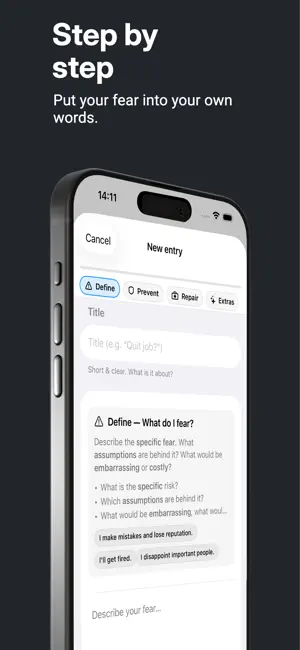
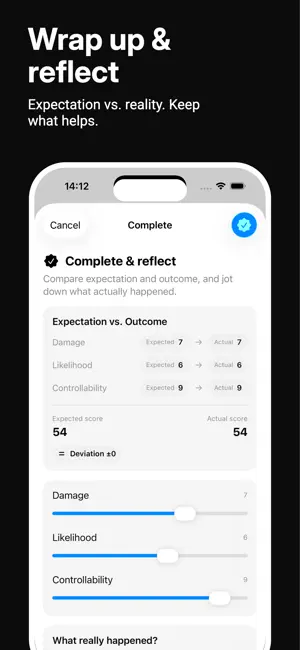
Facing Fear – structure fears clearly, act boldly Facing Fear helps you make inner hurdles tangible — with a clear method of Definition, Prevention, Repair, scenarios, and concrete next steps. This way you make better decisions, reduce rumination, and get into action. Why Facing Fear? - Clarity instead of catastrophizing: organize thoughts, assess risks, and see in black and white what truly matters. - Action instead of procrastination: set concrete steps — with due dates and reminders. - Reflect & learn: compare expectation vs. reality and close topics consciously. How it works - Define: What is it really about? Describe your fear/decision. - Prevent & Repair: What can you do to prevent problems — and what if something does go wrong? - Scenarios: Worst case, most likely course, and best case. - Costs of inaction: What happens if you change nothing (6/12/36 months)? - Next steps: Max. three concrete actions incl. date. - Assessment: Severity, likelihood, controllability — as a risk score (0–100). - Review: Set a review date. - Close out: Reflect at the end (“What actually happened?” and “What will I tell myself next time?”) and archive the entry. Highlights - Clear card view with risk chip and mini scale - Search, filter & sorting (Newest, Due date, Risk) - Due dates & reminders for your steps - Markdown-capable text input (including lists) - Quick duplication and share/export (Markdown for backups) - App lock (Face ID / Touch ID) for more privacy - Statistics dashboard: number of fears created, Ø score, trends over time, top topics, and much more - Close-out flow: expectation vs. outcome, learnings, archive Pro – unlock once, use everything With Facing Fear Pro you get: - Unlimited active entries - Markdown export for backups & sharing - Full statistics dashboard - App Lock (Face ID/Touch ID) - Close-out & reflection incl. archive view - Pay once, use forever. (No subscription.) Privacy - No account required. - Your data stays on your device. - Face ID/Touch ID optional. Note Facing Fear is not a substitute for therapy and does not provide medical or legal advice. It is a self-management tool that supports clear thinking and action.
What’s new
Version 2.2 · Updated October 19, 2026
New in version 2.2 • Complete entries for free and make room for your next active theme. • Find your next small step more easily on the home screen. • A clear Next button guides you through onboarding. New users no longer see an extra What's New dialog afterwards. • The Pro overview explains included features more clearly. Copy and translations have been refined. Thank you for using Facing Fear. Every small step counts.
App privacy
The developer, Henning Koetz, reported these privacy practices to Apple.
Data Not Collected
The developer does not collect any data from this app.
Alternatives to Facing Fear
Looking for apps like Facing Fear? Here are 6 similar apps on the App Store. The highest rated is FTPro - File Translate (5.0/5), and 5 of the 6 are free to download.
-
 FocusFlow Deep Work
-
 FTPro - File Translate
5.0
FTPro - File Translate
5.0
-
 Linkatory
-
 Aim: Goal Tracker & Planner
-
 Main Quest: Time Log
5.0
Main Quest: Time Log
5.0
-
 QuickIn Doc
| App | Rating | Price | Last updated | Compare |
|---|---|---|---|---|
| Facing Fear | – | Free | October 19, 2026 | |
| FocusFlow Deep Work | – | Free | Apr 17, 2026 | Compare |
| FTPro - File Translate | 5.0 / 5 (1) | 0.29 USD | Jun 8, 2026 | Compare |
| Linkatory | – | Free | Sep 1, 2026 | Compare |
| Aim: Goal Tracker & Planner | – | Free | Oct 28, 2026 | Compare |
| Main Quest: Time Log | 5.0 / 5 (2) | Free | Jul 23, 2026 | Compare |
| QuickIn Doc | – | Free | Apr 14, 2026 | Compare |
Compare Facing Fear with the top alternatives: ratings, updates, ASO score and keyword gaps →