

旅收 Tabi Shu: Trip Expenses
Playtoy Travel iPhoneiPadiPod touch
旅收 Tabi Shu: Trip Expenses is a free Travel app for iPhone and iPad by Playtoy. Requires iOS 18.0. Updated October 19, 2026.
- Price
- Free
- on the App Store
- Size
- 49 MB
- Age 4+
- Updated
- Oct 19
- 2026 · vv1.134
Screenshots



About 旅收 Tabi Shu: Trip Expenses
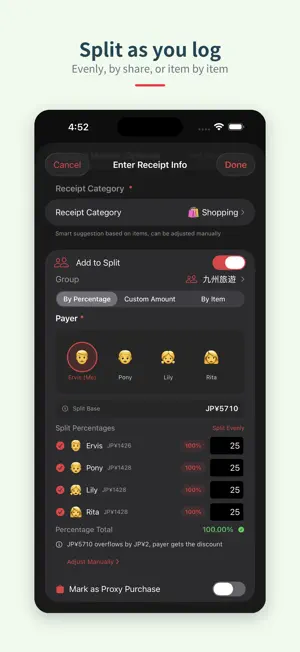
Tabi Shu — From planning to settling up, one trip in one journal Snap a receipt and it's logged. Share the trip with the people you're travelling with, and by the time you're home everything is already sorted. BEFORE YOU GO • Flights, stays, airport transfers and rental cars on one page • Import booking confirmations straight from a screenshot or PDF • Share a PDF or image from any app and it goes into your trip • Shared to-dos and packing lists your travel companions can tick off too • Shopping list for what you want to buy and what you're buying for others • Flight widget on your home screen, so departure time is always one glance away ON THE ROAD • Offline recognition for Japan and Korea — nothing leaves your device • Cloud recognition in 30 countries and regions, 22 currencies • Every result can be checked and corrected before you save it • Long receipts can be shot in segments and joined into one • Split as you log: evenly, by share, or item by item • Daily exchange rates, so you always know what you actually spent • Import transit card history from a screenshot, or tap a physical card with NFC • Say "log it with Tabi Shu", or use Shortcuts and the Action Button TRAVELLING IN JAPAN • Tax-free refund assistant: the new 2026-11-01 rules, a 90-day export countdown, and refund tracking • Menu translation: point your camera at a menu and see what's on it, flagged against your own dietary preferences • Drugstore scanning: check what a product contains and what it's for • A preference card you can show staff, with your allergies and what you avoid BACK HOME • Spending stats by category and payment method • Group settlement worked out in the fewest transfers • Travel journal: expenses, photos and notes in one place, shareable in a tap • Export to Markdown, CSV or XML TRAVELLING TOGETHER • Shared trips sync live, so everyone sees who paid for what • Split groups, shared to-dos and settlement in one place • Multi-country trips (up to 6 per trip) — receipts are filed by purchase date PRIVACY • Receipt photos stay on your device by default • Offline recognition uploads nothing • Anonymous Analytics can be turned off anytime — no store names or receipt images • iCloud backup and restore INTERFACE • English, Traditional Chinese and Japanese • 7 colour themes, dark mode • Full VoiceOver and Dynamic Type support REQUIREMENTS • iOS 18.0 or later • Offline recognition needs an Apple Intelligence device (iPhone 15 Pro or newer / M-series iPad, iOS 26 or later). Cloud recognition works on any supported device.
What’s new
Version v1.134 · Updated October 19, 2026
This update lets you find receipts by shopping photos, share a settlement with just one member, and adds two travel themes for winter and summer. New features - Shopping Photos On the Receipts tab, tap the photo icon at the top right to find receipts by haul photos and item photos. Tap a photo to open its receipt; if it has several item photos, you can choose which item to view. Tap the icon again to switch back to the receipt list. - Redesigned Share Settlement Tap Share on a split's settlement screen to share with everyone or with just one member, showing only what they pay and receive. Amounts now show what is still unpaid, and payments already made are no longer listed as due. Choose a summary or a summary with details; long details are split into several images automatically, and you can also copy everything as text. - Travel Themes: First Snow and Island Summer Breeze Settings › Travel Theme has two new decorations. First Snow adds a snowman and snowflakes to Home, with light snow drifting down into a thin layer at the bottom. Island Summer Breeze sends plumeria flowers drifting on the sea breeze, with gentle waves along the bottom. Improvements - IC card import in Japanese and English When the app language is Japanese or English, the IC card import screens, error messages, and imported store names appear in that language. - More reliable IC card import Tapping the import confirmation button more than once now imports only once. If some receipts fail to import, tap "Retry Failed Receipts" to import just those again. Receipts already saved won't be added twice. Important fixes - Fixed an issue where a split group screen could occasionally freeze after refreshing or settling up. Thank you for using this app! If you have any suggestions or questions, please reach out through the in-app Feedback option.
App privacy
The developer, Playtoy, reported these privacy practices to Apple.
Data Linked to You
The following data, which may be collected and linked to your identity, may be used for the following purposes:
- Purchases: Purchase History
- Identifiers: User ID, Device ID
- Usage Data: Product Interaction
Used for: Analytics, App Functionality
Data Not Linked to You
The following data, which may be collected but is not linked to your identity, may be used for the following purposes:
- User Content: Photos or Videos
- Diagnostics: Crash Data, Performance Data
Used for: App Functionality
Alternatives to 旅收 Tabi Shu: Trip Expenses
Looking for apps like 旅收 Tabi Shu: Trip Expenses? Here are 6 similar apps on the App Store. The highest rated is SNAP TALLY – AI Travel Expense (5.0/5), and all 6 are free to download.
-
 SNAP TALLY – AI Travel Expense
5.0
-
 Voyla! Map With Friends
5.0
-
 LocaSma
5.0
-
 Japan Travel Discount Coupons
5.0
-
 Dashla: Wireless Dashboard
4.8
-
 去趣 chicTrip
4.0
| App | Rating | Price | Last updated | Compare |
|---|---|---|---|---|
| 旅收 Tabi Shu: Trip Expenses | – | Free | October 19, 2026 | |
| SNAP TALLY – AI Travel Expense | 5.0 / 5 (1) | Free | Oct 2, 2026 | Compare |
| Voyla! Map With Friends | 5.0 / 5 (5) | Free | Oct 19, 2026 | Compare |
| LocaSma | 5.0 / 5 (3) | Free | Aug 6, 2025 | Compare |
| Japan Travel Discount Coupons | 5.0 / 5 (29) | Free | Oct 1, 2026 | Compare |
| Dashla: Wireless Dashboard | 4.8 / 5 (20) | Free | Oct 17, 2026 | Compare |
| 去趣 chicTrip | 4.0 / 5 (42) | Free | Oct 7, 2026 | Compare |