

Seamera: Underwater Editor
CHANG HWAN JUNG Photo & Video iPhoneiPadiPod touch
Seamera: Underwater Editor is a paid Photo & Video app for iPhone and iPad by CHANG HWAN JUNG. Requires iOS 15.0. Updated November 1, 2026.
- Price
- 7.99 USD
- on the App Store
- Size
- 25 MB
- Age 4+
- Updated
- Nov 1
- 2026 · v1.5.0
Screenshots


About Seamera: Underwater Editor
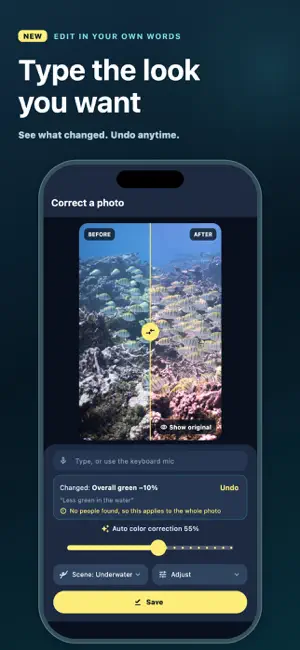
Fix the blue in your dive photos and videos, and keep the people in them looking natural. Underwater, red light fades first, so photos come out blue or green. Seamera corrects the color of the water and the scene, and when someone is in the shot, it applies a gentler version of the same correction to them so skin doesn't turn orange or gray. What you see in the editor is what gets saved. One purchase includes everything. No subscription, no in-app purchases, no watermark. NEW IN 1.5 • Natural skin — when a person is detected in a photo, Seamera corrects the water as usual and the person more gently. A "Natural skin" slider sets how gentle, and you can turn it off. Works when editing a photo, in multi-photo correction, and on new shots from the in-app camera. • Best shot — import up to 50 photos into multi-photo correction. Similar shots are grouped and one is marked as a pick in each group, based on sharpness, exposure and the subject. "Select picks" only changes what gets saved; nothing is hidden or deleted. • Search your photos — photos you save in Seamera are tagged on your device, so you can search "turtle", "shark" or "stingray". Tags cover about 20 common sea creatures and subjects that Apple's built-in image recognition knows. It does not identify species. • Type what you want — in the photo editor, type "less green in the water", "warmer" or "leave faces as they are". Seamera shows what it changed and lets you undo. Built-in phrases work on any supported iPhone; other free-form sentences need iOS 26 on a device with Apple Intelligence turned on. You can also use the keyboard's dictation. • Suggested parts — open a video of 30 seconds or longer and Seamera suggests up to three sharp, steady parts. Tap one to select it, or pick your own. • Steadier video color — with "Adapt to depth", color changes quickly where the scene cuts and gently everywhere else, so it pulses less as you change depth. • Your usual look — after you've saved a few edits, Seamera starts at the strength and tone you usually choose for that kind of scene. It always shows "Your usual look" with an Undo, and you can clear the history in Settings. EVERYTHING YOU NEED AFTER A DIVE • Photo correction with before/after comparison and fine-tuning. • Video correction: choose the part you want, preview, and export. • Multi-photo correction for up to 50 photos at once. • In-app camera that saves corrected shots. PRIVATE BY DESIGN All analysis happens on your device, and your photos are never sent anywhere. Grouping, tags, people detection and your taste history stay on this iPhone. No account needed. To improve the app, Seamera sends usage records under a random ID, never photos, and you can turn them off in Settings. Results depend on the original photo, lighting and water conditions. Color correction can't recover detail or color the camera didn't capture. Seamera does not make your device waterproof; use suitable protective housing when shooting underwater.
What’s new
Version 1.5.0 · Updated November 1, 2026
• Natural skin: when someone is in a photo, the water is corrected as usual and the person more gently. • Best shot: similar photos in multi-photo correction are grouped, with one pick per group. • Search: find saved photos by tags such as turtle, shark or stingray, added on your device. • Type an edit: "less green in the water", "warmer" and more. Free-form sentences need iOS 26 with Apple Intelligence. • Suggested parts: up to three sharp, steady parts in videos of 30 seconds or longer. • Steadier video color across depth changes and scene cuts. • Your usual look: starts at the strength and tone you usually choose, with Undo. All analysis stays on your device.
App privacy
The developer, CHANG HWAN JUNG, reported these privacy practices to Apple.
Data Not Linked to You
The following data, which may be collected but is not linked to your identity, may be used for the following purposes:
- Purchases: Purchase History
- Usage Data: Product Interaction
- Diagnostics: Other Diagnostic Data
Used for: Analytics
Alternatives to Seamera: Underwater Editor
Looking for apps like Seamera: Underwater Editor? Here are 6 similar apps on the App Store. The highest rated is Cully - Photo Cleaner (4.9/5), and 4 of the 6 are free to download.
-
 LUTCAM: Film LUT Camera
-
 ScubAI: Underwater Photography
-
 SkyGlide: 3D Route Videos
4.0
-
 Cully - Photo Cleaner
4.9
-
 Fotospots: Find Photo Spots
-
 DeepColors: Underwater Photo
3.7
| App | Rating | Price | Last updated | Compare |
|---|---|---|---|---|
| Seamera: Underwater Editor | – | 7.99 USD | November 1, 2026 | |
| LUTCAM: Film LUT Camera | – | 0.99 USD | Oct 19, 2026 | Compare |
| ScubAI: Underwater Photography | – | 9.99 USD | Oct 28, 2026 | Compare |
| SkyGlide: 3D Route Videos | 4.0 / 5 (1) | Free | Oct 9, 2026 | Compare |
| Cully - Photo Cleaner | 4.9 / 5 (56) | Free | Sep 30, 2026 | Compare |
| Fotospots: Find Photo Spots | – | Free | Oct 10, 2026 | Compare |
| DeepColors: Underwater Photo | 3.7 / 5 (3) | Free | Oct 7, 2026 | Compare |