

System Status Monitor: CPU RAM
Igor Bidenko Utilities iPhoneiPadiPod touchMac
System Status Monitor: CPU RAM is a free Utilities app for iPhone and iPad by Igor Bidenko. Rated 4.3/5 from 23 ratings. Requires iOS 17.0.
- Rating
- 4.3
- 23 ratings
- Price
- Free
- on the App Store
- Size
- 12 MB
- Age 4+
- Updated
- Sep 17
- 2026 · v5.1
Screenshots

About System Status Monitor: CPU RAM
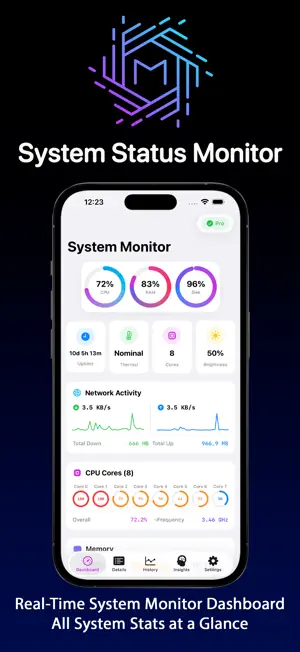
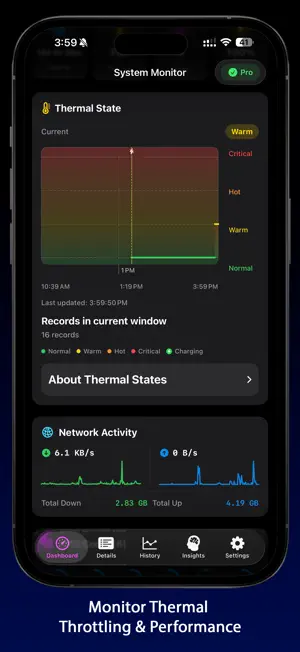
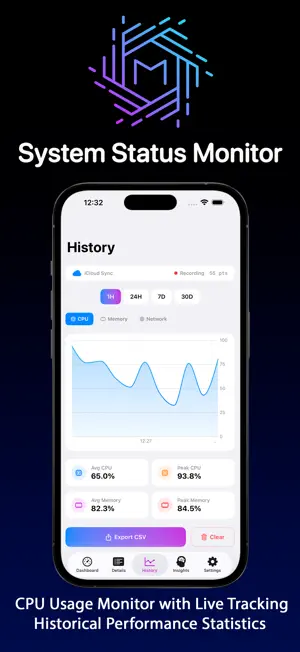
System Monitor is the ultimate device monitor and system status tracker designed for iPhone and iPad. Get comprehensive real-time insights into your device's performance, RAM usage, storage activity, battery health, and complete system monitoring in one powerful application. COMPLETE SYSTEM MONITOR DASHBOARD Transform how you monitor system status with our intuitive interface that displays all critical metrics at a glance. Track device performance, monitor RAM allocation, observe storage activity, and maintain optimal system health. Our system monitor provides instant access to vital system information, helping you identify performance issues and optimize your iPhone's resources. INTELLIGENT RAM & MEMORY MANAGEMENT Monitor RAM usage with precision memory tracking tools. View real-time memory pressure, track application memory consumption, and understand how your device utilizes resources. Our system monitor displays used, wired, compressed, and cached memory statistics, giving you complete visibility into RAM allocation. Monitor system status changes and optimize memory for improved multitasking on your iPhone and iPad. COMPREHENSIVE STORAGE ANALYSIS & TRACKER Monitor storage activity with detailed usage analysis. Track available space across all categories, monitor storage patterns, and identify what's consuming your device's capacity. Our device monitor provides real-time storage visualization, helping you understand system performance and manage storage efficiently before your iPhone runs out of space. BATTERY & CHARGING STATUS Keep an eye on your battery level and charging state. Our system monitor displays current charge percentage, thermal state, and charging status, giving you quick access to essential battery information alongside all your other system metrics. NETWORK ACTIVITY MONITOR Track network performance with real-time upload and download speed monitoring. Monitor Wi-Fi and cellular connections, analyze bandwidth usage, and identify network bottlenecks. Our device monitor displays comprehensive network statistics for both Wi-Fi and mobile data, helping you optimize connection performance and troubleshoot connectivity issues. DEVICE INFORMATION & SYSTEM STATUS Access complete device specifications and system information. Monitor processor details, check iOS version, track uptime, and view detailed hardware information. Our system status monitor gives you full transparency into your iPhone and iPad internals, providing information Apple doesn't show you by default. CPU & PROCESSOR PERFORMANCE Monitor CPU usage in real-time with detailed processor activity tracking. View system and user process load, track CPU performance patterns, and understand how apps impact your device. Our system monitor helps you identify resource-heavy applications and maintain smooth performance on your iPhone. KEY FEATURES • Real-time CPU monitoring with processor usage tracking • Comprehensive RAM and memory pressure analysis • Storage usage analysis with category breakdown • Battery health tracking including cycles and capacity • Network activity monitor with Wi-Fi and cellular stats • Device information and system specifications • Historical statistics dashboard • Home Screen widgets for quick system status • iCloud Sync • Customizable alerts for system status changes • Minimal resource footprint • Native iOS design optimized for iPhone and iPad Terms of Use: https://www.apple.com/legal/internet-services/itunes/dev/stdeula/ Whether you're a power user optimizing performance, a developer monitoring system resources, or simply want to keep track of your iPhone's health, System Monitor provides all the tools you need. Download now and take control of your device's performance with the most comprehensive system monitor available for iOS.
Ratings & reviews
4.3
23 ratings
What’s new
Version 5.1 · Updated September 17, 2026
Find out when your iPhone was working hard • The Dashboard has a new CPU Spikes card. It lists the times your device ran under sustained heavy load, how long each spike lasted and how hot it got. Match those times against Settings, Battery, Battery Usage by App, and you have the app responsible. iOS does not let any app see another app's CPU usage, so this is the fastest route to the cause. Overheating alerts, armed in one tap • The temperature alert now asks for notification permission at the moment it has something to tell you, so the request arrives with its reason attached. The Dashboard also shows a reminder while alerts are switched on and notifications are not allowed yet, and the default alert triggers as soon as the device runs hot rather than waiting for the last moment. Smooth while you scroll • Live readings keep updating under your finger, gauges and bars move with them, and storage is checked on a schedule that goes easier on your battery. Sharper widgets • Network totals count each byte once, even when a VPN or Personal Hotspot is active, and every widget on your screen reports the same CPU reading at the same moment. The newest devices are here • iPhone 18 Pro, iPhone 18 Pro Max and iPhone Duo join the device catalog with full specifications, including the Duo's folding display and its cover screen, along with refreshed camera and release details across the iPhone 17 family. Ready for iOS 27 • Full support for iOS 27, with updated compatibility and optimizations for the latest iPhone experience.
App privacy
The developer, Igor Bidenko, reported these privacy practices to Apple.
Data Not Collected
The developer does not collect any data from this app.
Alternatives to System Status Monitor: CPU RAM
Looking for apps like System Status Monitor: CPU RAM? Here are 6 similar apps on the App Store. The highest rated is Device Monitor + System Status (5.0/5), and all 6 are free to download.
-
 Device Monitor + System Status
5.0
Device Monitor + System Status
5.0
-
 Device Monitor - RAM CPU GPU
4.6
Device Monitor - RAM CPU GPU
4.6
-
 CPU-Kit: Device Info & Monitor
4.9
CPU-Kit: Device Info & Monitor
4.9
-
 System Monitor & Device Info
4.8
System Monitor & Device Info
4.8
-
 Status Monitor: Device Info
4.7
Status Monitor: Device Info
4.7
-
 Device Monitor: System Info
| App | Rating | Price | Last updated | Compare |
|---|---|---|---|---|
| System Status Monitor: CPU RAM | 4.3 / 5 (23 ratings) | Free | September 17, 2026 | |
| Device Monitor + System Status | 5.0 / 5 (4) | Free | Oct 1, 2026 | Compare |
| Device Monitor - RAM CPU GPU | 4.6 / 5 (5) | Free | Oct 16, 2026 | Compare |
| CPU-Kit: Device Info & Monitor | 4.9 / 5 (15) | Free | Jun 15, 2026 | Compare |
| System Monitor & Device Info | 4.8 / 5 (16) | Free | Sep 16, 2026 | Compare |
| Status Monitor: Device Info | 4.7 / 5 (6) | Free | Sep 2, 2026 | Compare |
| Device Monitor: System Info | – | Free | Jul 14, 2026 | Compare |