

CCTV Stadium: Pickleball VAR
Nguyen Pham Sports iPhoneiPadiPod touch
CCTV Stadium: Pickleball VAR is a free Sports app for iPhone and iPad by Nguyen Pham. Requires iOS 16.0. Updated September 3, 2026.
- Price
- Free
- on the App Store
- Size
- 25 MB
- Age 4+
- Updated
- Sep 3
- 2026 · v1.0.2
Screenshots


About CCTV Stadium: Pickleball VAR
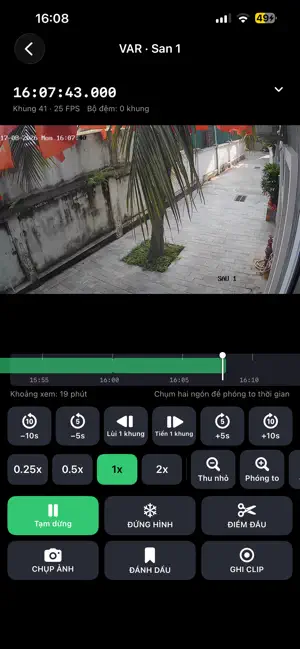
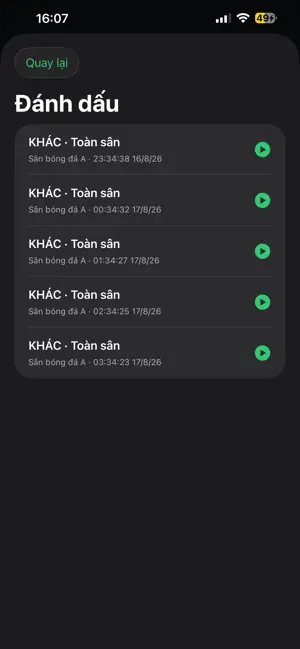
CCTV Stadium only works at a venue that already has a Dahua (or Dahua-OEM) NVR/DVR, when you have that venue's QR code, and while your phone is on the venue's own Wi-Fi/LAN — no cloud, no P2P, no remote viewing over the internet. Without all three it shows you nothing. With them: in or out? Did the ball cross the line? Did the cue ball hit the cushion first? Three sports, one argument — and the camera on the wall has had the answer all along. You pull out a phone, drag the timeline back to the second, play at 0.25x, freeze the frame, zoom in. Everyone looks, and play restarts. ANY VENUE THAT ALREADY HAS CAMERAS • Pickleball, tennis, badminton: was the ball on the line or out, was the serve legal. • Billiards, pool, snooker: which ball the cue struck first, did it find a cushion. • Football, 5-a-side, 7-a-side, artificial turf, futsal: goals, offside, fouls. • Basketball, volleyball, table tennis: travelling, a net touch, in or out. The app knows no sport's rules: it gives back exactly what the cameras recorded, frame by frame. LOCAL NETWORK ONLY Video never leaves the venue's network: • No account, no sign-up, no typing IP addresses. • The venue's internet can be down and you still get picture. • No subscription, no monthly fee, no middleman server. THREE STEPS 1. Join the venue Wi-Fi. 2. Open the app and scan the QR code posted at the counter. 3. Watch live, or tap VAR to review. Next visit is one tap. LIVE WALL • 1, 2 or 4 cameras on screen; tap a tile for full screen. • The VAR button opens review on the camera you are watching, at that moment. VAR / REVIEW SCREEN • One-tap replay of the last 10, 30, 60 or 120 seconds; jump 5 or 10 seconds either way. • Zoomable timeline with time ticks: land on the right second. • Play at 0.25x, 0.5x, 1x, 2x. Step one frame forward or back. Freeze at any point. • Digital zoom on real decoded pixels, then pan; double tap to zoom into the dispute. • The clock on screen is the recorder's own timestamp, not your phone's. • Portrait and landscape; collapse the toolbar for a bigger picture. SNAPSHOT, BOOKMARK, CUT A CLIP • Snapshot the frame you are looking at. • Bookmark a moment with a label and your own note; each keeps a still, and tapping it later jumps back there. • Cut a clip: mark start and end on the timeline; the app downloads exactly that stretch from the recorder as MP4 into Photos, up to 30 minutes. A download, not a screen recording. IF YOU RUN THE VENUE • A service that sets your venue apart with no extra hardware: it reuses what you own. • Print the QR code, laminate it, put it at the counter. Players scan it; nobody else needs the recorder password. • The QR is digitally signed and carries a viewer account only, never admin. • Arguments get settled on the spot; players keep their own highlights. FOR CCTV INSTALLERS You issue the QR code per venue; owners and players just scan it. No IP addresses down the phone, no open ports. WHO IT IS FOR Pickleball and tennis courts, badminton halls, billiards clubs, 5-a-side and futsal pitches, coaches and referees. FREE, AD-SUPPORTED Ads appear on the home screen, at launch, and when you leave the cameras. No ad ever covers live video or the review screen. With no internet everything still works; you just see no ads. PLAIN NOTES • This does not replace the referee. • Some of the built-in bookmark labels are football words (goal, offside, penalty); billiards has no label of its own — use "other" and type the note. • Sharpness and frame rate depend on the venue's cameras, recorder and Wi-Fi; a fast touch or a distant camera can still be unclear. • Snapshots stay inside the app, not your photo library. Cut clips do go to Photos. • A venue QR code can carry an expiry; ask the venue for a new one. • The interface is in Vietnamese. IT WILL NOT WORK IF • The venue has no Dahua or Dahua-OEM recorder. • You do not have the venue's QR code. • You are at home, or otherwise off the venue Wi-Fi, and want to watch over mobile data.
What’s new
Version 1.0.2 · Updated September 3, 2026
Fix some error
App privacy
The developer, Nguyen Pham, reported these privacy practices to Apple.
Data Used to Track You
The following data may be used to track you across apps and websites owned by other companies:
- Location: Coarse Location
Data Linked to You
The following data, which may be collected and linked to your identity, may be used for the following purposes:
- Location: Coarse Location
Used for: Third-Party Advertising, Analytics, Product Personalization
Data Not Linked to You
The following data, which may be collected but is not linked to your identity, may be used for the following purposes:
- Identifiers: Device ID
- Usage Data: Product Interaction, Advertising Data
- Diagnostics: Crash Data, Performance Data, Other Diagnostic Data
Used for: Third-Party Advertising, Analytics, Product Personalization
Alternatives to CCTV Stadium: Pickleball VAR
Looking for apps like CCTV Stadium: Pickleball VAR? Here are 6 similar apps on the App Store. The highest rated is Perfect Game TV (4.7/5), and all 6 are free to download.
-
 Odds Analyzer: Football Stats
-
 SnookCam
-
 BetsGoal - Betting Tips
1.0
BetsGoal - Betting Tips
1.0
-
 Sure Win Today
3.9
Sure Win Today
3.9
-
 Perfect Game TV
4.7
Perfect Game TV
4.7
-
 Enki's Football Stats
4.3
Enki's Football Stats
4.3
| App | Rating | Price | Last updated | Compare |
|---|---|---|---|---|
| CCTV Stadium: Pickleball VAR | – | Free | September 3, 2026 | |
| Odds Analyzer: Football Stats | – | Free | Oct 22, 2026 | Compare |
| SnookCam | – | Free | Sep 15, 2026 | Compare |
| BetsGoal - Betting Tips | 1.0 / 5 (4) | Free | Sep 17, 2026 | Compare |
| Sure Win Today | 3.9 / 5 (9) | Free | Mar 12, 2026 | Compare |
| Perfect Game TV | 4.7 / 5 (758) | Free | Jun 17, 2024 | Compare |
| Enki's Football Stats | 4.3 / 5 (171) | Free | May 30, 2026 | Compare |