

AIChatOCR
Shusuke Hashimoto Productivity iPhoneiPadiPod touch
AIChatOCR is a free Productivity app for iPhone and iPad by Shusuke Hashimoto. Requires iOS 18.0. Updated July 18, 2026.
- Price
- Free
- on the App Store
- Size
- 1.6 GB
- Age 12+
- Updated
- Jul 18
- 2026 · v1.6.0
Screenshots
About AIChatOCR
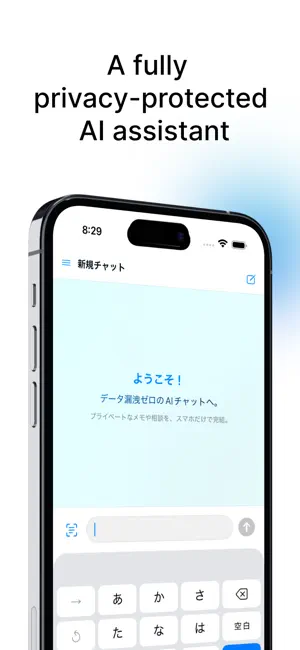
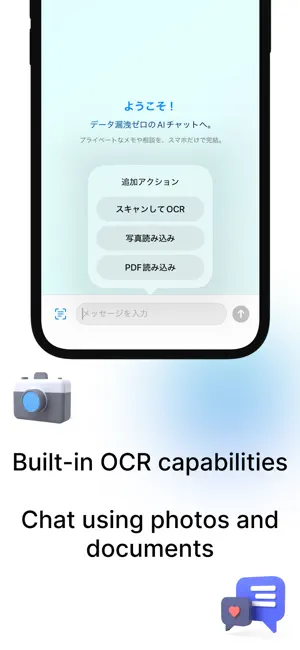
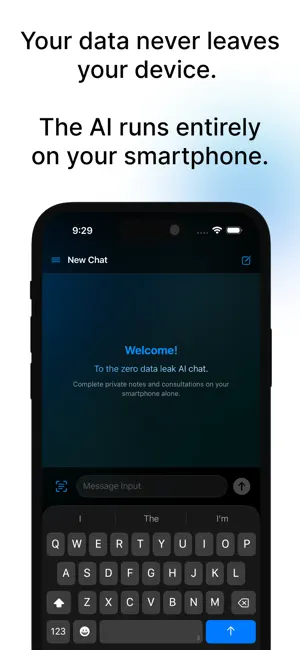
Perfect for These Private Scenarios * Organizing secret notes and diaries Summarize and structure personal records. Nothing ever leaves your device. * Private consultations Relationship advice, health notes, family matters—topics you hesitate to ask online AI. Fully offline and secure. * Personal document management Read passports, bank statements, and handwritten notes, then ask questions. Keep sensitive data completely safe. Key Features * High-Accuracy OCR Convert photos into text with your camera. Handwritten notes are recognized with high precision. * AI Chat Interaction Summarize long texts, extract key points, and create bullet lists via chat. Even sensitive conversations stay entirely on-device. * Flexible Information Extraction Keyword extraction, field extraction, Q&A, translation, and more. * User-Friendly UI Chat-style interface with intuitive access to conversation history. * Export & Share Export or share messages when needed. Get Started in 3 Easy Steps 1. Import documents Scan and capture private notes instantly. 2. Automatic OCR text extraction Fast, fully offline processing. 3. Chat with AI Summaries, questions, and more—no external servers required. Try it for free now! Your personal, private AI assistant awaits. Frequently Asked Questions * Supported documents Contracts, academic papers, diaries, and more. Japanese and English supported. * Offline usage Yes. All processing is done entirely on your device. * Data privacy No external data transmission. Zero leakage, even for sensitive conversations. Privacy Policy AIChatOCR performs all processing entirely on your device. No data is sent externally and no data is shared with third parties. Important Notes This app performs intensive data processing. Extended use or heavy workloads may cause the device to heat up. Due to high memory usage, the app may unexpectedly terminate (crash) depending on device performance. Support If you have any questions or requests, please contact us via “App Support” listed on the App Store. System Requirements * iOS 18.0 or later * iPhone 14 or later recommended
What’s new
Version 1.6.0 · Updated July 18, 2026
What's new in 1.6.0 • Starter prompts: one-tap templates on the new chat screen — Summarize, Extract key points, Translate, Scan & ask, and more. • Widget improvements: start a new chat with a Translate or Summarize template right from the widget. The widget now supports English. • Smarter chat titles: document chats get readable, meaningful titles automatically. • New Help (FAQ) section in Settings. • Improved response quality with concise, document-grounded answers. • Copy refinements and bug fixes.
App privacy
The developer, Shusuke Hashimoto, reported these privacy practices to Apple.
Data Not Linked to You
The following data, which may be collected but is not linked to your identity, may be used for the following purposes:
- Identifiers: Device ID
- Usage Data: Advertising Data
- Diagnostics: Crash Data, Performance Data, Other Diagnostic Data
Used for: Third-Party Advertising
Alternatives to AIChatOCR
Looking for apps like AIChatOCR? Here are 6 similar apps on the App Store.


| App | Rating | Price | Last updated | Compare |
|---|---|---|---|---|
| AIChatOCR | – | Free | July 18, 2026 | |
| ImaDeru | – | Free | Apr 8, 2026 | Compare |
| Aria — Private AI Chat | – | Free | Jun 18, 2026 | Compare |
| Elio Chat | – | Free | Feb 22, 2026 | Compare |
| Ocula | – | Free | Jun 27, 2026 | Compare |
| Secured24 - Private Note Vault | – | Free | Mar 16, 2026 | Compare |
| 自己監視で全集中! - 集中監視 - | – | Free | Oct 3, 2026 | Compare |
Compare AIChatOCR with the top alternatives: ratings, updates, ASO score and keyword gaps →