

EspressoLog - Shot tracker
Kate Lee Food & Drink iPhoneiPadiPod touch
EspressoLog - Shot tracker is a free Food & Drink app for iPhone and iPad by Kate Lee. Rated 4.8/5 from 5 ratings. Requires iOS 15.1.
- Rating
- 4.8
- 5 ratings
- Price
- Free
- on the App Store
- Size
- 52 MB
- Age 4+
- Updated
- Oct 8
- 2026 · v1.10.0
Screenshots


About EspressoLog - Shot tracker
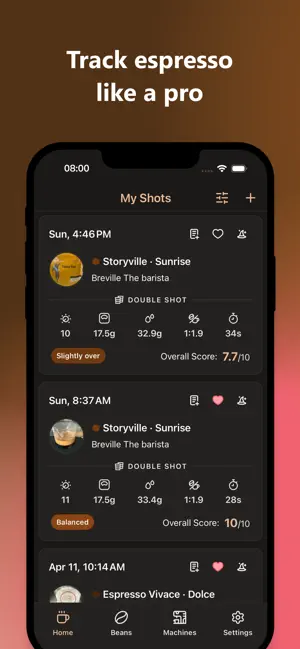
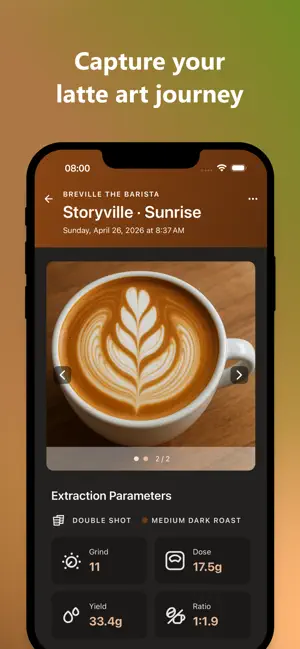
Dialing in a new coffee often means starting from scratch. After several test shots you finally find a recipe that tastes great — but weeks later, brewing the same coffee again, it's easy to forget what worked. EspressoLog helps you capture the recipes and tasting notes behind your best shots, so you can recreate them with confidence. Log dose, yield, ratio, shot time, temperature, and — for lever and pressure-profiling machines — peak pressure for every espresso. Rate acidity, sweetness, bitterness, body, and aftertaste to see how each change in the recipe shows up in the cup. Manage your coffees with roast details, freshness tracking, and flavor notes. Keep your machines and grinders on file, and see exactly what equipment was behind each shot. Two coaches are a tap away. The on-device Quick coach reads every shot the moment you save it, no connection needed. For a fuller read, ask the Head barista AI — it goes through what you logged: the recipe, how it tasted, your notes, the bean and how long it's been off roast, your machine and grinder, and your earlier shots on that bean. It answers in plain language with its own verdict and up to three things to try next, and that verdict shows on the shot, marked as the AI's. Either way, it's a suggestion, not a ruling. Your cup is still the last word. Share a shot as a photo, a short video, or plain text with every parameter, tool, and tasting note — ready to paste into a message or a note. Everything you log stays on your device, with no account to create and no cloud backup to manage. The one exception is the Head barista AI: asking it sends that shot's details to our server to write the read. Nothing is sent unless you tap the button, and photos never are. To move to a new phone or keep a copy, export your shots, beans, machines, and photos from Settings as one file and import it anywhere; videos aren't included, and the file goes nowhere unless you share it. Designed for home baristas who want more consistent espresso, faster dial-ins, and better coffee in every cup.
Ratings & reviews
4.8
5 ratings
What’s new
Version 1.10.0 · Updated October 8, 2026
New in 1.10.0: • Ask the head barista — tap "Analyze with head barista AI" on any shot and it reads what you logged: the recipe, how it tasted, your notes, the beans, and your earlier shots on them. It comes back with its own verdict, a couple of cards worth trying, and — when there's history — a note on how this bean's been going for you. Its verdict shows on the shot, marked as the AI's. Ask when you want to; skip it when you don't. • A finer verdict — the on-device read gains two shades, slightly under and slightly over, so a small lean no longer rounds up to a full call. On a slight read the Quick coach starts with the simplest move: pull the exact same recipe again, then a small change to the yield, then one step on the grinder. And "Balanced" is a little harder to earn — a cup with a harsh finish or a thin body no longer reads as dialed in. • Shot time, your way — say whether your seconds start at the button press or the first drip, right next to the Shot Time field. Your last choice carries over to the next shot. • Peak pressure — a new optional field for lever and pressure-profiling shots, alongside preinfusion pressure in Advanced Parameters. • Share shot details — send every parameter, tool, tasting note, and verdict as plain text from the shot detail screen, along with the bean's roast level and how many days off roast it was, ready to paste anywhere. • Backup and restore — in Settings → Manage Data, export your shots, beans, machines, custom entries, and photos as one file. AirDrop it or save it to Files, then import it on another phone. Importing only adds what's missing, so nothing already on that phone is changed. Videos aren't included. Also: your beans and shots now come along when you move to a new iPhone, a one-time notice about what the head barista AI sends off your device, and a few smaller fixes.
App privacy
The developer, Kate Lee, reported these privacy practices to Apple.
Data Not Linked to You
The following data, which may be collected but is not linked to your identity, may be used for the following purposes:
- Usage Data: Product Interaction
- User Content: Other User Content
- Identifiers: Device ID
Used for: Analytics, App Functionality
Alternatives to EspressoLog - Shot tracker
Looking for apps like EspressoLog - Shot tracker? Here are 6 similar apps on the App Store. The highest rated is Coffee Journal | Dialed In (5.0/5), and all 6 are free to download.
-
 Espresso Shot Log
4.4
Espresso Shot Log
4.4
-
 Puck Yeah! Espresso Tracker
4.9
Puck Yeah! Espresso Tracker
4.9
-
 Coffee Journal | Dialed In
5.0
Coffee Journal | Dialed In
5.0
-
 Dial In Espresso: Shot Journal
4.8
Dial In Espresso: Shot Journal
4.8
-
 Dial In Coffee: Espresso
4.9
Dial In Coffee: Espresso
4.9
-
 Espresso Tuner: Coffee Timer
5.0
Espresso Tuner: Coffee Timer
5.0
| App | Rating | Price | Last updated | Compare |
|---|---|---|---|---|
| EspressoLog - Shot tracker | 4.8 / 5 (5 ratings) | Free | October 8, 2026 | |
| Espresso Shot Log | 4.4 / 5 (9) | Free | Sep 26, 2026 | Compare |
| Puck Yeah! Espresso Tracker | 4.9 / 5 (19) | Free | Oct 12, 2026 | Compare |
| Coffee Journal | Dialed In | 5.0 / 5 (3) | Free | Feb 25, 2025 | Compare |
| Dial In Espresso: Shot Journal | 4.8 / 5 (28) | Free | Oct 12, 2026 | Compare |
| Dial In Coffee: Espresso | 4.9 / 5 (10) | Free | Sep 22, 2026 | Compare |
| Espresso Tuner: Coffee Timer | 5.0 / 5 (3) | Free | Aug 11, 2026 | Compare |