

Collage Studio by ChatStick
ChatStick Company Limited Photo & Video iPhoneiPadiPod touch
Collage Studio by ChatStick is a free Photo & Video app for iPhone and iPad by ChatStick Company Limited. Requires iOS 18.4. Updated March 17, 2026.
- Price
- Free
- on the App Store
- Size
- 18 MB
- Age 4+
- Updated
- Mar 17
- 2026 · v1.1
Screenshots


About Collage Studio by ChatStick
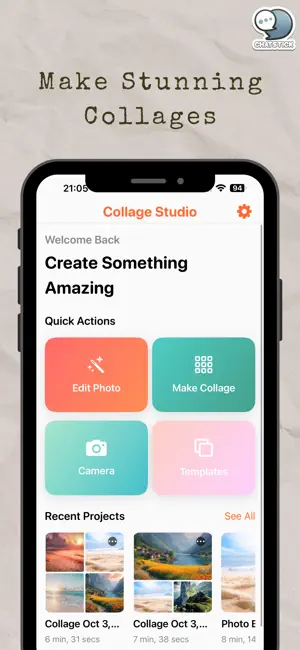
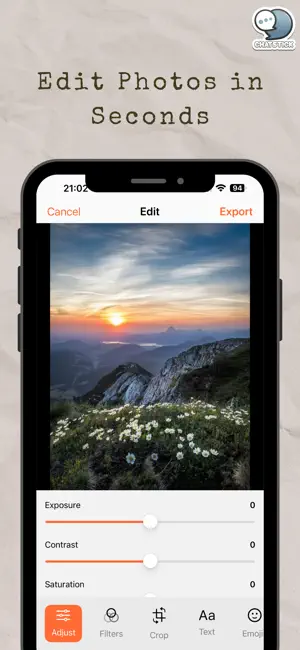
Meet Collage Studio—your all-in-one photo editor and collage maker. Whether you’re polishing a selfie, designing a story, or creating a photo grid, Collage Studio makes it fast, fun, and beautiful. Why you’ll love it • Edit beautifully: Fix lighting, boost colors, and sharpen details with simple sliders. • Instant looks: Tap through hand-picked filters for film, vintage, B&W, and modern styles. • Make perfect collages: Drop in your photos, pick a layout, and fine-tune spacing and corners. • Personalize your design: Add text, stickers, and emoji. Draw or place overlays for a unique vibe. • Share in high quality: Export in the right size for feeds, stories, and prints. Photo Editor • Essentials: exposure, contrast, highlights, shadows, saturation, vibrance, temperature, tint, clarity, sharpness, vignette, grain • Crop, rotate, and flip with common aspect ratios • Before/after preview and undo/redo for peace of mind Filters (20+ looks) • Free set to get you started (Vivid, Dramatic, Warm, Cool, Classic B&W, more) • Premium film, cinematic, vintage, matte, moody, and portrait styles Collage Maker • Ready-made layouts for 1–12 photos (grids, mosaics, stories, magazines) • Adjustable spacing and rounded corners • Backgrounds: solid colors, soft gradients, textures, or blur • Per-cell zoom and drag-to-swap for perfect placement Create & Share • Save standard or high-resolution images (up to 8K with Pro) • JPG free; PNG with transparency & HEIF available with Pro • Optional watermark removal with Pro • Built-in Share Sheet for Instagram, Facebook, TikTok, Messages, and more Collage Studio Pro (optional) Unlock everything: • All premium filters & collage layouts • Background remover & transparent PNG export • HD & Ultra export options • No watermark • Future premium packs as they’re added We respect your privacy—no account required to start creating. What’s New (first release) • Brand-new photo editor with easy sliders • 30+ filters and creative tools • Collage Maker with adjustable layouts • HD export and quick sharing
What’s new
Version 1.1 · Updated March 17, 2026
- Update Bug Fixed - Add more filters
App privacy
The developer, ChatStick Company Limited, reported these privacy practices to Apple.
Data Used to Track You
The following data may be used to track you across apps and websites owned by other companies:
- Location: Coarse Location
- Identifiers: Device ID
- Usage Data: Product Interaction, Advertising Data
Data Linked to You
The following data, which may be collected and linked to your identity, may be used for the following purposes:
- Location: Coarse Location
- Identifiers: Device ID
- Usage Data: Product Interaction, Advertising Data
Used for: Third-Party Advertising
Data Not Linked to You
The following data, which may be collected but is not linked to your identity, may be used for the following purposes:
- Diagnostics: Crash Data, Performance Data, Other Diagnostic Data
Used for: Analytics
Alternatives to Collage Studio by ChatStick
Looking for apps like Collage Studio by ChatStick? Here are 6 similar apps on the App Store. The highest rated is Photo Editor - Collages (5.0/5), and all 6 are free to download.
-
 Photo Editor - Collages
5.0
-
 Photo Grids Maker: Grid Post
4.7
-
 Tilea — Photo Collage Maker
4.0
-
 Blend Collage Maker
1.0
-
 Watermark Easy : Add Copyright
4.3
-
 Ai Photo Collage Maker Editor
4.3
| App | Rating | Price | Last updated | Compare |
|---|---|---|---|---|
| Collage Studio by ChatStick | – | Free | March 17, 2026 | |
| Photo Editor - Collages | 5.0 / 5 (1) | Free | Jul 31, 2025 | Compare |
| Photo Grids Maker: Grid Post | 4.7 / 5 (3) | Free | Jun 5, 2025 | Compare |
| Tilea — Photo Collage Maker | 4.0 / 5 (2) | Free | Nov 3, 2026 | Compare |
| Blend Collage Maker | 1.0 / 5 (2) | Free | Sep 3, 2026 | Compare |
| Watermark Easy : Add Copyright | 4.3 / 5 (6) | Free | Sep 24, 2026 | Compare |
| Ai Photo Collage Maker Editor | 4.3 / 5 (20) | Free | Nov 14, 2025 | Compare |