

BrickQuest
Mark van Alphen Entertainment iPhoneiPadiPod touch
BrickQuest is a free Entertainment app for iPhone and iPad by Mark van Alphen. Requires iOS 15.0. Updated October 19, 2026.
- Price
- Free
- on the App Store
- Size
- 45 MB
- Age 4+
- Updated
- Oct 19
- 2026 · v1.4.3
Screenshots

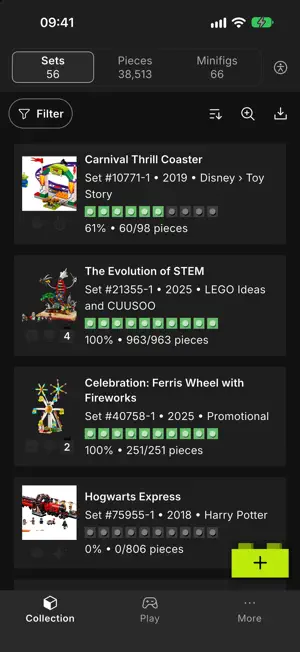


About BrickQuest
BrickQuest helps you manage your LEGO® collection and builds from start to finish. Create projects from sets, track every part with a checklist, and see exactly how close you are to completing your next build. Stay on top of every build • Turn sets into interactive checklists • Mark parts as found and track quantities • See real-time progress for each project Track build status • Set each project to Not started, Collecting, Ready to build, In progress, or Completed • Quickly see which sets are ready to build and which still need parts Understand what changed • Activity log for important actions like checklist changes and status updates • See how your build progressed over time Designed for focus and clarity • Clean, distraction-free interface in BrickQuest • Clear typography and color use to keep information readable • Accessibility-aware design for better legibility and usability Privacy-friendly • Your collection and build data stay on your device • No unnecessary accounts or social features Whether you are sorting parts, preparing a big build, or tracking which sets are ready to display, BrickQuest keeps your LEGO® projects organized and under control. LEGO® is a trademark of the LEGO Group, which does not sponsor, authorize or endorse this app.
What’s new
Version 1.4.3 · Updated October 19, 2026
New in 1.4.3 - Updated the biggest parts of the interface - Save your own filters - Zoomlevels on the overviews and checklist - New quiz game (BETA) - Minifig collection progress: the Minifigs overview now shows a colour-coded progress bar for every minifigure, so you can see at a glance which parts you have, which are in an alternative colour and which are still missing. It updates instantly as you tick parts off. - Status filters on Parts and Minifigs: filter by project status and collection status, just like your sets. Your selection also applies to the counts and to exports. - New Alternative Build status: for sets you built as a B-model or MOC, with its own medal icon. - More accessability settings Improvements - Show or hide the totals on the Parts and Minifigs overviews, each set independently. - Faster and smoother: your collection loads faster, large checklists scroll more fluidly and the app no longer freezes while creating or restoring a backup.
App privacy
The developer, Mark van Alphen, reported these privacy practices to Apple.
Data Not Collected
The developer does not collect any data from this app.
Alternatives to BrickQuest
Looking for apps like BrickQuest? Here are 6 similar apps on the App Store. The highest rated is ACE On-Demand (5.0/5), and 5 of the 6 are free to download.
-
 Brick AI : Minifig Scanner
3.0
-
 BrickWorld AI
-
 Brickly – Lego Scanner
4.6
-
 ontours
-
 ACE On-Demand
5.0
-
 LSW Sets
4.2
| App | Rating | Price | Last updated | Compare |
|---|---|---|---|---|
| BrickQuest | – | Free | October 19, 2026 | |
| Brick AI : Minifig Scanner | 3.0 / 5 (2) | Free | Jun 1, 2026 | Compare |
| BrickWorld AI | – | Free | Aug 28, 2026 | Compare |
| Brickly – Lego Scanner | 4.6 / 5 (14) | Free | Apr 7, 2026 | Compare |
| ontours | – | Free | Sep 25, 2025 | Compare |
| ACE On-Demand | 5.0 / 5 (4) | Free | Aug 22, 2026 | Compare |
| LSW Sets | 4.2 / 5 (10) | 2.99 USD | May 25, 2026 | Compare |
Compare BrickQuest with the top alternatives: ratings, updates, ASO score and keyword gaps →