

I Need That Widget: Calendar
Joohee Kim Productivity iPhoneiPadiPod touch
I Need That Widget: Calendar is a paid Productivity app for iPhone and iPad by Joohee Kim. Rated 5.0/5 from 5 ratings. Requires iOS 18.0.
- Rating
- 5.0
- 5 ratings
- Price
- 2.49 USD
- on the App Store
- Size
- 15 MB
- Age 4+
- Updated
- Oct 22
- 2026 · v1.6.1
Screenshots

About I Need That Widget: Calendar
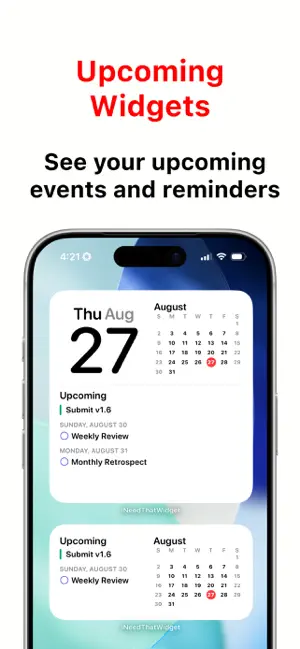
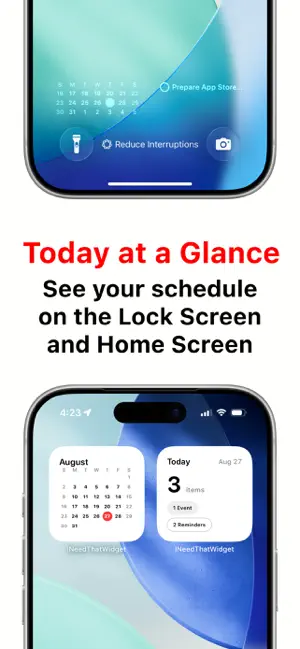
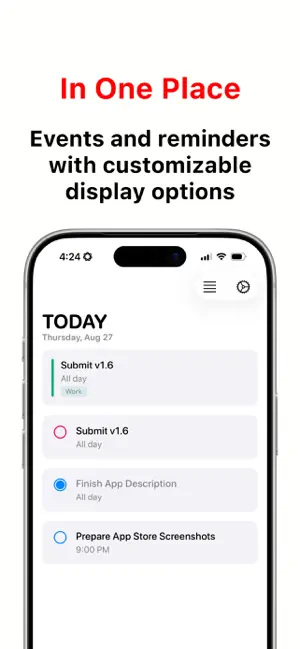
"I Need That Widget" brings clean, focused calendar and reminder widgets to your Home Screen and Lock Screen. See today's schedule, upcoming events and reminders, weekly plans, a full monthly calendar, and today's reminders at a glance without digging through apps. Your calendar and reminder data stays private on your device. KEY FEATURES - Home Screen Widgets for different layouts - Small: Month Calendar or Today Counts - Medium: Upcoming events and reminders, or Weekly Calendar - Large: Full Month Grid or Compact Event List - Lock Screen Widgets - View a compact 3-week calendar directly on your Lock Screen - See today's reminders from the Lock Screen with the reminder widget - Focus Calendar Filters - Choose which calendars stay visible while a Focus is active - Apply the same calendar filter in the app and widgets - Turn off the active Focus filter from the app when needed - Today Counts Widget - See today's total event and reminder count at a glance - Get a quick summary for busy days or free days - Reminder Support - View reminders alongside calendar events - See today's reminders and upcoming reminders in widgets - Choose whether to show overdue reminders and reminders without due dates - View recurring and all-day reminders more reliably - Open reminder details from supported widgets and app views - Weekly Calendar Widget - See your week in a clean 7-day layout - Choose a rolling 7-day view starting today, or use your selected week-start setting - Choose the first day of the week in the app settings, or follow your system setting - Open in Your Preferred Calendar App - Apple Calendar, Google Calendar, and Fantastical supported - Tap widgets and jump into the calendar app you prefer - Improved fallback helps widget taps recover when permissions or destination apps need attention - Customizable - Choose which calendars and reminder lists to show - Choose between the new calendar-inspired app icon and the Classic icon - Toggle all-day events - Control reminder visibility - Choose how to display past items - Localized - Available in English, Korean, German, Spanish, French, Arabic, Dutch, Hindi, Japanese, Simplified Chinese, Traditional Chinese, and Portuguese - Includes regional variants such as English (UK), English (Canada), English (Australia), Spanish (Mexico), Spanish (Spain), Portuguese (Portugal), and Portuguese (Brazil) - Privacy First - Your calendar and reminder data stays on your device - No accounts, no servers, no tracking - Clean and Simple - No ads - No clutter - No subscription PERFECT FOR - Checking your schedule without opening Calendar - Seeing today's workload instantly - Viewing reminders from the Home Screen or Lock Screen - Planning your week from the Home Screen - Keeping a calendar visible on the Lock Screen - Filtering calendars around your current Focus - Choosing a widget layout that fits your workflow - People who want simple, readable calendar widgets PRIVACY & SIMPLICITY Your calendar and reminder data never leaves your device. "I Need That Widget" is built for people who want practical widgets, minimal design, and quick access to what matters most. An in-app FAQ explains widget setup and answers common questions.
Ratings & reviews
5.0
5 ratings
What’s new
Version 1.6.1 · Updated October 22, 2026
This update improves compatibility with iPhone Duo and optimizes widget layouts for its new display, helping your widgets look clear and properly aligned. Thank you for using I Need That Widget!
App privacy
The developer, Joohee Kim, reported these privacy practices to Apple.
Data Not Collected
The developer does not collect any data from this app.
Alternatives to I Need That Widget: Calendar
Looking for apps like I Need That Widget: Calendar? Here are 6 similar apps on the App Store. The highest rated is TapCal: Calendar & Widgets (4.8/5), and all 6 are free to download.
-
 Pomodoro Timer: Pomidor Focus
4.7
Pomodoro Timer: Pomidor Focus
4.7
-
 Statos - Level Up Your Life
4.6
Statos - Level Up Your Life
4.6
-
 TapCal: Calendar & Widgets
4.8
TapCal: Calendar & Widgets
4.8
-
 Calendarly Lockscreen Calendar
4.5
Calendarly Lockscreen Calendar
4.5
-
 Notes for Dynamic Notch Island
4.8
Notes for Dynamic Notch Island
4.8
-
 AI Note Taker - Notri
4.8
AI Note Taker - Notri
4.8
| App | Rating | Price | Last updated | Compare |
|---|---|---|---|---|
| I Need That Widget: Calendar | 5.0 / 5 (5 ratings) | 2.49 USD | October 22, 2026 | |
| Pomodoro Timer: Pomidor Focus | 4.7 / 5 (14) | Free | Oct 19, 2026 | Compare |
| Statos - Level Up Your Life | 4.6 / 5 (29) | Free | Feb 14, 2026 | Compare |
| TapCal: Calendar & Widgets | 4.8 / 5 (10) | Free | Oct 26, 2026 | Compare |
| Calendarly Lockscreen Calendar | 4.5 / 5 (48) | Free | Oct 24, 2026 | Compare |
| Notes for Dynamic Notch Island | 4.8 / 5 (72) | Free | Sep 28, 2026 | Compare |
| AI Note Taker - Notri | 4.8 / 5 (5) | Free | Nov 3, 2025 | Compare |