

MultiOpen
Davyd Hruts Utilities iPhoneiPadiPod touchMac
MultiOpen is a free Utilities app for iPhone and iPad by Davyd Hruts. Requires iOS 17.0. Updated September 19, 2026.
- Price
- Free
- on the App Store
- Size
- 27 MB
- Age 4+
- Updated
- Sep 19
- 2026 · v2.1
Screenshots


About MultiOpen
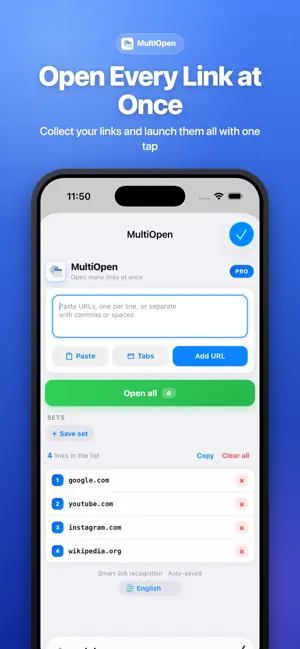
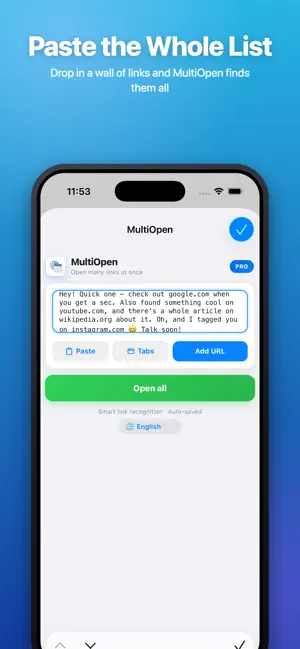
MultiOpen lets you open many links at once in Safari - paste a list, tap once, and every URL opens in its own tab. WHAT YOU CAN DO • Open dozens of links in a single tap • Save link sets for your daily routines and reopen them anytime • Grab all open tabs into a list • Smart paste - finds links inside any block of text • Your list auto-saves between sessions • Works on iPhone, iPad and Mac, with your sets synced via iCloud WHY MULTIOPEN No more tapping links one by one. Whether you start your day with the same set of sites, gather research, or share a batch of pages, MultiOpen turns a tedious chore into one tap. PRO Try everything free for 7 days. Then keep MultiOpen Pro for less than a coffee - $0.99/year, or $2.99 once, forever. MultiOpen is a Safari extension. After installing, enable it in Settings › Apps › Safari › Extensions. This app is governed by Apple's standard End User License Agreement (EULA), available at https://www.apple.com/legal/internet-services/itunes/dev/stdeula/.
What’s new
Version 2.1 · Updated September 19, 2026
Ready for iOS 27 and macOS 27, and optimized for iPhone Duo. New in the Safari extension: • Open in batches: split a long list into parts of 5, 10, 15 or 20 links and open one part at a time. Opened parts are marked, so you always know where you are. • Save tabs: all open tabs become a set in one tap. • Edit sets with large, easy buttons: rename, reorder, share or delete. • The list of links now fills the screen as you scroll. • Removed a link or cleared the list by mistake? Tap "Undo" within 5 seconds. • Smart paste reads more formats: links run together or separated by ; or |, in brackets, Markdown and HTML. • On Mac: "Open Links in Selection" in Safari's context menu, and ⌥⇧O opens MultiOpen. MultiOpen Pro now starts with a 7-day free trial of the yearly plan, run by the App Store. You see the terms before you start and can cancel anytime in App Store settings. "Open Settings" now goes straight to MultiOpen in Safari's extension settings on iOS 26.2 and later. Fixed: on iPhone the extension now recognizes everyone who bought MultiOpen before it became a subscription.
App privacy
The developer, Davyd Hruts, reported these privacy practices to Apple.
Data Linked to You
The following data, which may be collected and linked to your identity, may be used for the following purposes:
- Purchases: Purchase History
- Identifiers: User ID, Device ID
Used for: Analytics, App Functionality
Alternatives to MultiOpen
Looking for apps like MultiOpen? Here are 6 similar apps on the App Store. The highest rated is BabelVoice - Speech to Text (5.0/5), and 5 of the 6 are free to download.
-
 BabelVoice - Speech to Text
5.0
-
 Vaultory Authenticator 2FA App
5.0
-
 Padme - Custom keypad for Mac
-
 re-Code
-
 Screnly: Screenshot Cleaner
-
 CoCrypt
| App | Rating | Price | Last updated | Compare |
|---|---|---|---|---|
| MultiOpen | – | Free | September 19, 2026 | |
| BabelVoice - Speech to Text | 5.0 / 5 (2) | 3.99 USD | Aug 23, 2026 | Compare |
| Vaultory Authenticator 2FA App | 5.0 / 5 (1) | Free | Oct 22, 2026 | Compare |
| Padme - Custom keypad for Mac | – | Free | Jul 28, 2026 | Compare |
| re-Code | – | Free | Jul 10, 2026 | Compare |
| Screnly: Screenshot Cleaner | – | Free | Aug 9, 2026 | Compare |
| CoCrypt | – | Free | May 29, 2026 | Compare |
Compare MultiOpen with the top alternatives: ratings, updates, ASO score and keyword gaps →