

Spnding
Adri Johari Finance iPhoneiPadiPod touch
Spnding is a free Finance app for iPhone and iPad by Adri Johari. Requires iOS 15.1. Updated October 14, 2026.
- Price
- Free
- on the App Store
- Size
- 59 MB
- Age 4+
- Updated
- Oct 14
- 2026 · v3.2
Screenshots
About Spnding
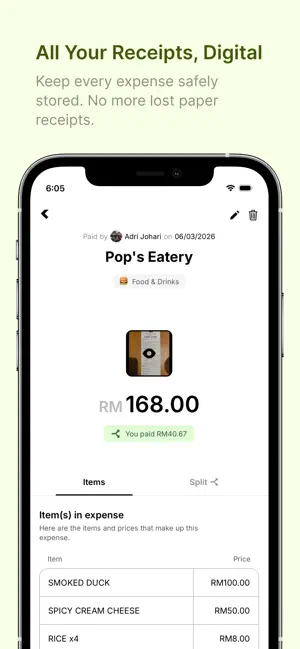
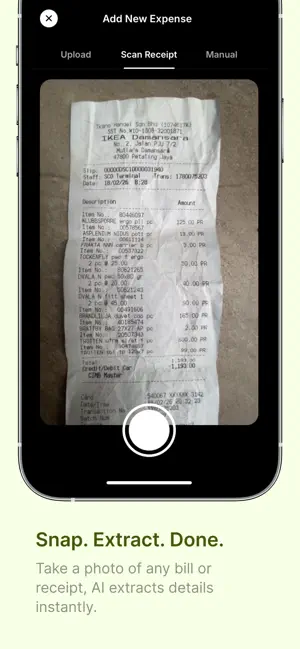
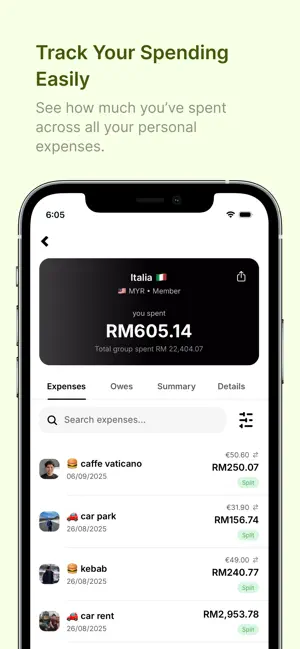
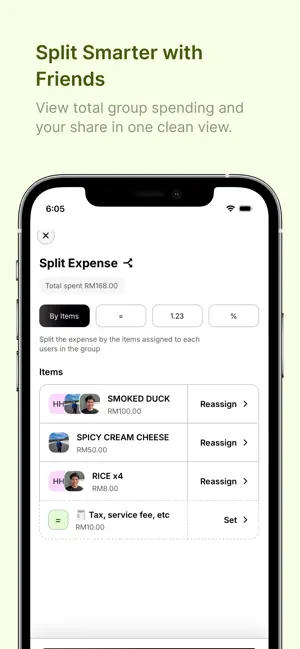
Spnding makes it easy to track personal and shared expenses in one place. Scan receipts with AI, capture Apple Pay purchases, organize spending by group, split costs with friends or guests, and keep track of who owes what without messy notes or manual calculations. ---- KEY FEATURES ------ • Scan Receipts with AI Take a photo, upload a receipt, or import a supported document and let AI extract details such as merchant, items, prices, date, total, currency, and receipt number. • Smarter Expense Categorization Automatically categorize scanned receipts and Apple Pay expenses. You can also create your own custom categories, and Spnding can use them when categorizing expenses. • Track Apple Pay Purchases Use Apple Pay automation on iPhone to quickly capture purchases and add them to Spnding with less manual entry. • Track Shared & Personal Expenses Create groups for trips, meals, sports, housemates, monthly spending, personal expenses, or anything else you want to organize. • Split Expenses with Friends or Guests Split costs between group members or add guests who do not have a Spnding account. • Know Who Owes What Spnding automatically calculates balances so you can easily see who paid, who owes whom, and how much is outstanding. • Support for Currencies Around the World Track expenses in different currencies while keeping totals consistent with your group’s base currency. Recently used currencies are also easier to access. • Powerful Expense Search & Filters Find expenses quickly using merchant names, amounts, receipt or invoice numbers, dates, payers, and more. Sort and filter your expense list to find exactly what you need. • Keep Receipts & Invoices with Your Expenses Attach receipts or invoices to manually created or existing expenses for your records. You can replace attachments or rescan supported receipts with AI whenever needed. • Export Expenses to CSV Export your expenses to CSV and receive the file by email for reporting, tracking, or personal records. • Clear Spending Insights View spending summaries by category and better understand where your money goes. • Multiple Groups for Different Needs Keep expenses separated by trip, event, month, activity, household, or group of friends. • In-App Support Have a problem, question, or idea? Report bugs, request features, ask questions, or send feedback directly from the Support section in Spnding. Whether you are splitting dinner, tracking a holiday, managing housemate expenses, keeping receipts for your records, or simply understanding your own spending, Spnding helps keep everything organized and easy to manage. Terms of Use (EULA): https://www.apple.com/legal/internet-services/itunes/dev/stdeula/ Spnding App Terms of Service & Privacy Policy: https://www.spnding.app/terms-and-privacy
What’s new
Version 3.2 · Updated October 14, 2026
This update brings a major new way to track spending on iPhone, plus improvements to group summaries and expense accuracy. • Track payments from your notifications You can now set up supported bank and e-wallet notifications to automatically create expenses in Spnding. Amount, merchant, and category can be filled in for you. No manual entry needed. • See what each member spent In shared groups, the Summary tab can now show spending by category for the whole group or for an individual member. • Better duplicate protection If both your bank and wallet app notify you about the same payment, Spnding now does a better job of recognizing it and avoiding duplicate expenses. • More accurate Summary totals Spending by category now stays in sync with the total shown at the top of your group as new expenses are added. Plus, we’ve made additional improvements and fixes to keep Spnding running smoothly.
App privacy
The developer, Adri Johari, reported these privacy practices to Apple.
Data Linked to You
The following data, which may be collected and linked to your identity, may be used for the following purposes:
- Usage Data: Product Interaction
- Contact Info: Email Address, Name
Used for: Analytics, Product Personalization, App Functionality
Alternatives to Spnding
Looking for apps like Spnding? Here are 6 similar apps on the App Store. The highest rated is Boost App Malaysia (4.4/5), and all 6 are free to download.
-
 ding! Merchant
-
 Olive Pro
3.3
Olive Pro
3.3
-
 BIBD Biznet Mobile
2.7
BIBD Biznet Mobile
2.7
-
 TAIBVX
2.4
TAIBVX
2.4
-
 SC Mobile Brunei
3.3
SC Mobile Brunei
3.3
-
 Boost App Malaysia
4.4
Boost App Malaysia
4.4
| App | Rating | Price | Last updated | Compare |
|---|---|---|---|---|
| Spnding | – | Free | October 14, 2026 | |
| ding! Merchant | – | Free | Jul 1, 2025 | Compare |
| Olive Pro | 3.3 / 5 (57) | Free | Oct 23, 2026 | Compare |
| BIBD Biznet Mobile | 2.7 / 5 (6) | Free | Aug 5, 2026 | Compare |
| TAIBVX | 2.4 / 5 (74) | Free | May 17, 2026 | Compare |
| SC Mobile Brunei | 3.3 / 5 (14) | Free | Aug 31, 2026 | Compare |
| Boost App Malaysia | 4.4 / 5 (250) | Free | Oct 19, 2026 | Compare |
Compare Spnding with the top alternatives: ratings, updates, ASO score and keyword gaps →