

Reading Tracker Pro: Book Log
JOSEPH G HORACKI Book iPhoneiPadiPod touch
Reading Tracker Pro: Book Log is a free Book app for iPhone and iPad by JOSEPH G HORACKI. Requires iOS 15.1. Updated August 26, 2026.
- Price
- Free
- on the App Store
- Size
- 109 MB
- Age 4+
- Updated
- Aug 26
- 2026 · v2.4.2
Screenshots
About Reading Tracker Pro: Book Log
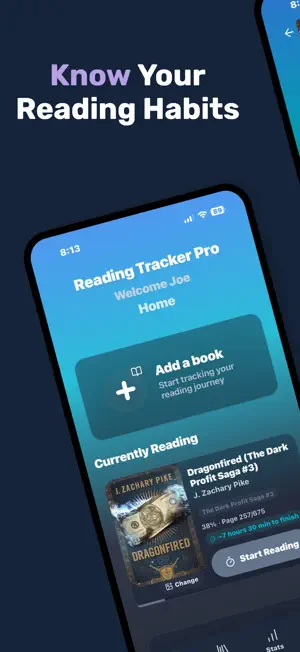
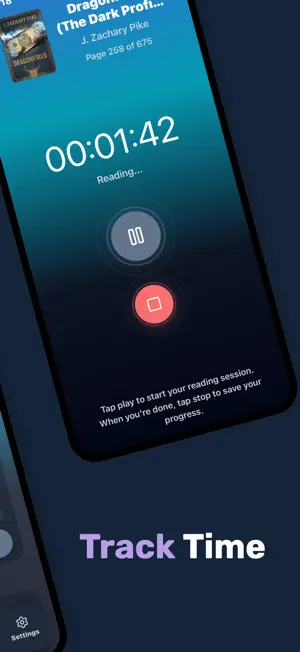
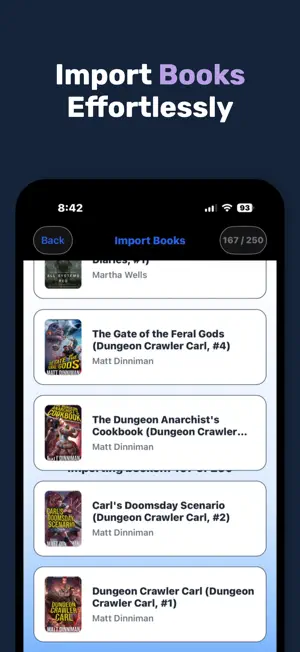
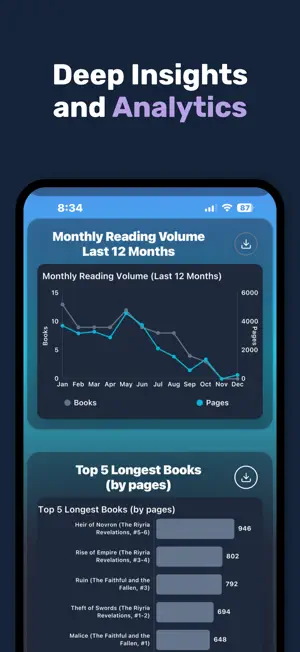
Some people read. Others know how they read. They know their best reading days, their fastest genres, how many pages they average in a session, and exactly which books shaped their year. They don’t guess — they know. That’s what Reading Tracker Pro gives you. Track every session. Start the timer when you open your book. Stop it when you put it down. Over time, a picture of your reading life emerges — one you’ve never seen before. Your entire library, beautifully organized. Every book you’ve read, every book you’re reading, every book you want to read — all in one place. Rate them, review them, remember them. Analytics that actually mean something. Pages read. Time spent. Streaks maintained. Books completed. Charts that show you not just what you’ve read, but how you read. Your next favourite book, waiting. AI-powered recommendations based on what you’ve loved. No more staring at a to-be-read list wondering where to start. Supports everything you read. Physical books, ebooks, audiobooks — all tracked together. Try every premium feature free for 14 days. No credit card required. Terms of Use (EULA): https://www.apple.com/legal/internet-services/itunes/dev/stdeula/
What’s new
Version 2.4.2 · Updated August 26, 2026
NEW FEATURES - Multiple narrators — an audiobook can now list its whole cast. Add narrators one at a time and remove any of them with a tap; they show separated by commas, and the Top Narrators card now credits each narrator individually. - Audiobook bundles — a single purchase that combines several titles into one file, like a 3-in-1 box set, can now be logged as one book instead of losing track of which titles it actually contains. Add each included title the same way you add narrators, one at a time, and they’ll show right on the book’s detail page. - Multiple authors — a book credited to more than one author can now list all of them, the same way narrators already work. Add authors one at a time and remove any of them with a tap, and adding a book you already own is recognized correctly even if a co-author gets added later or in a different order. - Resume Timer — stopping the timer by accident no longer loses your session. A new Resume Timer button on the save screen jumps you straight back to a running timer, picking up from the exact moment you stopped instead of leaving it paused until you notice. - Streak milestone celebrations — reaching a 7, 30, 100, 365, 500, 750, or 1000-day reading streak now unlocks its own full-screen celebration instead of the regular daily recap. Each milestone gets tiered medal artwork, escalating from bronze at 7 days up to a legendary design at 1000. - New reading achievements — six new badges to earn: read for 1, 3, or 5 hours in a single sitting, or log 3, 6, or 9 reading sessions of 20+ minutes in one day. Find them under Achievements alongside your existing badges, each with its own new artwork. IMPROVEMENTS - Narrator and author suggestions — start typing a name in either field and any matching narrator or author already used elsewhere in your library shows up to tap and add, so you’re not retyping someone you’ve already entered before. Keep typing to add someone new any time; suggestions never get in the way. - Action & Adventure — a new genre option alongside Thriller and the other fiction categories, so fast-paced, adventure-driven books have a home of their own instead of getting filed under something close but not quite right. Choose it the same way you already choose any other genre when adding or editing a book — it also shows up wherever genres already do, including filters, stats, and Read By Mood. BUG FIXES - Audiobooks now save the percentage you pick. Because you can speed playback up or slow it down, the minutes you listened don’t always match how far you got — so your number is kept as you set it instead of being recalculated from the time. You can also type the end percentage yourself when logging a session by hand. - In the reading calendar, a book you read on back-to-back days now lines up across the day divide instead of jumping sides, so a streak reads as one continuous run. - In Add Book, the Done button on the date picker no longer gets cut off at the bottom of the wheel — purchase, due, publication, start, and finish dates all keep it fully visible now, so it’s always there to tap when you’re ready to confirm. - In Edit Book, tapping into the title field now puts the cursor at the end of the existing text instead of wherever the tap happened to land, so fixing a typo in a title you’ve already entered isn’t a fight with the cursor anymore.
App privacy
The developer, JOSEPH G HORACKI, reported these privacy practices to Apple.
Data Not Collected
The developer does not collect any data from this app.
Alternatives to Reading Tracker Pro: Book Log
Looking for apps like Reading Tracker Pro: Book Log? Here are 6 similar apps on the App Store. The highest rated is BookNook | Reading Tracker (5.0/5), and all 6 are free to download.
-
 Book Tracker - Readflow
-
 Kiveo: Book & Reading Journal
4.8
Kiveo: Book & Reading Journal
4.8
-
 BookNook | Reading Tracker
5.0
BookNook | Reading Tracker
5.0
-
 Bookleap: Book Tracker TBR
-
 Chugs: Reading Tracker & Log
3.0
Chugs: Reading Tracker & Log
3.0
-
 Book Tracker - BookStack
4.8
Book Tracker - BookStack
4.8
| App | Rating | Price | Last updated | Compare |
|---|---|---|---|---|
| Reading Tracker Pro: Book Log | – | Free | August 26, 2026 | |
| Book Tracker - Readflow | – | Free | Mar 2, 2026 | Compare |
| Kiveo: Book & Reading Journal | 4.8 / 5 (5) | Free | Sep 30, 2026 | Compare |
| BookNook | Reading Tracker | 5.0 / 5 (2) | Free | Dec 17, 2025 | Compare |
| Bookleap: Book Tracker TBR | – | Free | Oct 19, 2026 | Compare |
| Chugs: Reading Tracker & Log | 3.0 / 5 (1) | Free | Oct 8, 2026 | Compare |
| Book Tracker - BookStack | 4.8 / 5 (6) | Free | Oct 26, 2026 | Compare |