

Spoken Ink
Chris Swafford Lifestyle iPhoneiPadiPod touch
Spoken Ink is a free Lifestyle app for iPhone and iPad by Chris Swafford. Rated 5.0/5 from 4 ratings. Requires iOS 16.0. Updated December 29, 2025.
- Rating
- 5.0
- 4 ratings
- Price
- Free
- on the App Store
- Size
- 172 MB
- Age 4+
- Updated
- Dec 29
- 2025 · v1.4
Screenshots



About Spoken Ink
Spoken Ink is a voice-to-text journal that turns your spoken thoughts into beautifully written entries. Simply speak, and the app transforms your voice into clear, polished writing—perfect for daily journaling, diary entries, notes, or quick reflections. Whether you’re capturing your day, recording ideas, or building a writing habit, Spoken Ink makes journaling effortless. Speak naturally, and the app handles the writing, formatting, and organization. ◆ Voice to Text Journaling Use speech to text to record your thoughts instantly. Spoken Ink cleans up punctuation, fixes grammar, and turns raw dictation into readable, meaningful writing. ◆ A Beautiful Digital Journal Your entries become elegant journal pages and are organized like real books on handcrafted shelves. Create journals for daily notes, gratitude, dreams, travel, memories, and more. ◆ Customize Your Writing Experience Make your journal feel personal with customizable fonts, ink colors, paper textures, and layout options. Choose handwriting-style fonts for a timeless, intimate writing experience. ◆ Writing and Rewriting Options Use optional tools to improve clarity, tone, and flow. Keep your natural voice or choose from rewriting styles that feel calm, concise, reflective, creative, or literary. ◆ Simple, Organized, and Fast Spoken Ink automatically sorts your entries by day, week, month, or year. Create shelves, volumes, and sections to keep your diary and notes beautifully organized. ◆ Your Journal, Your Privacy Your writing stays private on your device or securely synced with iCloud. No accounts, no tracking, and no stored audio. ◆ Perfect for: • Daily journaling • Diary entries • Voice notes • Gratitude journals • Fitness Journals • Self-reflection • Memory keeping • Writing practice • Speech-to-text note taking Speak freely—Spoken Ink turns your voice into a beautifully written journal you’ll love returning to. Why Spoken Ink? Because journaling shouldn’t feel like work. Because speaking is easy—and writing should be too. Because your life deserves a beautiful record. Turn your voice into a library of stories—effortlessly. Terms of Use (Apple Standard EULA): https://www.apple.com/legal/internet-services/itunes/dev/stdeula/ Privacy Policy: https://sites.google.com/view/spokenink/home
What’s new
Version 1.4 · Updated December 29, 2025
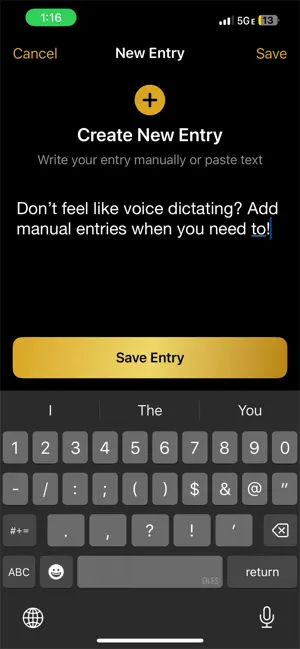
Easily restore your data from the cloud when you change devices with improved controls. Plus, you can now add a journal entry manually without voice dictation for those who can't or prefer manual input.
App privacy
The developer, Chris Swafford, reported these privacy practices to Apple.
Data Not Linked to You
The following data, which may be collected but is not linked to your identity, may be used for the following purposes:
- User Content: Other User Content
- Diagnostics: Crash Data
Used for: App Functionality
Alternatives to Spoken Ink
Looking for apps like Spoken Ink? Here are 6 similar apps on the App Store. The highest rated is Sonote: Reflect Voice Journal (5.0/5), and all 6 are free to download.
-
 Sonote: Reflect Voice Journal
5.0
-
 PawUp: Puppy Potty Timer
5.0
-
 Dayheld
-
 Pawtty: Puppy Potty Log
-
 Life Written
5.0
-
 Afterword - voice journaling
| App | Rating | Price | Last updated | Compare |
|---|---|---|---|---|
| Spoken Ink | 5.0 / 5 (4 ratings) | Free | December 29, 2025 | |
| Sonote: Reflect Voice Journal | 5.0 / 5 (2) | Free | Jul 30, 2026 | Compare |
| PawUp: Puppy Potty Timer | 5.0 / 5 (1) | Free | Sep 16, 2026 | Compare |
| Dayheld | – | Free | Oct 7, 2026 | Compare |
| Pawtty: Puppy Potty Log | – | Free | Aug 5, 2026 | Compare |
| Life Written | 5.0 / 5 (2) | Free | Jul 2, 2026 | Compare |
| Afterword - voice journaling | – | Free | Jul 21, 2026 | Compare |
Compare Spoken Ink with the top alternatives: ratings, updates, ASO score and keyword gaps →