

ReeMate
Marco Avizzano Utilities iPhoneiPadiPod touch
ReeMate is a free Utilities app for iPhone and iPad by Marco Avizzano. Requires iOS 18.0. Updated October 2, 2026.
- Price
- Free
- on the App Store
- Size
- 9 MB
- Age 4+
- Updated
- Oct 2
- 2026 · v1.1.1
Screenshots



About ReeMate
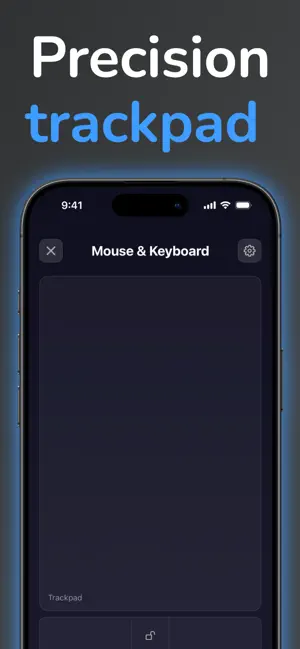
Control your Mac from your iPhone — fast, secure, and always within reach. ReeMate is built for those moments when your Mac is just out of reach: on the couch, during a presentation, or while you're focused on something else. Pair once, and your iPhone connects to your Mac in seconds, every time. ReeMate requires the free companion app ReeMate Server installed on your Mac. Instructions to download and install it are provided within the app. Key features: - Wireless remote control for your Mac over your local network or a direct Wi-Fi link - Secure by design: every iPhone–Mac pair gets its own encrypted connection - Quick pairing: scan a QR code or enter a 6-digit code - Automatic reconnection after your Mac sleeps or your network changes - Volume controls: raise/lower volume and mute instantly - Microphone controls: mute/unmute without touching your Mac - Media controls: play/pause, next, previous - Presentation controls: next slide, previous slide and black screen for Keynote and PowerPoint - Mouse control: use your iPhone like a trackpad to move the cursor with precision - Mouse actions: click, right-click, drag and scroll, with natural momentum - Remote keyboard: use your iPhone as a wireless Mac keyboard - Shortcuts: trigger common or custom keyboard shortcuts, with your favourites one tap away on the remote ReeMate keeps the experience clean and focused: it's a practical remote designed for real life.
What’s new
Version 1.1.1 · Updated October 2, 2026
ReeMate 1.1.1: now you can talk to your Mac. NEW IN 1.1.1 • Dictation: tap the mic in Mouse & Keyboard and just speak. • See what you type: a bubble above the keyboard shows the text on its way to your Mac. • The keyboard now follows the app's light or dark theme, and the Mac keys are easier to read in light mode. • Better fit on smaller iPhones, plus more fixes. On your Mac, ReeMate 1.1.1 brings a menu bar redesigned in the style of System Settings, sleek HUD notifications and support for several iPhones connected at the same time. IN CASE YOU MISSED IT: REEMATE 1.1, OUR BIGGEST UPDATE YET • All-new connection: faster, more reliable, encrypted end to end. It reconnects on its own after your Mac sleeps, when you switch Wi-Fi or when you come back to the app. • Pair in seconds with a QR code or a 6-digit code. • Works on managed work Macs too. • Presentation controls: next, previous and black screen for Keynote and PowerPoint. • One-tap keyboard shortcuts right on the remote (Pro). • Redesigned remote with bigger media controls. • Momentum scrolling, just like a real trackpad, plus a smoother, more responsive mouse. • Auto-dim saves battery when you're not touching the screen. • Bluetooth is no longer needed. • Lots of fixes and stability improvements. Important: ReeMate on your Mac must be 1.1 or later. Coming from 1.0? Update your Mac too, then pair your devices again.
App privacy
The developer, Marco Avizzano, reported these privacy practices to Apple.
Data Not Collected
The developer does not collect any data from this app.
Alternatives to ReeMate
Looking for apps like ReeMate? Here are 6 similar apps on the App Store. The highest rated is PhonePass Diagnostic (5.0/5), and all 6 are free to download.
-
 PhonePass Diagnostic
5.0
PhonePass Diagnostic
5.0
-
 Scroll Volume Remote
-
 LinkRouter: Opener for Safari
5.0
LinkRouter: Opener for Safari
5.0
-
 noiseguard:environmental noise
-
 Sound Meter: dB SPL Veltora
-
 Phone Doctor Pro - Cleaner
| App | Rating | Price | Last updated | Compare |
|---|---|---|---|---|
| ReeMate | – | Free | October 2, 2026 | |
| PhonePass Diagnostic | 5.0 / 5 (1) | Free | Sep 21, 2026 | Compare |
| Scroll Volume Remote | – | Free | Jul 13, 2026 | Compare |
| LinkRouter: Opener for Safari | 5.0 / 5 (1) | Free | Oct 10, 2026 | Compare |
| noiseguard:environmental noise | – | Free | May 19, 2026 | Compare |
| Sound Meter: dB SPL Veltora | – | Free | Sep 17, 2026 | Compare |
| Phone Doctor Pro - Cleaner | – | Free | Apr 4, 2026 | Compare |
Compare ReeMate with the top alternatives: ratings, updates, ASO score and keyword gaps →