

TaskQueue
Christopher Bass Productivity iPhoneiPadiPod touch
TaskQueue is a free Productivity app for iPhone and iPad by Christopher Bass. Rated 2.5/5 from 2 ratings. Requires iOS 18.6. Updated October 23, 2025.
- Rating
- 2.5
- 2 ratings
- Price
- Free
- on the App Store
- Size
- 3 MB
- Age 4+
- Updated
- Oct 23
- 2025 · v1.4.0
Screenshots


About TaskQueue
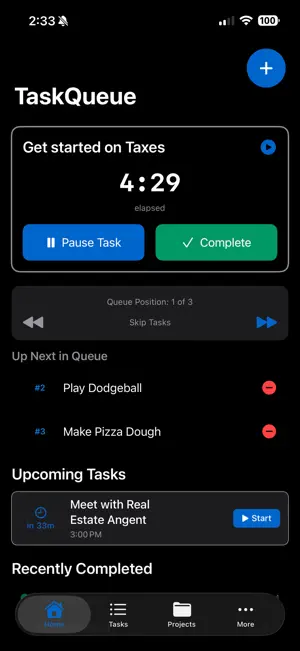
TaskQueue - Single-Threaded Focus Stay focused on one task at a time with TaskQueue's streamlined approach to task management. Built for single-threaded productivity, TaskQueue helps you maintain focus through timer-based workflows and queue management. KEY FEATURES: • Single-task focus with built-in timer functionality • Queue-based task organization for sequential workflow • Estimated vs actual time tracking with progress insights • Smart notifications at 50%, 75%, and overtime milestones • Daily recurring task support with completion tracking • Comprehensive task history and statistics • Clean, intuitive SwiftUI interface optimized for iOS • Dark and light theme support • Skip between queued tasks with playlist-style controls PRODUCTIVITY BENEFITS: • Eliminate multitasking distractions • Accurate time estimation through tracking • Maintain momentum with automatic task progression • Review performance with detailed completion history • Stay motivated with progress notifications Perfect for professionals, students, freelancers, and anyone who wants to improve their focus and time management through proven single-threaded productivity techniques. Built with SwiftUI and SwiftData for a native iOS experience.
What’s new
Version 1.4.0 · Updated October 23, 2025
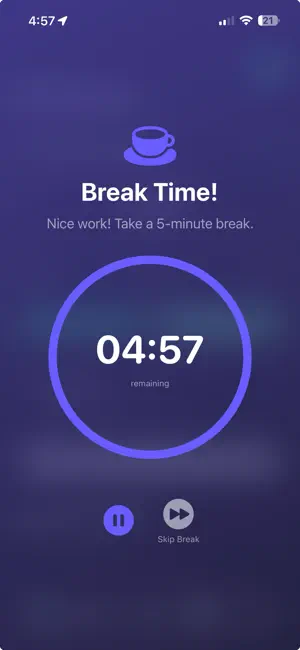
INTRODUCING POMODORO TECHNIQUE Transform your productivity with structured focus sessions and timed breaks! POMODORO FEATURES • Standard Pomodoro: 4×25min sessions with 5min breaks + 15min reward • Short Pomodoro: 2×25min sessions for quick focus bursts • Extended Pomodoro: 4×25min sessions with 20min long break • Custom Pomodoro: Design your own (5-60min work, 1-15min breaks, 1-10 sessions) • Beautiful break timers with countdown, pause/resume, and skip controls • Custom naming for playlists and tasks • Automatic queue management HOW IT WORKS 1. Tap Pomodoro button in Playlists tab 2. Choose a template or create custom 3. Name your session and tasks 4. Start working with automatic timers 5. Enjoy timed breaks between sessions 6. Celebrate completion! UI ENHANCEMENTS • New toolbar on Playlists: Create Task, New Playlist, and Pomodoro buttons • New toolbar on Projects: Create Task and New Project buttons • Removed overlapping floating buttons • Enhanced break timer with blur overlay for better focus Work smarter with structured focus!
App privacy
The developer, Christopher Bass, reported these privacy practices to Apple.
Data Not Collected
The developer does not collect any data from this app.
Alternatives to TaskQueue
Looking for apps like TaskQueue? Here are 6 similar apps on the App Store. The highest rated is DayTime - Track Your Day (5.0/5), and all 6 are free to download.





| App | Rating | Price | Last updated | Compare |
|---|---|---|---|---|
| TaskQueue | 2.5 / 5 (2 ratings) | Free | October 23, 2025 | |
| Solven | – | Free | Nov 8, 2025 | Compare |
| XSheets | – | Free | Dec 8, 2025 | Compare |
| TickTid | – | Free | Sep 10, 2025 | Compare |
| Reminder Focus Timer | – | Free | Apr 23, 2024 | Compare |
| DayTime - Track Your Day | 5.0 / 5 (1) | Free | Jul 16, 2025 | Compare |
| TaskLoop | 5.0 / 5 (2) | Free | Sep 18, 2024 | Compare |
Compare TaskQueue with the top alternatives: ratings, updates, ASO score and keyword gaps →