

Signature Maker - Sign & Fill
Milos Dimitrijevic Business iPhoneiPadiPod touch
Signature Maker - Sign & Fill is a free Business app for iPhone and iPad by Milos Dimitrijevic. Rated 1.0/5 from 1 ratings. Requires iOS 17.0.
- Rating
- 1.0
- 1 ratings
- Price
- Free
- on the App Store
- Size
- 27 MB
- Age 4+
- Updated
- Jun 25
- 2026 · v1.3
Screenshots


About Signature Maker - Sign & Fill
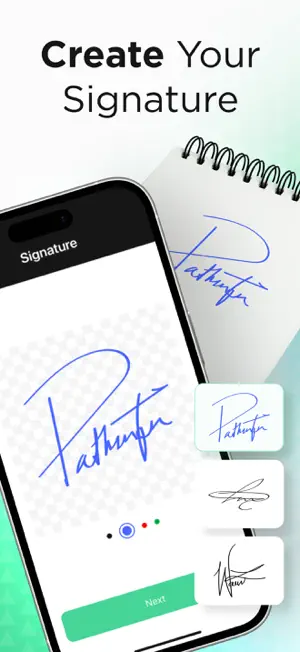
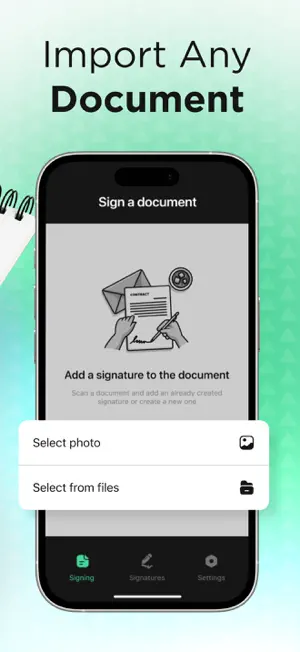
Sign Documents Anytime, Anywhere with Ease Transform the way you manage paperwork with this all-in-one signature app. Fast, secure, and reliable, it lets you create personalized signatures and apply them directly to any document—PDFs, scans, or images—without needing external services. Everything happens offline, so your data stays private and stored safely on your device. Whether for personal, business, or academic use, this app streamlines your workflow while keeping your information under your control. Key Highlights Custom Signatures – Draw your own, capture from a photo, or auto-generate from your name. Universal Signing – Add your signature to PDFs, scanned pages, or images in just a few taps. Offline & Secure – No internet required. Your signatures and documents remain private. Document Tools – Edit, save, and manage all your signed files in one place. Quick Sharing – Send signed documents instantly via email, chat, or cloud services. Simple Interface – Designed for speed and ease, even on the go. Upgrade for More Power Unlock premium tools with a subscription: Advanced PDF and image editing. Unlimited signature storage with multiple profiles. Cloud sync for cross-device access. Real-time notifications for signed or updated files. Enhanced encryption for sensitive documents. Unlimited Plan: Weekly access with a 3-day free trial included. Your iTunes account will be charged after purchase confirmation. Subscriptions renew automatically unless cancelled at least 24 hours before the current period ends. Manage or cancel anytime in your Account Settings. Privacy & Support Privacy Policy: https://sites.google.com/view/pp-signature-maker-milos/home Terms of Use: https://sites.google.com/view/tou-signature-maker-milos/home Contact Support: [email protected] Take full control of your digital paperwork—sign, store, and share securely in seconds.
What’s new
Version 1.3 · Updated June 25, 2026
Critical bug fix
App privacy
The developer, Milos Dimitrijevic, reported these privacy practices to Apple.
Data Used to Track You
The following data may be used to track you across apps and websites owned by other companies:
- Identifiers: User ID, Device ID
Data Not Linked to You
The following data, which may be collected but is not linked to your identity, may be used for the following purposes:
- Identifiers: User ID, Device ID
- Usage Data: Product Interaction
Used for: Third-Party Advertising, Developer’s Advertising or Marketing, Analytics
Alternatives to Signature Maker - Sign & Fill
Looking for apps like Signature Maker - Sign & Fill? Here are 6 similar apps on the App Store. The highest rated is PDF to Word Convert: Papivo (5.0/5), and all 6 are free to download.
-
 Resume Maker Create Perfect CV
1.0
Resume Maker Create Perfect CV
1.0
-
 【豆宝Ai助手】 - 用童趣般心态接受前沿科技的AI宝贝
4.4
【豆宝Ai助手】 - 用童趣般心态接受前沿科技的AI宝贝
4.4
-
 PDF to Word Convert: Papivo
5.0
PDF to Word Convert: Papivo
5.0
-
 Сrypto Сonverter, News Track
-
 SwiftPrinter: Print & Scan
5.0
SwiftPrinter: Print & Scan
5.0
-
 Cancel Subscriptions - Saver
5.0
Cancel Subscriptions - Saver
5.0
| App | Rating | Price | Last updated | Compare |
|---|---|---|---|---|
| Signature Maker - Sign & Fill | 1.0 / 5 (1 rating) | Free | June 25, 2026 | |
| Resume Maker Create Perfect CV | 1.0 / 5 (2) | Free | Nov 17, 2025 | Compare |
| 【豆宝Ai助手】 - 用童趣般心态接受前沿科技的AI宝贝 | 4.4 / 5 (7) | Free | Jun 1, 2026 | Compare |
| PDF to Word Convert: Papivo | 5.0 / 5 (1) | Free | Oct 12, 2026 | Compare |
| Сrypto Сonverter, News Track | – | Free | Aug 3, 2026 | Compare |
| SwiftPrinter: Print & Scan | 5.0 / 5 (1) | Free | Sep 29, 2026 | Compare |
| Cancel Subscriptions - Saver | 5.0 / 5 (1) | Free | Oct 23, 2026 | Compare |