

AMAZE VR Concerts
AmazeVR, Inc. Music iPhoneiPadiPod touch
AMAZE VR Concerts is a free Music app for iPhone and iPad by AmazeVR, Inc. Rated 3.6/5 from 5 ratings. Requires iOS 15.0. Updated August 24, 2026.
- Rating
- 3.6
- 5 ratings
- Price
- Free
- on the App Store
- Size
- 555 MB
- Age 12+
- Updated
- Aug 24
- 2026 · v1.0.49
Screenshots


About AMAZE VR Concerts
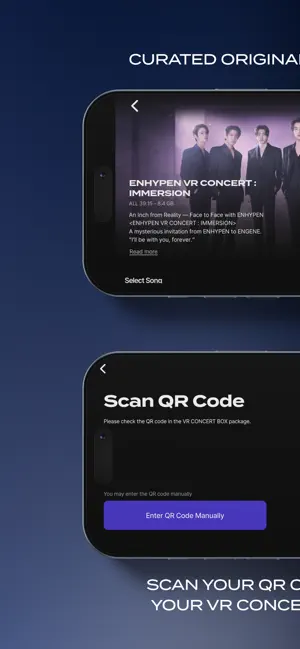
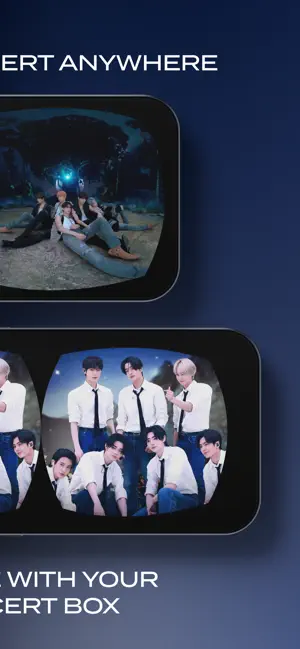
■ How to Use Have you purchased a VR Concert Box? Concert viewing begins once you register the QR code included with your VR Concert Box. 1. Install the app and sign up with your email, phone number, or a social media account. 2. Scan the QR code included with your VR Concert Box to register the concert to your account. 3. Download the concert. (Approximately 9GB per concert; Wi-Fi is recommended.) 4. Insert your smartphone into the VR Concert Box and the concert will begin. If the screen appears off-center, look straight ahead and double-tap the screen. ■ VR Concert Lineup [ENHYPEN] ● ENHYPEN VR CONCERT : IMMERSION [TOMORROW X TOGETHER] ● HYPERFOCUS : TOMORROW X TOGETHER VR CONCERT ● TOMORROW X TOGETHER VR CONCERT : HEART ATTACK You can watch each concert by registering the QR code from your purchased VR Concert Box. If you register multiple QR codes, you can enjoy all concerts with a single account. ■ Supported Devices For smooth playback, please check that your device is supported before viewing. ● iPhone 11 or later (iOS 14+) ● Samsung Galaxy S22 or later, Galaxy Z Flip 4 or later (Android 13+) ● Optimized for screens sized 4.5–7 inches ■ Please Note ● Concert viewing begins once you register the QR code from your purchased VR Concert Box. Before that, only app installation and sign-up are available. ● Playback may not work properly on devices that are not officially supported. Please check the supported devices before viewing. ● Each concert is approximately 9GB or larger, and file size varies by concert. Please check your available storage before downloading. ● You can re-download concerts an unlimited number of times. Even if you delete a concert or switch devices, simply log in with the account you used to register the QR code. ● Each QR code can only be registered to one account. ● An internet connection is required during playback. ● To protect artist content, screen recording and screenshots are restricted during playback. ■ Permissions Guide [Required Permissions] None [Optional Permissions] ● Camera: To scan QR codes ● Notifications: To receive concert updates ● Storage: To download concert content You may use the service without granting optional permissions. Support: [email protected] Terms of Service: https://www.amazevr.com/terms-and-conditions Privacy Policy: https://www.amazevr.com/privacy-notice
Ratings & reviews
3.6
5 ratings
What’s new
Version 1.0.49 · Updated August 24, 2026
• Smoother video playback — fixed the intermittent stuttering that could occur during long viewing sessions • Playback quality is now automatically optimized based on your device's condition, for a consistently stable viewing experience • Added support for ProMotion (120Hz) displays on the latest iPhone models for an even smoother picture • Playback now picks up right where you left off, even after switching earphones/Bluetooth devices or apps • Fixed display errors and flickering on the concert list screen • Improved opening the app from notifications and enhanced overall stability
App privacy
The developer, AmazeVR, Inc., reported these privacy practices to Apple.
Data Not Collected
The developer does not collect any data from this app.
Alternatives to AMAZE VR Concerts
Looking for apps like AMAZE VR Concerts? Here are 6 similar apps on the App Store. The highest rated is PYPD (5.0/5), and all 6 are free to download.
-
 Smart Music Card
2.1
Smart Music Card
2.1
-
 JO1 OFFICIAL APP
4.5
JO1 OFFICIAL APP
4.5
-
 KiTplayer
4.5
KiTplayer
4.5
-
 Weverse Albums
3.1
Weverse Albums
3.1
-
 PYPD
5.0
PYPD
5.0
-
 Tier’d - K-Pop Music Rating
5.0
Tier’d - K-Pop Music Rating
5.0
| App | Rating | Price | Last updated | Compare |
|---|---|---|---|---|
| AMAZE VR Concerts | 3.6 / 5 (5 ratings) | Free | August 24, 2026 | |
| Smart Music Card | 2.1 / 5 (37) | Free | Oct 13, 2026 | Compare |
| JO1 OFFICIAL APP | 4.5 / 5 (2) | Free | Sep 17, 2026 | Compare |
| KiTplayer | 4.5 / 5 (462) | Free | Oct 6, 2026 | Compare |
| Weverse Albums | 3.1 / 5 (116) | Free | Sep 22, 2026 | Compare |
| PYPD | 5.0 / 5 (25) | Free | Aug 4, 2026 | Compare |
| Tier’d - K-Pop Music Rating | 5.0 / 5 (35) | Free | Oct 9, 2026 | Compare |
Compare AMAZE VR Concerts with the top alternatives: ratings, updates, ASO score and keyword gaps →