

BiasBoard – Bias Photo Widget
Tomohiro Kawase Photo & Video iPhoneiPadiPod touch
BiasBoard – Bias Photo Widget is a free Photo & Video app for iPhone and iPad by Tomohiro Kawase. Rated 4.0/5 from 4 ratings. Requires iOS 17.6.
- Rating
- 4.0
- 4 ratings
- Price
- Free
- on the App Store
- Size
- 22 MB
- Age 4+
- Updated
- Aug 14
- 2026 · v1.10
Screenshots


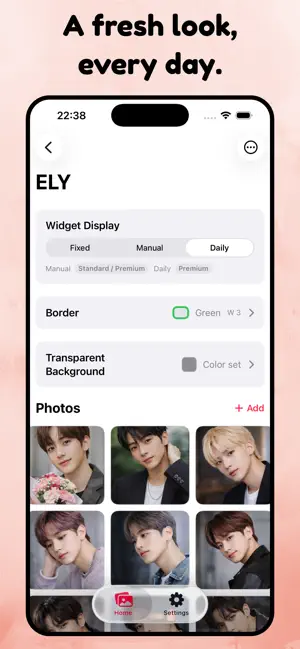
About BiasBoard – Bias Photo Widget
Your favorite photos — right on your home screen. Always visible. Always close. Those perfect shots of your bias, your idol, your pet — sitting in your camera roll, buried and forgotten. When was the last time you actually looked at them? BiasBoard is a simple, aesthetic photo widget app that puts your favorite pictures directly on your iPhone home screen. No complicated setup. No account required. Just pick a photo, place it, done. You check your phone dozens of times a day. Why fill your screen with just app icons? Give your favorite photos the spotlight they deserve. Why BiasBoard? ▸ 3 steps: Create album → Pick photos → Place widget. That's it. ▸ No clutter: We cut the noise. Just you and your photos. ▸ Total freedom: Size, position, background — customize it all. Perfect for ▸ K-pop and idol fans who want their bias always visible ▸ Anime fans looking for a cute, clean home screen ▸ Anyone who gave up on complicated widget apps ▸ Pet lovers who want their cat or dog on display ▸ Anyone who wants a simple, stan-worthy photo widget Plans ▸ Free: 1 widget to start (with ads) ▸ Premium: Unlimited widgets, no ads, with daily auto-switch The simplest way to keep what you love close. Your bias, on your home screen — every time you look. Terms of Use: https://www.apple.com/legal/internet-services/itunes/dev/stdeula/
What’s new
Version 1.10 · Updated August 14, 2026
- Removed the Standard plan. Premium is now the only paid option. - Minor display improvements.
App privacy
The developer, Tomohiro Kawase, reported these privacy practices to Apple.
Data Not Linked to You
The following data, which may be collected but is not linked to your identity, may be used for the following purposes:
- Identifiers: Device ID
- Usage Data: Product Interaction, Advertising Data, Other Usage Data
- Diagnostics: Crash Data, Performance Data, Other Diagnostic Data
- Purchases: Purchase History
Used for: Third-Party Advertising, Developer’s Advertising or Marketing, Analytics, App Functionality