

777 QRG
Andrew Oakley Reference iPad
777 QRG is a paid Reference app for iPad by Andrew Oakley. Rated 5.0/5 from 1 ratings. Requires iOS 18.0. Updated October 19, 2026.
- Rating
- 5.0
- 1 ratings
- Price
- 19.99 USD
- on the App Store
- Size
- 136 MB
- Age 4+
- Updated
- Oct 19
- 2026 · v3.8
Screenshots


About 777 QRG
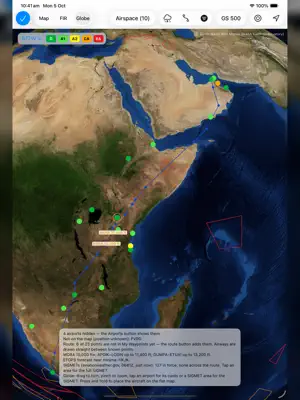
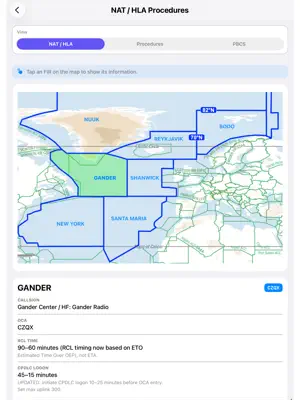
777 QRG — A Pilot's Interactive Quick Reference Guide — The Pilot's Companion Every flight deck iPad ends up with one app that just stays open. 777 QRG is built to be that app for B777 crews — a growing kit of calculators, references, and personal logbooks that hand you the answer to whatever question you're mid-flow wrestling with. CALCULATORS THAT DO THE MATHS Available Holding — fuel endurance, alternate reachability, and diversion planning on one screen, with a radar-style plot of your alternates around destination and live countdowns as the fuel drains Overweight Landing / VREF / EO Gear Down Rate of Climb — QRH tables interpolated for you, with the source cells highlighted so you can cross-check Vertical Path Deviation (Hot Temperatures) — density altitude, groundspeed, and VPA correction stacked end-to-end for a hot-day descent brief, with PAPI guidance showing what you'll actually see out the window Fuel Jettison, Enroute Diversion, BTMS Reference Energy Crosswind, Cold Weather Ops, Hot and High Ops — every performance corner covered FLIGHT TIME PLANNING FDP Calculators — Acclimatised, Not Acclimatised, plus a companion for your own airline's Maximum Daily FDP table FDP Timeline visualiser — a colour-segmented bar showing Report → STD → End of Duty with augment rest and commander's discretion extensions rendered proportionally "Am I Acclimatised?" checker — one-tap answer to the "am I ready to sign on?" question crew ask themselves after a string of days off In-Flight Crew Rest Calculator, Layover Allowance READY-REFERENCE Boeing 777 General, Limitations, Memory Items / Quick Action Manoeuvres PAs, First Officer Limitations, Route & Area Information RVSM, PBN, NADP, RNAV & RNP(AR) Approach Stabilization with a drawn profile diagram and full PAPI guidance Sunrise / Sunset Calculator, Ground Chart Distance Measurement WEATHER SNOWTAM / GRF, MOTNE Decoder, Volcanic Ash, Windshear, Low Visibility, Weather Codes, Hazardous Weather Decision Chart COMMS GMS Call Template — structured form for in-flight medical calls with a searchable, colour-coded medical-bag catalogue. DCL / PDC, Tech Log & MEL, Company Contacts PERSONAL LOGBOOKS (yours, on device, nothing leaves your iPad) My Clipboard — build your own flight sheet with the exact rows and columns your operation needs, then save the format so it's safe from accidental edits mid-flight My Q & A — capture the trivia line-training instructors throw at you Astronauts and Plonkers — a private log of the memorable crew you've flown with, for better or worse My Aerodrome Information — your own field notes per airport My Flight Log, My Notes, Secure Notes, My Checklists, My Sketches, Text Scanner Create your own clipboard, Boredom Buster, PF-PM Randomiser, Abbreviations dictionary, FAQs, "Can We..." Model, a "My Menu" section you can populate with your most-used tools by drag-and-drop, plus a What's New sheet that walks you through every feature added in each build. AND MUCH MORE... Built by a working B777 line pilot. Updated regularly with new tools driven by what actually happens on the line. Most of QRGme is non type specific; some performance and limitation content is 777-specific.
What’s new
Version 3.8 · Updated October 19, 2026
Cold Weather Operations - A new navy look, with the SNOWTAM / GRF decoder now one of its pages. - The de/anti-icing flowchart is now a step-by-step walk-through: tap Done or YES / NO and it lights the path to TAKE-OFF ALLOWED. - The Holdover Timer has a large colour-coded countdown and keeps running if you leave the screen. - Updated Snowfall Intensity vs Visibility table and notes. - Cold temperature effects are drawn live: move the OAT slider and watch the altimeter error grow. SNOWTAM / GRF - NEW: Paste a runway condition report, or scan a photo of it. Each runway is decoded by thirds — RWYCC, condition, coverage and depth — with the worst-case third highlighted, and one tap sends it to the decoder for take-off and landing guidance. Scans are read on the iPad itself. My Flight card - Block off, Take off, Landing and Block on now sit on the flight strip, with the flight and block times beneath. - A Scan Flight Times key opens a new voyage report straight on the Flight Times page scan. - STD and STA show each airport's local time in brackets. Also - In-Flight Crew Rest fills in take-off (STD + 20 min) and flight time from My Flight. - Calculators has the new look, and endurance, range and density altitude work out as you type. - NEW: Reorder items in My Checklists. - Updated flight crew report times in the FDP quick reference.
App privacy
The developer, Andrew Oakley, reported these privacy practices to Apple.
Data Not Linked to You
The following data, which may be collected but is not linked to your identity, may be used for the following purposes:
- User Content: Other User Content
- Identifiers: User ID
Used for: App Functionality
Alternatives to 777 QRG
Looking for apps like 777 QRG? Here are 6 similar apps on the App Store. The highest rated is E6BJA E6B Flight Computer (5.0/5), and 4 of the 6 are free to download.
-
 A6-777 Tech Quiz
-
 SNOWTAMS
1.0
SNOWTAMS
1.0
-
 B777Q
B777Q
-
 E6BJA E6B Flight Computer
5.0
E6BJA E6B Flight Computer
5.0
-
 Aviation4SA Platinum
-
 Airline Selection Programme
| App | Rating | Price | Last updated | Compare |
|---|---|---|---|---|
| 777 QRG | 5.0 / 5 (1 rating) | 19.99 USD | October 19, 2026 | |
| A6-777 Tech Quiz | – | 24.99 USD | May 14, 2026 | Compare |
| SNOWTAMS | 1.0 / 5 (1) | Free | May 30, 2026 | Compare |
| B777Q | – | Free | Oct 23, 2026 | Compare |
| E6BJA E6B Flight Computer | 5.0 / 5 (6) | 9.99 USD | Aug 20, 2026 | Compare |
| Aviation4SA Platinum | – | Free | Feb 23, 2024 | Compare |
| Airline Selection Programme | – | Free | Sep 30, 2026 | Compare |
Compare 777 QRG with the top alternatives: ratings, updates, ASO score and keyword gaps →